

WordPress
Building the JDBC URL
After installing the license, open the connection management page by running java -jar kingswaysoft.jdbc.jar. Enter the required details to generate the JDBC connection URL. Click Test Connection to test the generated URL, or Copy to Clipboard to copy the connection string for use in your application.
Note: If the license is not installed, you can still use the connection manager to generate a JDBC URL; however, the 'Test Connection' feature will be disabled.
General Page
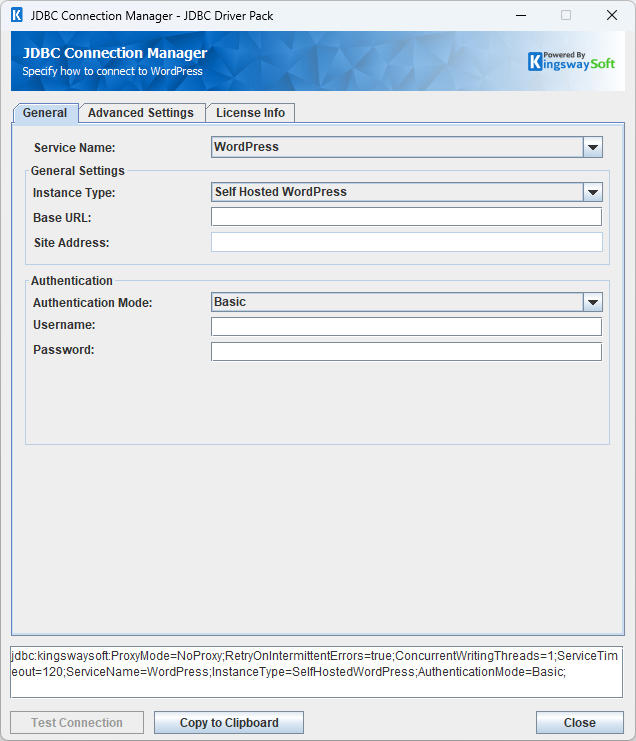
The General page allows you to specify connection properties and login credentials for the WordPress REST service.
General Settings
- Instance Type
-
The Instance Type option allows you to choose the instance used to authenticate with the API. Available options are:
- Self Hosted WordPress
- WordPress.com
Note: The selected instance affects the methods available for authentication.
Authentication
- Authentication Mode
-
The Authentication Mode option allows you to choose the method used to authenticate with the API.
Available options for Self Hosted WordPress are:
- Basic
- Application Password
- JWT
- OAuth 1
-
Available options for WordPress.com are:
- OAuth 2
Authentication Methods for Self Hosted WordPress
Basic
Basic authentication can be used to authenticate and connect to WordPress. Provide the Username and Password.
- Username
-
The Username field allows you to specify the Username used to authenticate with the API.
- Password
-
The Password field allows you to specify the Password used to authenticate with the API.
Application Password
Application Password can be used to authenticate and connect to WordPress. Provide the Username and Application Password.
- Username
-
The Username field allows you to specify the Username used to authenticate with the API.
- Application Password
-
The Application Password field allows you to specify the Application Password used to authenticate with the API.
JWT
JWT can be used to authenticate and connect to WordPress. Provide the Username and Password.
- Username
-
The Username field allows you to specify the Username used to authenticate with the API.
- Password
-
The Password field allows you to specify the Password used to authenticate with the API.
OAuth 1
Click Generate New OAuth Token to go through the token generation process, and use the specified token password to connect.
- Generate New OAuth Token
-
This button completes the OAuth authentication process to generate a new token. Enter your Consumer Key and Consumer Secret, then click Get Temp Tokens. The driver will retrieve temporary OAuth tokens, and then prompt you to authorize in browser. Click Authorize in Browser, once authorized you will be presented with a verification token. Enter this verification token in the driver to generate the OAuth token that will be used to authenticate requests.
- Consumer Key: The public identifier for the client making the API requests.
- Consumer Secret: A private key associated with the ConsumerKey used to securely authenticate the client.
- Temp OAuth Token: A temporary OAuth token generated using the ConsumerKey and ConsumerSecret exchanged for an AccessToken.
- Temp OAuth Token Secret: A temporary OAuth token secret generated alongside the OAuthToken used to sign requests during the token exchange process.
- Consumer Key
-
The public identifier for the client making the API requests.
- Consumer Secret
-
A private key associated with the ConsumerKey used to securely authenticate the client.
- OAuth Token
-
A temporary credential exchanged for an AccessToken.
- OAuth Token Secret
-
The private key used alongside the OAuthToken to sign requests during the token exchange process.
Authentication Methods for WordPress.com
OAuth 2
Click Generate Access Token to go through the token generation process to create a new access token, or use a pre-existing access token.
- Generate Access Token
-
This button completes the OAuth authentication process to generate a new token. Once completed, it will auto-fill the Access Token field.
- Client ID: The client ID for the application making the API requests.
- Client Secret:The client secret for the application making the API requests.
- Redirect URL: The redirect URL that is configured within the application.
- Scope: Specify the scopes the token should be granted access to.
- Access Token
-
The access token to use to authenticate requests to the WordPress API. You can use a pre-existing token, or generate a new access token using the 'Generate Access Token' button.
After completing the configuration for all required connection and authentication settings in the JDBC Connection Manager, you can use the Test Connection button to validate your configuration and verify API requests will authenticate successfully.
Advanced Settings Page
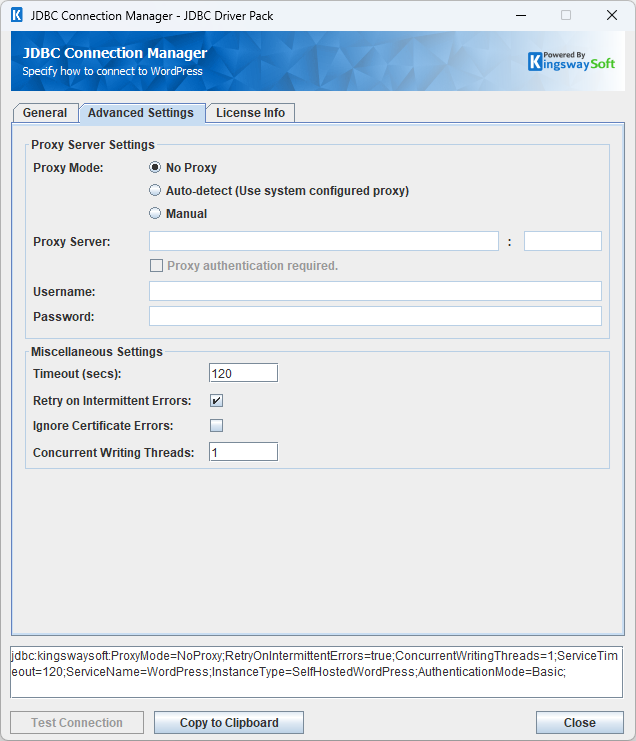
The Advanced Settings page allows you to specify advanced settings for the connection.
Proxy Server Settings
- Proxy Mode
-
The Proxy Mode option allows you to specify how you want to configure the proxy server setting. There are three options available.
- No Proxy
- Auto-detect (Use system configured proxy)
- Manual
- Proxy Server
-
Using the Proxy Server option allows you to specify the name of the proxy server for the connection.
- Port
-
The Port option allows you to specify the port number of the proxy server for the connection.
- Username (Proxy Server Authentication)
-
The Username option (under Proxy Server Authentication) allows you to specify the proxy user account.
- Password (Proxy Server Authentication)
-
The Password option (under Proxy Server Authentication) allows you to specify the proxy user's password.
Miscellaneous Settings
- Timeout (secs)
-
The Timeout (secs) option allows you to specify a timeout value in seconds for the connection. The default value is 120 seconds. Specify 0 for an infinite timeout.
- Retry on Intermittent Errors
-
The retry on intermittent errors determines if requests will be retried when there is an error. If this option is checked requests will be retried up to 3 times.
- Ignore Certificate Errors
-
This option can be used to ignore those SSL certificate errors when connecting to the target server.
Warning: Enabling the "Ignore Certificate Errors" option is generally NOT recommended, particularly for production instances. Unless there is a strong reason to believe the connection is secure - such as the network communication is only happening in an internal infrastructure, this option should be unchecked for best security.
Note: When this option is enabled, it applies to all HTTP-based SSL connections in the same job process.
- Concurrent Writing Threads
-
This option can be used to set the number of threads to be used during write operations. This can improve performance during large-volume write operations.
Using the JDBC Driver
This section provides examples that use JDBC classes such as Connection, Statement, and ResultSet to manage interactions with WordPress data. It covers regular statements and prepared statements for complex or frequently executed queries.
Executing Statements
After you have connected from your code, you can execute SQL statements using the Statement class. For connection details, see Connecting with DriverManager or Connecting with DataSource. For parameterized statements, see Executing Prepared Statements.
SELECT
Use the Statement class's generic execute method or the executeQuery method to execute SQL statements that return data. To retrieve the results of a query, call the getResultSet method of the Statement.
String sql = "SELECT * FROM wp/v2/pages";
try {
    ResultSet resultSet = statement.executeQuery(sql);
    LOGGER.info(resultSet.toString());
} catch (SQLException e) {
    LOGGER.severe(e.toString());
}
INSERT
Use either the generic execute method or the executeUpdate method of the Statement class to execute an INSERT operation.
You can pass query-specific write options by appending a USING OPTIONS (...) clause at the end of the INSERT statement, and it will override the respective property defined in the connection properties.
The results of SQL queries are saved in a ResultSet. You can retrieve the ResultSet after execution to view the inserted data's ID, exceptions raised during execution, and details of the affected data.
String sql = "INSERT INTO wp/v2/users (username, name, email, nickname, description, password) VALUES "
           + "('testusername', 'testName', '[email protected]', 'testNickname', 'testDescription', 'testPassword')";

try {
    int result = statement.executeUpdate(sql);
    LOGGER.info(statement.getResultSet().toString());
} catch (SQLException e) {
    LOGGER.severe(e.toString());
}
id,errorcode,errormessage,processdata,haserrors
83,null,null,{"username":"testusername","name":"testName","email":"[email protected]","nickname":"testNickname","description":"testDescription","password":"****"},false
UPDATE
Use either the generic execute method or the executeUpdate method of the Statement class to execute an UPDATE operation.
You can pass query-specific write options by appending a USING OPTIONS (...) clause at the end of the UPDATE statement, and it will override the respective property defined in the connection properties.
The results of SQL queries are saved in a ResultSet. You can retrieve the ResultSet after execution to view the updated data's ID, exceptions raised during execution, and details of the affected data.
String sql = "UPDATE wp/v2/users SET name = 'UpdatedName' WHERE id = 83";
try {
    statement.executeUpdate(sql);
    LOGGER.info(statement.getResultSet().toString());
} catch (SQLException e) {
    LOGGER.severe(e.toString());
}
id,errorcode,errormessage,processdata,haserrors
83,null,null,{"name":"UpdatedName"},false
DELETE
Use either the generic execute method or the executeUpdate method of the Statement class to execute a DELETE operation.
You can pass query-specific write options by appending a USING OPTIONS (...) clause at the end of the DELETE statement, and it will override the respective property defined in the connection properties.
The results of SQL queries are saved in a ResultSet. You can retrieve the ResultSet after execution to view the deleted data's ID, exceptions raised during execution, and details of the affected data.
String sql = "DELETE FROM wp/v2/users WHERE id = 83 and reassign = 0 and force = true";
try {
    statement.executeUpdate(sql);
    LOGGER.info(statement.getResultSet().toString());
} catch (SQLException e) {
    LOGGER.severe(e.toString());
}
id,errorcode,errormessage,processdata,haserrors
null,null,null,{"reassign":0,"force":true},false
Executing Prepared Statements
Using a PreparedStatement can improve performance when you need to execute a SQL statement multiple times with different parameters. Unlike a Statement object, a PreparedStatement object is provided with a SQL statement when it is created, which can then be executed with different values each time. This special type of statement is derived from the more general Statement class.
Below are the steps outlining how to execute a prepared statement:
Creating and Executing a Prepared Statement
- Create a PreparedStatement
-
Use the
prepareStatementmethod of theConnectionclass to instantiate aPreparedStatement.For connection details, see Connecting with DriverManager or Connecting with DataSource.
- Set Parameters
- Declare parameters by calling the corresponding setter method of the
PreparedStatement. - NOTE: The parameter indices start at 1.
- Execute the PreparedStatement
- Use the generic
executeorexecuteUpdatemethod of thePreparedStatement. - Retrieve Results
- Call the
getResultSetmethod of thePreparedStatementto obtain the query results, which are returned as aResultSet. - Iterate Over the Result Set
- Use the
nextmethod of theResultSetto iterate through the results. To obtain column information, use theResultSetMetaDataclass. Instantiate aResultSetMetaDataobject by calling thegetMetaDatamethod of theResultSet.
SELECT
Use the PreparedStatement class's generic execute method or the executeQuery method to execute SQL statements that return data.
The results of SQL queries are saved in a ResultSet. You can retrieve the ResultSet after execution to view the retrieved data.
String sql = "SELECT * FROM wp/v2/pages where id = ?";
try {
    PreparedStatement ps = connection.prepareStatement(sql);
    ps.setInt(1, 2);
    boolean ret = ps.execute();
    if (ret) {
        ResultSet rs = ps.getResultSet();
        LOGGER.info(rs.toString());
    }
} catch (SQLException e) {
    LOGGER.severe(e.toString());
}
INSERT
Use either the generic execute method or the executeUpdate method of the PreparedStatement class to execute an INSERT operation.
You can pass query-specific write options by appending a USING OPTIONS (...) clause at the end of the INSERT statement, and it will override the respective property defined in the connection properties.
The results of SQL queries are saved in a ResultSet. You can retrieve the ResultSet after execution to view the ID of inserted data, exceptions raised during execution, and the data affected by the insertion.
String sql = "INSERT INTO wp/v2/users (username, name, email, nickname, description, password) VALUES "
           + "(?, ?, ?, ?, ?, ?)";

try {
    PreparedStatement ps = connection.prepareStatement(sql);
    ps.setString(1, "testusername");
    ps.setString(2, "testName");
    ps.setString(3, "[email protected]");
    ps.setString(4, "testNickname");
    ps.setString(5, "testDescription");
    ps.setString(6, "testPassword");
    ps.executeUpdate();

    LOGGER.info(ps.getResultSet().toString());
} catch (SQLException e) {
    LOGGER.severe(e.toString());
}
id,errorcode,errormessage,processdata,haserrors
83,null,null,{"username":"testusername","name":"testName","email":"[email protected]","nickname":"testNickname","description":"testDescription","password":"****"},false
UPDATE
Use either the generic execute method or the executeUpdate method of the PreparedStatement class to execute an UPDATE operation.
You can pass query-specific write options by appending a USING OPTIONS (...) clause at the end of the UPDATE statement, and it will override the respective property defined in the connection properties.
The results of SQL queries are saved in a ResultSet. You can retrieve the ResultSet after execution to view the ID of updated data, exceptions raised during execution, and the data affected by the update.
String sql = "UPDATE wp/v2/users SET name = ? WHERE id = ?";

try {
    PreparedStatement ps = connection.prepareStatement(sql);
    ps.setString(1, "UpdatedName");
    ps.setInt(2, 83);
    ps.executeUpdate();

    LOGGER.info(ps.getResultSet().toString());
} catch (SQLException e) {
    LOGGER.severe(e.toString());
}
id,errorcode,errormessage,processdata,haserrors
83,null,null,{"name":"UpdatedName"},false
DELETE
Use either the generic execute method or the executeUpdate method of the PreparedStatement class to execute a DELETE operation.
You can pass query-specific write options by appending a USING OPTIONS (...) clause at the end of the DELETE statement, and it will override the respective property defined in the connection properties.
The results of SQL queries are saved in a ResultSet. You can retrieve the ResultSet after execution to view the deleted data's ID, exceptions raised during execution, and details of the affected data.
String sql = "DELETE FROM wp/v2/users WHERE id = ? and reassign = ? and force = ?";

try {
    PreparedStatement ps = connection.prepareStatement(sql);
    ps.setInt(1, 83);
    ps.setInt(2, 0);
    ps.setBoolean(3, true);
    ps.executeUpdate();
    LOGGER.info(ps.getResultSet().toString());
} catch (SQLException e) {
    e.printStackTrace();
}
id,errorcode,errormessage,processdata,haserrors
1,null,null,[{"id":10}],false
Metadata Discovery
This section provides examples on how to retrieve table and column metadata using the getTables, getColumns, and getPrimaryKeys methods from the DatabaseMetaData interface. These are essential for discovering database structures.
Tables
The getTables method from the DatabaseMetaData interface can be used to retrieve a list of tables.
This method only retrieves tables that are not write-only.
To get a list of tables that includes write-only tables, query the table system.tables.
try {
    ResultSet rs = connection.getMetaData().getTables(null, null, null, null);
    LOGGER.info("\r\n" + rs.toString());
} catch (SQLException e) {
    LOGGER.severe(e.getMessage());
}
TABLE_CAT,TABLE_SCHEM,TABLE_NAME,TABLE_TYPE,REMARKS,TYPE_CAT,TYPE_SCHEM,TYPE_NAME,SELF_REFERENCING_COL_NAME,REF_GENERATION
WordPress,WordPress,wp/v2/abilities/run,TABLE,null,null,null,null,null,null
WordPress,WordPress,wp/v2/activity-log-events,TABLE,null,null,null,null,null,null
WordPress,WordPress,wp/v2/activity-log-events/autosaves,TABLE,null,null,null,null,null,null
WordPress,WordPress,wp/v2/block-directory/search,TABLE,null,null,null,null,null,null
WordPress,WordPress,wp/v2/block-patterns/categories,TABLE,null,null,null,null,null,null
WordPress,WordPress,wp/v2/block-patterns/patterns,TABLE,null,null,null,null,null,null
WordPress,WordPress,wp/v2/block-renderer,TABLE,null,null,null,null,null,null
WordPress,WordPress,wp/v2/block-types,TABLE,null,null,null,null,null,null
WordPress,WordPress,wp/v2/blocks,TABLE,null,null,null,null,null,null
WordPress,WordPress,wp/v2/blocks/autosaves,TABLE,null,null,null,null,null,null
WordPress,WordPress,wp/v2/blocks/revisions,TABLE,null,null,null,null,null,null
WordPress,WordPress,wp/v2/categories,TABLE,null,null,null,null,null,null
WordPress,WordPress,wp/v2/comments,TABLE,null,null,null,null,null,null
WordPress,WordPress,wp/v2/feedback,TABLE,null,null,null,null,null,null
......
The getTables method returns the following metadata columns:
| Column Name | Data Type | Description |
|---|---|---|
| TABLE_CAT | String | The catalog that contains the table. |
| TABLE_SCHEM | String | The schema of the table. |
| TABLE_NAME | String | The name of the table. |
| TABLE_TYPE | String | The type of the table (e.g., TABLE or VIEW). |
| REMARKS | String | An optional description of the table. |
Columns
Use the getColumns method of the DatabaseMetaData interface to retrieve detailed information about database columns.
This method returns columns only for tables that are not write-only.
To get columns for write-only tables, query the table system.columns.
try {
    ResultSet rs = connection.getMetaData().getColumns(null, null, "wp/v2/users", null);
    LOGGER.info(rs.toString());
} catch (SQLException e) {
    e.printStackTrace();
}
TABLE_CAT,TABLE_SCHEM,TABLE_NAME,COLUMN_NAME,DATA_TYPE,TYPE_NAME,COLUMN_SIZE,BUFFER_LENGTH,DECIMAL_DIGITS,NUM_PREC_RADIX,NULLABLE,REMARKS,COLUMN_DEF,SQL_DATA_TYPE,SQL_DATETIME_SUB,CHAR_OCTET_LENGTH,ORDINAL_POSITION,IS_NULLABLE,SCOPE_CATALOG,SCOPE_SCHEMA,SCOPE_TABLE,SOURCE_DATA_TYPE,IS_AUTOINCREMENT,IS_GENERATEDCOLUMN,DTS_TYPE
WordPress,WordPress,wp/v2/users,acf,12,VARCHAR,255,null,0,0,null,null,null,12,null,null,null,null,null,null,null,null,null,null,DT_WSTR
WordPress,WordPress,wp/v2/users,avatar_urls.24,12,VARCHAR,255,null,0,0,null,null,null,12,null,null,null,null,null,null,null,null,null,null,DT_WSTR
WordPress,WordPress,wp/v2/users,avatar_urls.48,12,VARCHAR,255,null,0,0,null,null,null,12,null,null,null,null,null,null,null,null,null,null,DT_WSTR
WordPress,WordPress,wp/v2/users,avatar_urls.96,12,VARCHAR,255,null,0,0,null,null,null,12,null,null,null,null,null,null,null,null,null,null,DT_WSTR
WordPress,WordPress,wp/v2/users,capabilities,12,VARCHAR,255,null,0,0,null,null,null,12,null,null,null,null,null,null,null,null,null,null,DT_WSTR
WordPress,WordPress,wp/v2/users,description,12,VARCHAR,255,null,0,0,null,null,null,12,null,null,null,null,null,null,null,null,null,null,DT_WSTR
WordPress,WordPress,wp/v2/users,email,12,VARCHAR,255,null,0,0,null,null,null,12,null,null,null,null,null,null,null,null,null,null,DT_WSTR
WordPress,WordPress,wp/v2/users,extra_capabilities,12,VARCHAR,255,null,0,0,null,null,null,12,null,null,null,null,null,null,null,null,null,null,DT_WSTR
WordPress,WordPress,wp/v2/users,first_name,12,VARCHAR,255,null,0,0,null,null,null,12,null,null,null,null,null,null,null,null,null,null,DT_WSTR
WordPress,WordPress,wp/v2/users,id,-5,BIGINT,19,null,0,0,null,null,null,-5,null,null,null,null,null,null,null,null,null,null,DT_I8
WordPress,WordPress,wp/v2/users,last_name,12,VARCHAR,255,null,0,0,null,null,null,12,null,null,null,null,null,null,null,null,null,null,DT_WSTR
WordPress,WordPress,wp/v2/users,link,12,VARCHAR,255,null,0,0,null,null,null,12,null,null,null,null,null,null,null,null,null,null,DT_WSTR
WordPress,WordPress,wp/v2/users,locale,12,VARCHAR,255,null,0,0,null,null,null,12,null,null,null,null,null,null,null,null,null,null,DT_WSTR
......
The getColumns method returns the following columns:
| Column Name | Data Type | Description |
|---|---|---|
| TABLE_CAT | String | The database name. |
| TABLE_SCHEM | String | The table schema. |
| TABLE_NAME | String | The table name. |
| COLUMN_NAME | String | The column name. |
| DATA_TYPE | Integer | The data type represented by a constant value from java.sql.Types. |
| TYPE_NAME | String | The data type name used by the driver. |
| COLUMN_SIZE | Integer | The length in characters of the column or the numeric precision. |
| BUFFER_LENGTH | Integer | The buffer length. |
| DECIMAL_DIGITS | Integer | The column scale or number of digits to the right of the decimal point. |
| NUM_PREC_RADIX | Integer | The radix, or base. |
| NULLABLE | Integer | Whether the column can contain null as defined by the following JDBC DatabaseMetaData constants: columnNoNulls (0) or columnNullable (1). |
| REMARKS | String | The comment or note associated with the object. |
| COLUMN_DEF | String | The default value for the column. |
| SQL_DATA_TYPE | Integer | Reserved by the specification. |
| SQL_DATETIME_SUB | Integer | Reserved by the specification. |
| CHAR_OCTET_LENGTH | Integer | The maximum length of binary and character-based columns. |
| ORDINAL_POSITION | Integer | The position of the column in the table, starting at 1. |
| IS_NULLABLE | String | Whether a null value is allowed: YES or NO. |
| SCOPE_CATALOG | String | The catalog of the table referenced by a reference attribute (null if DATA_TYPE is not REF). |
| SCOPE_SCHEMA | String | The schema of the table referenced by a reference attribute (null if DATA_TYPE is not REF). |
| SCOPE_TABLE | String | The name of the table referenced by a reference attribute (null if DATA_TYPE is not REF). |
| SOURCE_DATA_TYPE | Short | The source type of a distinct type or user-defined REF type (null if DATA_TYPE is neither DISTINCT nor a user-defined REF). |
| IS_AUTOINCREMENT | String | Whether the column value is assigned by WordPress in fixed increments. |
| IS_GENERATEDCOLUMN | String | Whether the column is generated: YES or NO. |
| DTS_TYPE | String | Object DTS attribute type. |
Primary Keys
The getPrimaryKeys method in the DatabaseMetaData interface is used to retrieve metadata about primary keys for a given table in WordPress.
try {
    ResultSet resultSet = connection.getMetaData().getPrimaryKeys(null, null, "wp/v2/users");
    LOGGER.info("\r\n" + resultSet.toString());
} catch (SQLException e) {
    LOGGER.severe(e.getMessage());
}
TABLE_CAT,TABLE_SCHEM,TABLE_NAME,COLUMN_NAME,KEY_SEQ,PK_NAME
null,null,wp/v2/users,id,1,null
The getPrimaryKeys method returns the following columns:
| Column Name | Data Type | Description |
|---|---|---|
| TABLE_CAT | String | The catalog name. |
| TABLE_SCHEM | String | The schema name. |
| TABLE_NAME | String | The name of the table that contains the primary key. |
| COLUMN_NAME | String | The name of the column that serves as the primary key for the table. |
| KEY_SEQ | Short | The sequence number within the primary key. |
| PK_NAME | String | The primary key name. |
Connection Settings
| Connection Setting | Type | Default Value | Description |
|---|---|---|---|
| AccessToken | String | "" | The AccessToken is used to authenticate to the WordPress API. |
| ApiThrottleRate | Integer | 0 | The maximum number of API requests a client can make to the server within a specific time period, defined in requests per second. |
| AuthenticationMode | String | "Basic" | Method used to retrieve an authentication token from the server. |
| BaseUrl | String | "" | The BaseUrl is used to indicate your specific WordPress account's domain. |
| BatchSizeForReading | Integer | 1000 | BatchSizeForReading is used to set how many records can be read from WordPress in a single call. |
| BatchSizeForWriting | Integer | 1 | BatchSizeForWriting is used to set how many records can be written to WordPress in a single call. |
| CacheExpirationTime | Integer | 30 | Defines the expiration time for cache. A value of 0 disables caching. |
| ClientId | String | "" | The ClientId used to access WordPress. |
| ClientSecret | String | "" | The ClientSecret used to access WordPress. |
| ConcurrentWritingThreads | Integer | 1 | The number of threads for executing operations in parallel. A value of 0 will disable multi threading. |
| ConnectionTimeout | Integer | 30 | ConnectionTimeout is the maximum amount of time the program will wait to set up a connection to the WordPress API. |
| ConsumerKey | String | "" | The public identifier for the client making the API requests. |
| ConsumerSecret | String | "" | A private key associated with the ConsumerKey used to securely authenticate the client. |
| ContinueOnErrors | Boolean | false | Determines if the program continues executing SQL statements after encountering an error. |
| IgnoreCertificateErrors | Boolean | false | Specifies whether to verify the certificate when connecting to WordPress. If certificate verification is not required, you can set this value to 'true'. |
| InstanceType | String | "SelfHostedWordPress" | Specifies whether the WordPress instance is self hosted or located on WordPress.com |
| LogFileSize | String | "10485760" | A string specifying the maximum size in bytes for a log file. |
| LogLevel | String | "INFO" | The logging level for the JDBC driver. |
| LogPath | String | "./jdbcLogs" | The directory where log files are stored. |
| OAuthToken | String | "" | A temporary credential exchanged for an AccessToken. |
| OAuthTokenSecret | String | "" | The private key used alongside the OAuthToken to sign requests during the token exchange process. |
| OemKey | String | "" | The OEM license key. |
| Password | String | "" | The password of the WordPress account used to authenticate requests to the WordPress API. |
| ProxyMode | String | NoProxy | This setting configures the proxy. Allowed values are "NoProxy", "AutoDetect" and "Manual". |
| ProxyPassword | String | "" | The password to be used to authenticate to the proxy. |
| ProxyServer | String | "" | The host of the proxy server. |
| ProxyServerPort | Integer | 0 | The port of the proxy server. |
| ProxyUsername | String | "" | The username to be used to authenticate to the proxy. |
| ResultPath | String | "" | The path where the execution result files are saved. |
| RetryOnIntermittentErrors | Boolean | true | The RetryOnIntermittentErrors parameter indicates whether to retry the connection when it might occasionally fail due to temporary issues. |
| SaveResult | Boolean | false | The SaveResult parameter indicates whether to save the execution results to a file. |
| ServiceName | String | "" | The ServiceName refers to the name of the service API selected by the user. |
| ServiceTimeout | Integer | 120 | The ServiceTimeout is the timeout to receive the full response from WordPress API. |
| SiteAddress | String | "" | The SiteAddress is the full web address where your WordPress site is publicly accessible. |
| Suppress404NotFoundError | Boolean | true | When set to true, if a query results in an HTTP 404 error, a result set will still be created. When set to false, an error is logged instead and no result set is created. |
| UserName | String | "" | The username of the WordPress account that will be used to authenticate requests to the WordPress API. |