

Facebook Business
Building the JDBC URL
After installing the license, access the connection management page by executing the command java -jar kingswaysoft.jdbc.jar. Enter the necessary details, and the program will automatically generate the JDBC connection URL. Users can click Test Connection to test the generated URL and Copy to Clipboard to copy the connection string for use within the application where the JDBC driver is being used.
Note: If the license is not installed, you can still use the connection manager to generate a JDBC URL; however, the 'Test Connection' feature will be disabled.
General Page
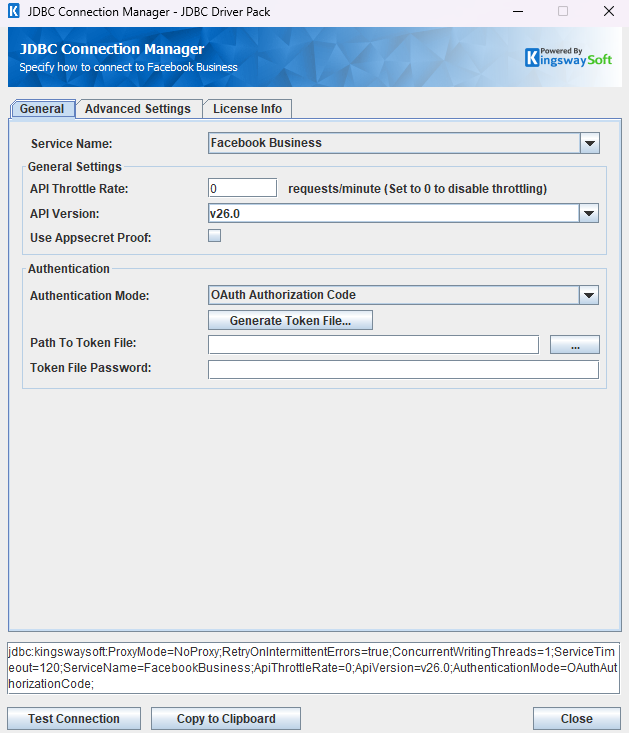
The General page allows you to specify connection properties and authentication settings for Facebook Business.
General Settings
- API Throttle Rate
-
The API Throttle Rate option limits how many requests can be sent per minute. Set this value to 0 to disable API throttling.
- API Version
-
The API Version option specifies the Facebook Graph API version used by the driver. Available options are
v26.0andv25.0. The screenshot showsv26.0; select the version appropriate for your application. - Use Appsecret Proof
-
The Use Appsecret Proof option adds an
appsecret_proofvalue to Facebook Graph API requests. When enabled, the App Secret used during OAuth token generation must be available so the driver can calculate the proof value.
Authentication Methods for Facebook Business
OAuth Authorization Code
A saved token file and token password can be used to establish a connection. If you need to generate a new token file, click Generate Token File and complete the OAuth authorization process.
The driver exchanges the authorization code using a form-encoded POST request. It then sends the returned user token to /oauth/client_code using a form-encoded POST with App ID, App Secret, Redirect URL, and grant_type=authorization_code. The returned client code is redeemed using GET /oauth/access_token with code, client_id, redirect_uri, and machine_id in the query string. No fb_exchange_token request is made. The token file stores the returned long-lived token in both access_token and refresh_token, together with App ID (client_id), App Secret (client_secret), Redirect URL (redirect_uri), and the expiry returned by Facebook. Tokens and the App Secret are encrypted using the token file password. Any returned machine_id is saved and reused.
The refresh_token field stores the latest long-lived access token; it is not a separate OAuth refresh token issued by Facebook. On the first use after 24 hours since the last successful token update, the driver uses this token for the same POST client-code / GET access-token exchange, then updates both token fields and expiry. Refreshing happens while the connection is used, rather than through a background timer. For existing token files without refresh_token, the driver attempts this exchange using the saved access token while it is still valid.
This exchange does not guarantee indefinite renewal. If the stored long-lived token expires or is revoked, generate a new token file by completing authorization again. See Meta's long-lived token documentation.
- Path To Token File
-
The path to the generated
.toktoken file on the file system. - Token File Password
-
The password used to protect the token file.
- Generate Token File
-
This button opens the OAuth configuration dialog and starts the Facebook authorization flow.
- App ID: The Facebook App ID used by the OAuth application.
- App Secret: The Facebook App Secret used by the OAuth application.
- Redirect URL: The redirect URL configured for the Facebook app.
- Scope: The permissions requested for the token. The default scopes are
ads_read,ads_management,business_management, andread_insights.
System User Access Token
A Facebook Business System User access token can be used directly when server-to-server access is preferred.
- Access Token
-
The System User access token used to authenticate requests to the Facebook Graph API.
After completing the required connection and authentication settings in the JDBC Connection Manager, you can use the Test Connection button to validate your configuration. The driver validates the token by calling the Graph API /me endpoint.
Advanced Settings Page
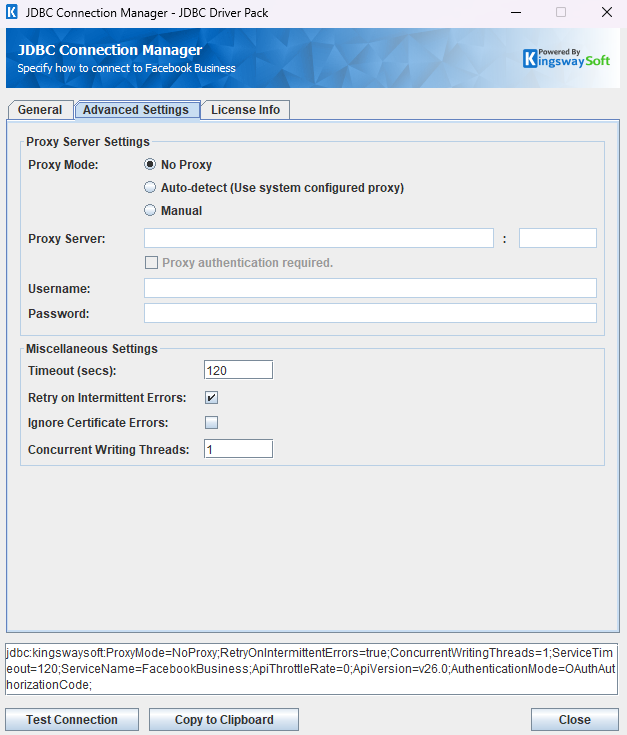
The Advanced Settings page allows you to specify advanced settings for the connection.
Proxy Server Settings
- Proxy Mode
-
The Proxy Mode option allows you to specify how to configure the proxy server setting. There are three options available.
- No Proxy
- Auto-detect (Use system configured proxy)
- Manual
- Proxy Server
-
The Proxy Server option allows you to specify the name of the proxy server for the connection.
- Port
-
The Port option allows you to specify the port number of the proxy server for the connection.
- Username (Proxy Server Authentication)
-
The Username option allows you to specify the proxy user account.
- Password (Proxy Server Authentication)
-
The Password option allows you to specify the proxy user's password.
Miscellaneous Settings
- Timeout (secs)
-
The Timeout (secs) option allows you to specify a timeout value in seconds for the connection. The default value is 120 seconds. Specify 0 for infinite timeout.
- Retry on Intermittent Errors
-
The retry on intermittent errors option determines whether requests are retried when a temporary error occurs. If this option is checked, requests will be retried up to 3 times.
- Ignore Certificate Errors
-
This option can be used to ignore SSL certificate errors when connecting to the target server.
Warning: Enabling the "Ignore Certificate Errors" option is generally NOT recommended, particularly for production instances.
- Concurrent Writing Threads
-
This option sets the number of threads to use during write operations. This can improve performance during large-volume write operations.
Using the JDBC Driver
Explore detailed examples in this section that demonstrate the application of JDBC classes such as Connection, Statement, and ResultSet to effectively manage interactions with Facebook Business data. This section covers regular statements and prepared statements for executing queries.
Note: Table names follow the driver's current metadata. Use collection tables such as AdAccount/campaigns to list or create objects, and object tables such as Campaign to read, update, or delete an individual object. Enclose table names containing / in square brackets in SQL. Pass the name without brackets to JDBC metadata methods or in table_name filters. Include the required path parameters in the WHERE clause for reads, updates, and deletes, or in the column list for inserts. For ad-account-scoped tables, ad_account_id can be supplied with or without the act_ prefix.
The IDs below are illustrative. Replace them with IDs accessible to your token, and use the IDs returned by INSERT operations in subsequent reads, updates, and deletes.
Executing Statements
Once you've connected from your code (see Connecting with DriverManager and Connecting with DataSource), you can execute SQL statements using the Statement class. Refer to the Executing Prepared Statements section for information on how to execute parameterized statements.
SELECT
Use the Statement class's generic execute method or the executeQuery method to execute SQL statements that return data. To retrieve the results of a query, call the getResultSet method of the Statement.
String sql = "SELECT id, name FROM AdAccount/campaigns WHERE ad_account_id = '493444904779121'";
try {
    ResultSet resultSet = statement.executeQuery(sql);
    LOGGER.info(resultSet.toString());
} catch (SQLException e) {
    LOGGER.severe(e.toString());
}
String sql = "SELECT account_id, campaign_id, impressions, spend "
           + "FROM AdAccount/insights WHERE ad_account_id = 'act_493444904779121' "
           + "AND level = 'campaign' AND time_increment = '1'";
try {
    ResultSet resultSet = statement.executeQuery(sql);
    LOGGER.info(resultSet.toString());
} catch (SQLException e) {
    LOGGER.severe(e.toString());
}
USING OPTIONS for Access Tokens
Append USING OPTIONS (...) to a SQL statement to select an App Access Token or Page Access Token for that statement. These options apply to SELECT (including pagination), INSERT, UPDATE, DELETE, and batch writes. They do not replace the connection's original access token. Omitting both token options, or setting both to false, uses the connection's normal authentication.
| Option | Usage | Supported Authentication |
|---|---|---|
UseAppToken |
Set to true to authenticate as the application. |
OAuth Authorization Code (AuthenticationMode=OAuthAuthorizationCode) |
UsePageToken |
Set to true to authenticate as a Page. |
OAuth Authorization Code or System User Access Token (AuthenticationMode=SystemUserAccessToken) |
PageId |
The Page whose access token should be used when UsePageToken=true. |
Same as UsePageToken |
UseAppToken and UsePageToken cannot both be true; enabling both raises an error. The selected Facebook endpoint must accept the chosen token type, and the token must have the permissions required for the operation. If UseAppSecretProof is enabled, the driver calculates the proof using the token selected for the request.
Use Page Token with USING OPTIONS
Set UsePageToken=true and supply PageId. The driver uses the connection's OAuth user token or System User token to retrieve a Page Access Token for that Page. The authenticated user or System User must have access to the Page and the required Page permissions.
SELECT id FROM Page WHERE page_id = 'me'
USING OPTIONS (UsePageToken=true, PageId='987654321')
Replace 987654321 with your Page ID. In this example, me resolves to the selected Page, so the returned id should match PageId. PageId selects the authentication token; any endpoint parameters such as page_id still belong in the SQL statement.
For an OAuth connection, you can list the Pages available to the current user before selecting a Page ID:
SELECT id, nameFROMUser/accounts WHEREuser_id = 'me'
USING OPTIONS (UsePageToken=false)
Supply PageId to select the intended Page. With a nonblank PageId, the driver retrieves the token directly from /{page-id}?fields=access_token. If PageId is omitted or blank, the driver looks up the current user and uses the first Page token returned by that user's /accounts endpoint; this fallback only checks the first response page. Token lookup raises an error if no Page token is returned.
On an OAuth connection, the following statement uses the original user token again:
SELECT id FROMUserWHEREuser_id = 'me'
USING OPTIONS (UsePageToken=false)
Use App Token with USING OPTIONS
Set UseAppToken=true to use an App Access Token. This option is available only with OAuth Authorization Code authentication. The driver uses the OAuth App ID and App Secret, loading them from the encrypted OAuth token file when necessary. Configure the token file path and password as usual; you do not need to supply an App Access Token in the SQL statement.
SELECT id, nameFROM Application WHERE application_id = '123456789'
USING OPTIONS (UseAppToken=true)
Replace 123456789 with your OAuth App ID. Enabling UseAppToken outside OAuth mode or omitting the required app credentials raises an error. Omit UseAppToken or set it to false on subsequent statements to use the connection's normal authentication.
INSERT
Use either the generic execute method or the executeUpdate method of the Statement class to execute an INSERT operation.
The results of SQL queries are saved in a ResultSet. You can retrieve the ResultSet after execution to view the inserted data's ID, exceptions raised during execution, and details of the affected data.
String sql = "INSERT INTO AdAccount/campaigns (ad_account_id, name, objective, buying_type, bid_strategy, daily_budget, status, special_ad_categories) "
           + "VALUES ('act_493444904779121', 'jdbc-crud-campaign', 'OUTCOME_TRAFFIC', 'AUCTION', "
           + "'LOWEST_COST_WITHOUT_CAP', 500, 'PAUSED', '[]')";
try {
    int result = statement.executeUpdate(sql);
    LOGGER.info(statement.getResultSet().toString());
} catch (SQLException e) {
    LOGGER.severe(e.toString());
}
id,errorcode,errormessage,processdata,haserrors
120000000000000,null,null,{"name":"jdbc-crud-campaign","objective":"OUTCOME_TRAFFIC","buying_type":"AUCTION","bid_strategy":"LOWEST_COST_WITHOUT_CAP","daily_budget":500,"status":"PAUSED","special_ad_categories":"[]"},false
UPDATE
Use either the generic execute method or the executeUpdate method of the Statement class to execute an UPDATE operation.
The results of SQL queries are saved in a ResultSet. You can retrieve the ResultSet after execution to view the updated data's ID, exceptions raised during execution, and details of the affected data.
String sql = "UPDATE Campaign SET name = 'jdbc-crud-campaign-updated', status = 'PAUSED' "
           + "WHERE campaign_id = '120000000000000'";
try {
    int result = statement.executeUpdate(sql);
    LOGGER.info(statement.getResultSet().toString());
} catch (SQLException e) {
    LOGGER.severe(e.toString());
}
id,errorcode,errormessage,processdata,haserrors
120000000000000,null,null,{"name":"jdbc-crud-campaign-updated","status":"PAUSED"},false
DELETE
Use either the generic execute method or the executeUpdate method of the Statement class to execute a DELETE operation.
The results of SQL queries are saved in a ResultSet. You can retrieve the ResultSet after execution to view the deleted data's ID, exceptions raised during execution, and details of the affected data.
String sql = "DELETE FROM Campaign WHERE campaign_id = '120000000000000'";
try {
    int result = statement.executeUpdate(sql);
    LOGGER.info(statement.getResultSet().toString());
} catch (SQLException e) {
    LOGGER.severe(e.toString());
}
id,errorcode,errormessage,processdata,haserrors
120000000000000,null,null,null,false
Executing Prepared Statements
Using a PreparedStatement can improve performance when you need to execute a SQL statement multiple times with different parameters. Unlike a Statement object, a PreparedStatement object is provided with a SQL statement when it is created, which can then be executed with different values each time.
Below are the steps outlining how to execute a prepared statement:
Creating and Executing a Prepared Statement
- Create a PreparedStatement
-
Use the
prepareStatementmethod of theConnectionclass to instantiate aPreparedStatement. - Set Parameters
- Declare parameters by calling the corresponding setter method of the
PreparedStatement. - NOTE: The parameter indices start at 1.
- Execute the PreparedStatement
- Use the generic
execute,executeQuery, orexecuteUpdatemethod of thePreparedStatement. - Retrieve Results
- Call the
getResultSetmethod of thePreparedStatementto obtain the query results, which will be returned as a ResultSet.
SELECT
Use the PreparedStatement class's generic execute method or the executeQuery method to execute SQL statements that return data.
String sql = "SELECT id, name FROM Campaign WHERE campaign_id = ?";
try {
    PreparedStatement ps = connection.prepareStatement(sql);
    ps.setInt(1, 1);
    boolean ret = ps.execute();
    if (ret) {
        ResultSet rs = ps.getResultSet();
        LOGGER.info(rs.toString());
    }
} catch (SQLException e) {
    LOGGER.severe(e.toString());
}
INSERT
Use either the generic execute method or the executeUpdate method of the PreparedStatement class to execute an INSERT operation.
String sql = "INSERT INTO AdAccount/adsets (ad_account_id, name, campaign_id, billing_event, optimization_goal, destination_type, targeting, status) "
        + "VALUES (?, ?, ?, ?, ?, ?, ?, ?)";
try {
    PreparedStatement ps = connection.prepareStatement(sql);
    ps.setString(1, "act_493444904779121");
    ps.setString(2, "jdbc-ps-adset");
    ps.setString(3, "120000000000000");
    ps.setString(4, "IMPRESSIONS");
    ps.setString(5, "LINK_CLICKS");
    ps.setString(6, "WEBSITE");
    ps.setString(7, "{\"geo_locations\":{\"countries\":[\"US\"]}}");
    ps.setString(8, "PAUSED");
    ps.executeUpdate();
    LOGGER.info(ps.getResultSet().toString());
} catch (SQLException e) {
    LOGGER.severe(e.toString());
}
UPDATE
Use either the generic execute method or the executeUpdate method of the PreparedStatement class to execute an UPDATE operation.
String sql = "UPDATE AdSet SET name = ?, status = ? WHERE ad_set_id = ?";
try {
    PreparedStatement ps = connection.prepareStatement(sql);
    ps.setString(1, "jdbc-ps-adset-updated");
    ps.setString(2, "PAUSED");
    ps.setString(3, "120000000000001");
    ps.executeUpdate();
    LOGGER.info(ps.getResultSet().toString());
} catch (SQLException e) {
    LOGGER.severe(e.toString());
}
DELETE
Use either the generic execute method or the executeUpdate method of the PreparedStatement class to execute a DELETE operation.
String sql = "DELETE FROM AdSet WHERE ad_set_id = ?";
try {
    PreparedStatement ps = connection.prepareStatement(sql);
    ps.setString(1, "120000000000001");
    ps.executeUpdate();
    LOGGER.info(ps.getResultSet().toString());
} catch (SQLException e) {
    LOGGER.severe(e.toString());
}
Batch Writes
Multi-row INSERT statements, UPDATE/DELETE statements with multiple keys, and PreparedStatement.addBatch() / executeBatch() use Graph API batch requests when BatchSizeForWriting is greater than 1. USING OPTIONS (BatchSize=25) overrides the connection setting. Each HTTP batch contains at most 50 requests, even when a larger size is configured.
Each subresponse is mapped to its input row, including returned IDs and errors. Prepared statement batches return an update count for each parameter set, or Statement.EXECUTE_FAILED for a failed entry. With ContinueOnErrors=false, the driver retains all results from the submitted batch and stops before sending the next batch; successful writes in that batch are not rolled back.
Metadata Discovery
This section provides examples on how to retrieve table and column metadata using the getTables, getColumns, and getPrimaryKeys methods from the DatabaseMetaData interface. These are essential for discovering database structures.
Tables
The getTables method from the DatabaseMetaData interface can be used to retrieve a list of tables.
This method only retrieves tables that are not write-only.
To get a list of tables which include write-only tables, query the table system.tables.
try {
    Connection connection = buildRestConnectionFromDriverManager();
    ResultSet rs = connection.getMetaData().getTables(null, null, null, null);
    LOGGER.info("\r\n" + rs.toString());
} catch (SQLException e) {
    LOGGER.severe(e.getMessage());
}
TABLE_CAT,TABLE_SCHEM,TABLE_NAME,TABLE_TYPE,REMARKS,TYPE_CAT,TYPE_SCHEM,TYPE_NAME,SELF_REFERENCING_COL_NAME,REF_GENERATION
FacebookBusiness,FacebookBusiness,ALMAdAccountInfo,TABLE,null,null,null,null,null,null
FacebookBusiness,FacebookBusiness,ALMEndAdvertiserInfo,TABLE,null,null,null,null,null,null
FacebookBusiness,FacebookBusiness,ALMEvent,TABLE,null,null,null,null,null,null
FacebookBusiness,FacebookBusiness,AREffect,TABLE,null,null,null,null,null,null
FacebookBusiness,FacebookBusiness,Ad,TABLE,null,null,null,null,null,null
FacebookBusiness,FacebookBusiness,Ad/adcreatives,TABLE,null,null,null,null,null,null
FacebookBusiness,FacebookBusiness,Ad/adrules_governed,TABLE,null,null,null,null,null,null
FacebookBusiness,FacebookBusiness,Ad/copies,TABLE,null,null,null,null,null,null
FacebookBusiness,FacebookBusiness,Ad/insights,TABLE,null,null,null,null,null,null
.......
The getTables method returns the following metadata columns:
| Column Name | Data Type | Description |
|---|---|---|
| TABLE_CAT | String | The catalog that contains the table. |
| TABLE_SCHEM | String | The schema of the table. |
| TABLE_NAME | String | The name of the table. |
| TABLE_TYPE | String | The type of the table (e.g., TABLE or VIEW). |
| REMARKS | String | An optional description of the table. |
Columns
Use the getColumns method of the DatabaseMetaData interface to retrieve detailed information about database columns.
This method returns columns only for tables that are not write-only.
To get columns for tables which are write-only or operation-specific parameters, query the table system.columns.
try {
    Connection connection = buildRestConnectionFromDriverManager();
    ResultSet rs = connection.getMetaData().getColumns(null, null, "Ad/insights", null);
    LOGGER.info(rs.toString());
} catch (SQLException e) {
    e.printStackTrace();
}
INFO: TABLE_CAT,TABLE_SCHEM,TABLE_NAME,COLUMN_NAME,DATA_TYPE,TYPE_NAME,COLUMN_SIZE,BUFFER_LENGTH,DECIMAL_DIGITS,NUM_PREC_RADIX,NULLABLE,REMARKS,COLUMN_DEF,SQL_DATA_TYPE,SQL_DATETIME_SUB,CHAR_OCTET_LENGTH,ORDINAL_POSITION,IS_NULLABLE,SCOPE_CATALOG,SCOPE_SCHEMA,SCOPE_TABLE,SOURCE_DATA_TYPE,IS_AUTOINCREMENT,IS_GENERATEDCOLUMN,DTS_TYPE
FacebookBusiness,FacebookBusiness,Ad/insights,account_currency,12,VARCHAR,255,null,0,0,null,null,null,12,null,null,null,null,null,null,null,null,null,null,DT_WSTR
FacebookBusiness,FacebookBusiness,Ad/insights,account_id,12,VARCHAR,255,null,0,0,null,null,null,12,null,null,null,null,null,null,null,null,null,null,DT_WSTR
FacebookBusiness,FacebookBusiness,Ad/insights,account_name,12,VARCHAR,255,null,0,0,null,null,null,12,null,null,null,null,null,null,null,null,null,null,DT_WSTR
FacebookBusiness,FacebookBusiness,Ad/insights,action_values,12,VARCHAR,255,null,0,0,null,null,null,12,null,null,null,null,null,null,null,null,null,null,DT_WSTR
FacebookBusiness,FacebookBusiness,Ad/insights,actions,12,VARCHAR,255,null,0,0,null,null,null,12,null,null,null,null,null,null,null,null,null,null,DT_WSTR
FacebookBusiness,FacebookBusiness,Ad/insights,ad_click_actions,12,VARCHAR,255,null,0,0,null,null,null,12,null,null,null,null,null,null,null,null,null,null,DT_WSTR
FacebookBusiness,FacebookBusiness,Ad/insights,ad_id,12,VARCHAR,255,null,0,0,null,null,null,12,null,null,null,null,null,null,null,null,null,null,DT_WSTR
FacebookBusiness,FacebookBusiness,Ad/insights,ad_impression_actions,12,VARCHAR,255,null,0,0,null,null,null,12,null,null,null,null,null,null,null,null,null,null,DT_WSTR
FacebookBusiness,FacebookBusiness,Ad/insights,ad_name,12,VARCHAR,255,null,0,0,null,null,null,12,null,null,null,null,null,null,null,null,null,null,DT_WSTR
FacebookBusiness,FacebookBusiness,Ad/insights,adset_end,12,VARCHAR,255,null,0,0,null,null,null,12,null,null,null,null,null,null,null,null,null,null,DT_WSTR
FacebookBusiness,FacebookBusiness,Ad/insights,adset_id,12,VARCHAR,255,null,0,0,null,null,null,12,null,null,null,null,null,null,null,null,null,null,DT_WSTR
FacebookBusiness,FacebookBusiness,Ad/insights,adset_name,12,VARCHAR,255,null,0,0,null,null,null,12,null,null,null,null,null,null,null,null,null,null,DT_WSTR
FacebookBusiness,FacebookBusiness,Ad/insights,adset_start,12,VARCHAR,255,null,0,0,null,null,null,12,null,null,null,null,null,null,null,null,null,null,DT_WSTR
The getColumns method returns the following columns:
| Column Name | Data Type | Description |
|---|---|---|
| TABLE_CAT | String | The database name. |
| TABLE_SCHEM | String | The table schema. |
| TABLE_NAME | String | The table name. |
| COLUMN_NAME | String | The column name. |
| DATA_TYPE | Integer | The data type represented by a constant value from java.sql.Types. |
| TYPE_NAME | String | The data type name used by the driver. |
| COLUMN_SIZE | Integer | The length in characters of the column or the numeric precision. |
| BUFFER_LENGTH | Integer | The buffer length. |
| DECIMAL_DIGITS | Integer | The column scale or number of digits to the right of the decimal point. |
| NUM_PREC_RADIX | Integer | The radix, or base. |
| NULLABLE | Integer | Whether the column can contain null as defined by the following JDBC DatabaseMetaData constants: columnNoNulls (0) or columnNullable (1). |
| REMARKS | String | The comment or note associated with the object. |
| COLUMN_DEF | String | The default value for the column. |
| SQL_DATA_TYPE | Integer | Reserved by the specification. |
| SQL_DATETIME_SUB | Integer | Reserved by the specification. |
| CHAR_OCTET_LENGTH | Integer | The maximum length of binary and character-based columns. |
| ORDINAL_POSITION | Integer | The position of the column in the table, starting at 1. |
| IS_NULLABLE | String | Whether a null value is allowed: YES or NO. |
| SCOPE_CATALOG | String | The catalog of the table referenced by a reference attribute (null if DATA_TYPE is not REF). |
| SCOPE_SCHEMA | String | The schema of the table referenced by a reference attribute (null if DATA_TYPE is not REF). |
| SCOPE_TABLE | String | The name of the table referenced by a reference attribute (null if DATA_TYPE is not REF). |
| SOURCE_DATA_TYPE | Short | The source type of a distinct type or user-defined REF type (null if DATA_TYPE is neither DISTINCT nor a user-defined REF). |
| IS_AUTOINCREMENT | String | Whether the column value is assigned by Facebook Business in fixed increments. |
| IS_GENERATEDCOLUMN | String | Whether the column is generated: YES or NO. |
| DTS_TYPE | String | Object DTS attribute type. |
Primary Keys
The getPrimaryKeys method in the DatabaseMetaData interface is used to retrieve metadata about primary keys for a given table in Facebook Business.
try {
Connection connection = buildRestConnectionFromDriverManager();
ResultSet resultSet = connection.getMetaData().getPrimaryKeys(null, null, "AdAccount/campaigns");
    LOGGER.info("\r\n" + resultSet.toString());
        } catch (SQLException e) {
        LOGGER.severe(e.getMessage());
        }
INFO: TABLE_CAT,TABLE_SCHEM,TABLE_NAME,COLUMN_NAME,KEY_SEQ,PK_NAME
null,null,AdAccount/campaigns,id,1,null
The getPrimaryKeys method returns the following columns:
| Column Name | Data Type | Description |
|---|---|---|
| TABLE_CAT | String | The name of the catalog (if it exists) that the table is located within. |
| TABLE_SCHEM | String | The schema or namespace of the table (if it exists) for the specified table. |
| TABLE_NAME | String | The name of the table that contains the primary key. |
| COLUMN_NAME | String | The name of the column that serves as the primary key for the table. |
| KEY_SEQ | Short | The position of the column within the primary key. If the table has a single column as the primary key, KEY_SEQ will always be 1. |
| PK_NAME | String | The name of the primary key. |
Connection Settings
| Connection Setting | Type | Default Value | Description |
|---|---|---|---|
| AccessToken | String | "" | The System User access token used when AuthenticationMode is SystemUserAccessToken. |
| ApiThrottleRate | Integer | 0 | The maximum number of API requests sent per minute. A value of 0 disables throttling. |
| ApiVersion | String | "v26.0" | Set an explicit Facebook Graph API version. The Connection Manager offers v26.0 and v25.0, with v26.0 selected for a new connection. |
| AuthenticationMode | String | "OAuthAuthorizationCode" | The authentication mode. Supported values are OAuthAuthorizationCode and SystemUserAccessToken. |
| BatchSizeForReading | Integer | 50 | The page size for endpoints that support pagination. The driver maps this to the endpoint's limit parameter when available. |
| BatchSizeForWriting | Integer | 50 | The requested number of writes per Graph API batch, capped at 50. Set to 1 to send individual requests. |
| CacheExpirationTime | Integer | 30 | Defines the expiration time for cache. A value of 0 disables caching. |
| ConcurrentWritingThreads | Integer | 1 | The number of threads for executing write operations in parallel. A value of 0 disables multi threading. |
| ConnectionTimeout | Integer | 30 | The maximum amount of time the program will wait to set up a connection to Facebook Business. |
| ContinueOnErrors | Boolean | false | Determines whether the program continues executing SQL statements after encountering an error. |
| IgnoreCertificateErrors | Boolean | false | Specifies whether to verify the certificate when connecting to Facebook Business. |
| LogFileSize | String | "10485760" | A string specifying the maximum size in bytes for a log file. |
| LogLevel | String | "INFO" | The logging level for the JDBC driver. |
| LogPath | String | "./jdbcLogs" | The directory where log files are stored. |
| OemKey | String | "" | The OEM license key. |
| PathToTokenFile | String | "" | The path to the OAuth token file used when AuthenticationMode is OAuthAuthorizationCode. |
| ProxyMode | String | NoProxy | This setting configures the proxy. Allowed values are NoProxy, AutoDetect, and Manual. |
| ProxyPassword | String | "" | The password used to authenticate to the proxy. |
| ProxyServer | String | "" | The host of the proxy server. |
| ProxyServerPort | Integer | 0 | The port of the proxy server. |
| ProxyUsername | String | "" | The username used to authenticate to the proxy. |
| ResultPath | String | "" | The path where execution result files are saved. |
| RetryOnIntermittentErrors | Boolean | true | Indicates whether to retry the connection when it might occasionally fail due to temporary issues. |
| SaveResult | Boolean | false | Indicates whether to save execution results to a file. |
| ServiceName | String | "" | The service API selected by the user. Use FacebookBusiness for this connector. |
| ServiceTimeout | Integer | 120 | The timeout to receive the full response from Facebook Business. |
| Suppress404NotFoundError | Boolean | true | When set to true, if a query results in an HTTP 404 error, a result set will still be created. |
| TokenPassword | String | "" | The password for the OAuth token file. |
| UseAppSecretProof | Boolean | false | Indicates whether requests should include Facebook appsecret_proof. |