

Discord
Building the JDBC URL
After installing the license, open the connection management page by running java -jar kingswaysoft.jdbc.jar. Enter the required details to generate the JDBC connection URL. Click Test Connection to test the generated URL, or Copy to Clipboard to copy the connection string for use in your application.
Note: If the license is not installed, you can still use the connection manager to generate a JDBC URL; however, the 'Test Connection' feature will be disabled.
General Page
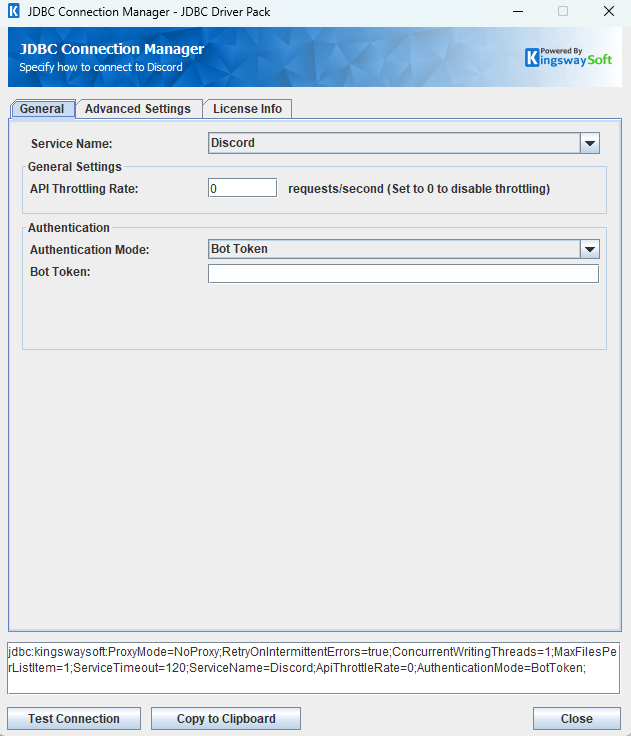
The General page allows you to specify connection properties and login credentials for the Discord REST service.
General Settings
- API Throttling Rate
-
The API Throttling Rate will limit the number of requests that can be sent per second. Set this value to 0 to disable API throttling.
Authentication
- Authentication Mode
-
The Authentication Mode option allows you to choose the method used to authenticate with the Discord API. Available options are:
- Bot Token
- OAuth Authorization Code
- OAuth Client Credentials
Authentication Methods for Discord
Bot Token
A Bot Token can be used to establish a connection.
- Bot Token
- The Bot Token is an authentication key that allows a bot to connect to Discord and perform actions on behalf of that bot account.
OAuth Authorization Code
A saved token file and token password can be used to establish a connection. If you wish to generate a new token file, click Generate Token File to go through the token generation process, save the token file locally, and use the specified token password to connect.
Authentication
-
- Generate Token File
-
This button completes the OAuth authentication process to generate a new token.
- Client ID: The Client ID option allows you to specify the unique ID which identifies the application making the request.
- Client Secret: The Client Secret option allows you to specify the client secret belonging to your app.
- Redirect URL: The Redirect URL option allows you to specify the Redirect URL to complete the authentication process.
- Scope: The scope field and tree view allows you to select the scopes which should be granted to the token that is being created. Note, not all scopes are supported for every application type. Refer to the Discord API documentation for further information.
- Path To Token File
-
The path to the token file on the file system.
- Token File Password
-
The Password for the token file.
OAuth Client Credentials
Enter Client ID, Client Secret, and scope to establish a connection.
- Client ID
- The Client ID option allows you to specify the unique ID which identifies the application making the request.
- Client Secret
- The Client Secret option allows you to specify the client secret belonging to your app.
- Scope
- The scope option allows you to select the scopes to be requested when generating a token file. Select from the list of available scopes or add your own in the text field.
After completing the configuration for all required connection and authentication settings in the JDBC Connection Manager, you can use the Test Connection button to validate your configuration and verify API requests will authenticate successfully.
Advanced Settings Page
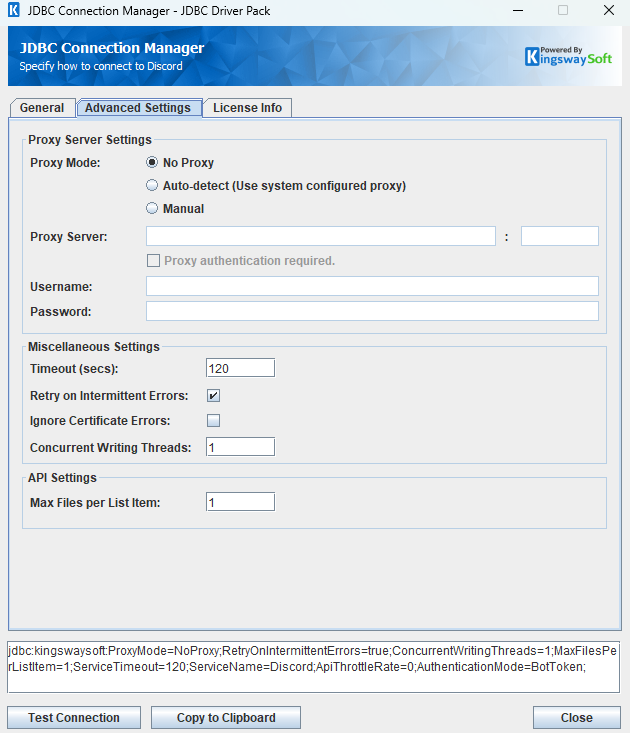
The Advanced Settings page allows you to specify advanced settings for the connection.
Proxy Server Settings
- Proxy Mode
-
The Proxy Mode option allows you to specify how you want to configure the proxy server setting. There are three options available.
- No Proxy
- Auto-detect (Use system configured proxy)
- Manual
- Proxy Server
-
Using the Proxy Server option allows you to specify the name of the proxy server for the connection.
- Port
-
The Port option allows you to specify the port number of the proxy server for the connection.
- Username (Proxy Server Authentication)
-
The Username option (under Proxy Server Authentication) allows you to specify the proxy user account.
- Password (Proxy Server Authentication)
-
The Password option (under Proxy Server Authentication) allows you to specify the proxy user's password.
Miscellaneous Settings
- Timeout (secs)
-
The Timeout (secs) option allows you to specify a timeout value in seconds for the connection. The default value is 120 seconds. Specify 0 for an infinite timeout.
- Retry on Intermittent Errors
-
The retry on intermittent errors determines if requests will be retried when there is an error. If this option is checked requests will be retried up to 3 times.
- Ignore Certificate Errors
-
This option can be used to ignore those SSL certificate errors when connecting to the target server.
Warning: Enabling the "Ignore Certificate Errors" option is generally NOT recommended, particularly for production instances. Unless there is a strong reason to believe the connection is secure - such as the network communication is only happening in an internal infrastructure, this option should be unchecked for best security.
Note: When this option is enabled, it applies to all HTTP-based SSL connections in the same job process.
- Concurrent Writing Threads
-
This option can be used to set the number of threads to be used during write operations. This can improve performance during large-volume write operations.
API Settings
- Max Files per List Item
- This setting allows you to configure the amount of file input fields in the 'channels/messages' table. For instance, setting this to 2 will cause
File_0_BinaryContentandFile_1_BinaryContentto be added to this table.
Using the JDBC Driver
This section provides examples that use JDBC classes such as Connection, Statement, and ResultSet to manage interactions with Discord data. It covers regular statements and prepared statements for complex or frequently executed queries.
Executing Statements
After you have connected from your code, you can execute SQL statements using the Statement class. For connection details, see Connecting with DriverManager or Connecting with DataSource. For parameterized statements, see Executing Prepared Statements.
SELECT
Use the Statement class's generic execute method or the executeQuery method to execute SQL statements that return data. To retrieve the results of a query, call the getResultSet method of the Statement.
String sql = "SELECT * FROM guilds/members WHERE guild_id = '906181220155678741'";
try {
    ResultSet resultSet = statement.executeQuery(sql);
    LOGGER.info(resultSet.toString());
} catch (SQLException e) {
    LOGGER.severe(e.toString());
}
INSERT
Use either the generic execute method or the executeUpdate method of the Statement class to execute an INSERT operation.
The results of SQL queries are saved in a ResultSet. You can retrieve the ResultSet after execution to view the inserted data's ID, exceptions raised during execution, and details of the affected data.
String sql = "INSERT INTO channels/messages (content,tts, channel_id) VALUES ('test content', false, 907420152818171935)";

try {
    int result = statement.executeUpdate(sql);
    LOGGER.info(statement.getResultSet().toString());
} catch (SQLException e) {
    LOGGER.severe(e.toString());
}
id,errorcode,errormessage,processdata,haserrors
1437906096600776795,null,null,{"content":"test content","tts":false},false
UPDATE
Use either the generic execute method or the executeUpdate method of the Statement class to execute an UPDATE operation.
The results of SQL queries are saved in a ResultSet. You can retrieve the ResultSet after execution to view the updated data's ID, exceptions raised during execution, and details of the affected data.
String sql = "UPDATE channels/messages SET content= 'update content' WHERE channel_id = 907420152818171935 AND message_id = 1437906096600776795";
try {
    statement.executeUpdate(sql);
    LOGGER.info(statement.getResultSet().toString());
} catch (SQLException e) {
    LOGGER.severe(e.toString());
}
id,errorcode,errormessage,processdata,haserrors
1437906096600776795,null,null,{"content":"update content"},false
DELETE
Use either the generic execute method or the executeUpdate method of the Statement class to execute a DELETE operation.
The results of SQL queries are saved in a ResultSet. You can retrieve the ResultSet after execution to view the deleted data's ID, exceptions raised during execution, and details of the affected data.
String sql = "DELETE FROM channels/messages WHERE channel_id = 907420152818171935 AND message_id = 1437562116392502333";
try {
    statement.executeUpdate(sql);
    LOGGER.info(statement.getResultSet().toString());
} catch (SQLException e) {
    LOGGER.severe(e.toString());
}
id,errorcode,errormessage,processdata,haserrors
null,null,null,null,false
Executing Prepared Statements
Using a PreparedStatement can improve performance when you need to execute a SQL statement multiple times with different parameters. Unlike a Statement object, a PreparedStatement object is provided with a SQL statement when it is created, which can then be executed with different values each time. This special type of statement is derived from the more general Statement class.
Below are the steps outlining how to execute a prepared statement:
Creating and Executing a Prepared Statement
- Create a PreparedStatement
-
Use the
prepareStatementmethod of theConnectionclass to instantiate aPreparedStatement.For connection details, see Connecting with DriverManager or Connecting with DataSource.
- Set Parameters
- Declare parameters by calling the corresponding setter method of the
PreparedStatement. - NOTE: The parameter indices start at 1.
- Execute the PreparedStatement
- Use the generic
executeorexecuteUpdatemethod of thePreparedStatement. - Retrieve Results
- Call the
getResultSetmethod of thePreparedStatementto obtain the query results, which are returned as aResultSet. - Iterate Over the Result Set
- Use the
nextmethod of theResultSetto iterate through the results. To obtain column information, use theResultSetMetaDataclass. Instantiate aResultSetMetaDataobject by calling thegetMetaDatamethod of theResultSet.
SELECT
Use the PreparedStatement class's generic execute method or the executeQuery method to execute SQL statements that return data.
The results of SQL queries are saved in a ResultSet. You can retrieve the ResultSet after execution to view the retrieved data.
String sql = "SELECT * FROM guilds/members WHERE guild_id = ?";
try {
    PreparedStatement ps = connection.prepareStatement(sql);
    ps.setLong(1, 1437562116392502333L);
    boolean ret = ps.execute(sql);
    if (ret) {
        ResultSet rs = ps.getResultSet();
        LOGGER.info(rs.toString());
    }
} catch (SQLException e) {
    LOGGER.severe(e.toString());
}
INSERT
Use either the generic execute method or the executeUpdate method of the PreparedStatement class to execute an INSERT operation.
The results of SQL queries are saved in a ResultSet. You can retrieve the ResultSet after execution to view the ID of inserted data, exceptions raised during execution, and the data affected by the insertion.
String sql = "INSERT INTO channels/messages (content,tts, channel_id) VALUES (?, ?, 907420152818171935)";
    PreparedStatement ps = connection.prepareStatement(sql);
    ps.setString(1, "test content");
    ps.setBoolean(2, false);
    ps.executeUpdate();

    LOGGER.info(ps.getResultSet().toString());
} catch (SQLException e) {
    LOGGER.severe(e.toString());
}
id,errorcode,errormessage,processdata,haserrors
1437907674850398308,null,null,{"content":"test content","tts":"0"},false
UPDATE
Use either the generic execute method or the executeUpdate method of the PreparedStatement class to execute an UPDATE operation.
The results of SQL queries are saved in a ResultSet. You can retrieve the ResultSet after execution to view the ID of updated data, exceptions raised during execution, and the data affected by the update.
String sql = "UPDATE channels/messages SET content = ? WHERE channel_id = 907420152818171935 AND message_id = 1437907674850398308";
try {
    PreparedStatement ps = connection.prepareStatement(sql);
    ps.setString(1, "update content");
    ps.executeUpdate();

    LOGGER.info(ps.getResultSet().toString());
} catch (SQLException e) {
    LOGGER.severe(e.toString());
}
id,errorcode,errormessage,processdata,haserrors
1437907674850398308,null,null,{"content":"update content"},false
DELETE
Use either the generic execute method or the executeUpdate method of the PreparedStatement class to execute a DELETE operation.
The results of SQL queries are saved in a ResultSet. You can retrieve the ResultSet after execution to view the deleted data's ID, exceptions raised during execution, and details of the affected data.
String sql = "DELETE FROM channels/messages WHERE channel_id = ? and message_id = ?";
try {
    PreparedStatement ps = connection.prepareStatement(sql);
    ps.setLong(1, 907420152818171935L);
    ps.setLong(2, 1437562116392502333L);
    ps.executeUpdate();
    LOGGER.info(ps.getResultSet().toString());
} catch (SQLException e) {
    e.printStackTrace();
}
id,errorcode,errormessage,processdata,haserrors
null,null,null,null,false
Metadata Discovery
This section provides examples on how to retrieve table and column metadata using the getTables, getColumns, and getPrimaryKeys methods from the DatabaseMetaData interface. These are essential for discovering database structures.
Tables
The getTables method from the DatabaseMetaData interface can be used to retrieve a list of tables.
This method only retrieves tables that are not write-only.
To get a list of tables that includes write-only tables, query the table system.tables.
try {
    ResultSet rs = connection.getMetaData().getTables(null, null, null, null);
    LOGGER.info("\r\n" + rs.toString());
} catch (SQLException e) {
    LOGGER.severe(e.getMessage());
}
TABLE_CAT,TABLE_SCHEM,TABLE_NAME,TABLE_TYPE,REMARKS
null,null,applications,Table,null
null,null,applications/activity-instances,Table,null
null,null,applications/commands,Table,null
null,null,applications/emojis,Table,null
null,null,applications/entitlements,Table,null
null,null,applications/guilds/commands,Table,null
null,null,applications/guilds/commands/permissions,Table,null
null,null,applications/me,Table,null
null,null,applications/role-connections/metadata,Table,null
null,null,channels,Table,null
null,null,channels/invites,Table,null
null,null,channels/messages,Table,null
null,null,channels/messages/pins,Table,null
null,null,channels/messages/reactions,Table,null
null,null,channels/pins,Table,null
null,null,channels/polls/answers,Table,null
null,null,channels/thread-members,Table,null
null,null,channels/threads/archived/private,Table,null
null,null,channels/threads/archived/public,Table,null
null,null,channels/threads/search,Table,null
null,null,channels/webhooks,Table,null
The getTables method returns the following metadata columns:
| Column Name | Data Type | Description |
|---|---|---|
| TABLE_CAT | String | The catalog that contains the table. |
| TABLE_SCHEM | String | The schema of the table. |
| TABLE_NAME | String | The name of the table. |
| TABLE_TYPE | String | The type of the table (e.g., TABLE or VIEW). |
| REMARKS | String | An optional description of the table. |
Columns
Use the getColumns method of the DatabaseMetaData interface to retrieve detailed information about database columns.
This method returns columns only for tables that are not write-only.
To get columns for write-only tables, query the table system.columns.
try {
    ResultSet rs = connection.getMetaData().getColumns(null, null, "guilds", null);
    LOGGER.info(rs.toString());
} catch (SQLException e) {
    e.printStackTrace();
}
TABLE_CAT,TABLE_SCHEM,TABLE_NAME,COLUMN_NAME,DATA_TYPE,TYPE_NAME,COLUMN_SIZE,BUFFER_LENGTH,DECIMAL_DIGITS,NUM_PREC_RADIX,NULLABLE,REMARKS,COLUMN_DEF,SQL_DATA_TYPE,SQL_DATETIME_SUB,CHAR_OCTET_LENGTH,ORDINAL_POSITION,IS_NULLABLE,SCOPE_CATALOG,SCOPE_SCHEMA,SCOPE_TABLE,SOURCE_DATA_TYPE,IS_AUTOINCREMENT,IS_GENERATEDCOLUMN,DTS_TYPE
null,null,guilds,afk_channel_id,12,VARCHAR,0,null,0,0,null,null,null,12,null,null,null,null,null,null,null,null,null,null,DT_WSTR
null,null,guilds,afk_timeout,-5,BIGINT,null,null,0,0,null,null,null,-5,null,null,null,null,null,null,null,null,null,null,DT_I8
null,null,guilds,application_id,12,VARCHAR,0,null,0,0,null,null,null,12,null,null,null,null,null,null,null,null,null,null,DT_WSTR
null,null,guilds,approximate_member_count,12,VARCHAR,0,null,0,0,null,null,null,12,null,null,null,null,null,null,null,null,null,null,DT_WSTR
null,null,guilds,approximate_presence_count,12,VARCHAR,0,null,0,0,null,null,null,12,null,null,null,null,null,null,null,null,null,null,DT_WSTR
null,null,guilds,banner,12,VARCHAR,0,null,0,0,null,null,null,12,null,null,null,null,null,null,null,null,null,null,DT_WSTR
null,null,guilds,default_message_notifications,-5,BIGINT,null,null,0,0,null,null,null,-5,null,null,null,null,null,null,null,null,null,null,DT_I8
null,null,guilds,description,12,VARCHAR,0,null,0,0,null,null,null,12,null,null,null,null,null,null,null,null,null,null,DT_WSTR
null,null,guilds,discovery_splash,12,VARCHAR,0,null,0,0,null,null,null,12,null,null,null,null,null,null,null,null,null,null,DT_WSTR
null,null,guilds,emojis,12,VARCHAR,0,null,0,0,null,null,null,12,null,null,null,null,null,null,null,null,null,null,DT_WSTR
null,null,guilds,explicit_content_filter,-5,BIGINT,null,null,0,0,null,null,null,-5,null,null,null,null,null,null,null,null,null,null,DT_I8
null,null,guilds,features,12,VARCHAR,0,null,0,0,null,null,null,12,null,null,null,null,null,null,null,null,null,null,DT_WSTR
null,null,guilds,home_header,12,VARCHAR,0,null,0,0,null,null,null,12,null,null,null,null,null,null,null,null,null,null,DT_WSTR
null,null,guilds,icon,12,VARCHAR,0,null,0,0,null,null,null,12,null,null,null,null,null,null,null,null,null,null,DT_WSTR
null,null,guilds,id,12,VARCHAR,0,null,0,0,null,null,null,12,null,null,null,null,null,null,null,null,null,null,DT_WSTR
null,null,guilds,max_members,-5,BIGINT,null,null,0,0,null,null,null,-5,null,null,null,null,null,null,null,null,null,null,DT_I8
null,null,guilds,max_presences,12,VARCHAR,0,null,0,0,null,null,null,12,null,null,null,null,null,null,null,null,null,null,DT_WSTR
null,null,guilds,max_stage_video_channel_users,-5,BIGINT,null,null,0,0,null,null,null,-5,null,null,null,null,null,null,null,null,null,null,DT_I8
null,null,guilds,max_video_channel_users,-5,BIGINT,null,null,0,0,null,null,null,-5,null,null,null,null,null,null,null,null,null,null,DT_I8
null,null,guilds,mfa_level,-5,BIGINT,null,null,0,0,null,null,null,-5,null,null,null,null,null,null,null,null,null,null,DT_I8
null,null,guilds,name,12,VARCHAR,0,null,0,0,null,null,null,12,null,null,null,null,null,null,null,null,null,null,DT_WSTR
null,null,guilds,nsfw,16,BOOLEAN,null,null,0,0,null,null,null,16,null,null,null,null,null,null,null,null,null,null,DT_BOOL
null,null,guilds,nsfw_level,-5,BIGINT,null,null,0,0,null,null,null,-5,null,null,null,null,null,null,null,null,null,null,DT_I8
null,null,guilds,owner_id,12,VARCHAR,0,null,0,0,null,null,null,12,null,null,null,null,null,null,null,null,null,null,DT_WSTR
null,null,guilds,preferred_locale,12,VARCHAR,0,null,0,0,null,null,null,12,null,null,null,null,null,null,null,null,null,null,DT_WSTR
null,null,guilds,premium_progress_bar_enabled,16,BOOLEAN,null,null,0,0,null,null,null,16,null,null,null,null,null,null,null,null,null,null,DT_BOOL
null,null,guilds,premium_subscription_count,-5,BIGINT,null,null,0,0,null,null,null,-5,null,null,null,null,null,null,null,null,null,null,DT_I8
null,null,guilds,premium_tier,-5,BIGINT,null,null,0,0,null,null,null,-5,null,null,null,null,null,null,null,null,null,null,DT_I8
null,null,guilds,public_updates_channel_id,12,VARCHAR,0,null,0,0,null,null,null,12,null,null,null,null,null,null,null,null,null,null,DT_WSTR
null,null,guilds,region,12,VARCHAR,0,null,0,0,null,null,null,12,null,null,null,null,null,null,null,null,null,null,DT_WSTR
null,null,guilds,roles,12,VARCHAR,0,null,0,0,null,null,null,12,null,null,null,null,null,null,null,null,null,null,DT_WSTR
null,null,guilds,rules_channel_id,12,VARCHAR,0,null,0,0,null,null,null,12,null,null,null,null,null,null,null,null,null,null,DT_WSTR
null,null,guilds,safety_alerts_channel_id,12,VARCHAR,0,null,0,0,null,null,null,12,null,null,null,null,null,null,null,null,null,null,DT_WSTR
The getColumns method returns the following columns:
| Column Name | Data Type | Description |
|---|---|---|
| TABLE_CAT | String | The database name. |
| TABLE_SCHEM | String | The table schema. |
| TABLE_NAME | String | The table name. |
| COLUMN_NAME | String | The column name. |
| DATA_TYPE | Integer | The data type represented by a constant value from java.sql.Types. |
| TYPE_NAME | String | The data type name used by the driver. |
| COLUMN_SIZE | Integer | The length in characters of the column or the numeric precision. |
| BUFFER_LENGTH | Integer | The buffer length. |
| DECIMAL_DIGITS | Integer | The column scale or number of digits to the right of the decimal point. |
| NUM_PREC_RADIX | Integer | The radix, or base. |
| NULLABLE | Integer | Whether the column can contain null as defined by the following JDBC DatabaseMetaData constants: columnNoNulls (0) or columnNullable (1). |
| REMARKS | String | The comment or note associated with the object. |
| COLUMN_DEF | String | The default value for the column. |
| SQL_DATA_TYPE | Integer | Reserved by the specification. |
| SQL_DATETIME_SUB | Integer | Reserved by the specification. |
| CHAR_OCTET_LENGTH | Integer | The maximum length of binary and character-based columns. |
| ORDINAL_POSITION | Integer | The position of the column in the table, starting at 1. |
| IS_NULLABLE | String | Whether a null value is allowed: YES or NO. |
| SCOPE_CATALOG | String | The catalog of the table referenced by a reference attribute (null if DATA_TYPE is not REF). |
| SCOPE_SCHEMA | String | The schema of the table referenced by a reference attribute (null if DATA_TYPE is not REF). |
| SCOPE_TABLE | String | The name of the table referenced by a reference attribute (null if DATA_TYPE is not REF). |
| SOURCE_DATA_TYPE | Short | The source type of a distinct type or user-defined REF type (null if DATA_TYPE is neither DISTINCT nor a user-defined REF). |
| IS_AUTOINCREMENT | String | Whether the column value is assigned by Discord in fixed increments. |
| IS_GENERATEDCOLUMN | String | Whether the column is generated: YES or NO. |
| DTS_TYPE | String | Object DTS attribute type. |
Primary Keys
The getPrimaryKeys method in the DatabaseMetaData interface is used to retrieve metadata about primary keys for a given table in Discord.
try {
    ResultSet resultSet = connection.getMetaData().getPrimaryKeys(null, null, "guilds");
    LOGGER.info("\r\n" + resultSet.toString());
} catch (SQLException e) {
    LOGGER.severe(e.getMessage());
}
TABLE_CAT,TABLE_SCHEM,TABLE_NAME,COLUMN_NAME,KEY_SEQ,PK_NAME
null,null,guilds,id,1,null
The getPrimaryKeys method returns the following columns:
| Column Name | Data Type | Description |
|---|---|---|
| TABLE_CAT | String | The catalog name. |
| TABLE_SCHEM | String | The schema name. |
| TABLE_NAME | String | The name of the table that contains the primary key. |
| COLUMN_NAME | String | The name of the column that serves as the primary key for the table. |
| KEY_SEQ | Short | The sequence number within the primary key. |
| PK_NAME | String | The primary key name. |
Connection Settings
| Connection Setting | Type | Default Value | Description |
|---|---|---|---|
| ApiThrottleRate | Integer | 10 | The maximum number of API requests a client can make to the server within a specific time period, defined in requests per second. |
| AuthenticationMode | String | "BotToken" | AuthenticationMode specifies the method used to authenticate when connecting to Discord API. |
| BotToken | String | "" | Bot token is an authentication key that allows a bot to connect to Discord and perform actions on behalf of that bot account. |
| CacheExpirationTime | Integer | 30 | Defines the expiration time for cache. A value of 0 disables caching. |
| ClientId | String | "" | The Client ID you have selected or created in Discord. |
| ClientSecret | String | "" | The client secret you have selected or created in Discord. |
| ConcurrentWritingThreads | Integer | 1 | The number of threads for executing operations in parallel. A value of 0 will disable multi threading. |
| ConnectionTimeout | Integer | 30 | ConnectionTimeout is the maximum amount of time the program will wait to set up a connection to the Discord API. |
| IgnoreCertificateErrors | Boolean | false | Specifies whether to verify the certificate when connecting to Discord. If certificate verification is not required, you can set this value to 'true'. |
| ContinueOnErrors | Boolean | false | Determines if the program continues executing SQL statements after encountering an error. |
| LogFileSize | String | "10485760" | A string specifying the maximum size in bytes for a log file. |
| LogLevel | String | "INFO" | The logging level for the JDBC driver. |
| LogPath | String | "./jdbcLogs" | The directory where log files are stored. |
| MaxFilesPerListItem | Integer | 1 | This setting allows you to configure the amount of file input fields in the 'channels/messages' table. For instance, setting this to 2 will cause File_0_BinaryContent and File_1_BinaryContent to be added to this table. |
| OemKey | String | "" | The OEM license key. |
| PathToTokenFile | String | "" | PathToTokenFile allows you to specify the path to the token file on the file system. |
| ProxyMode | String | NoProxy | This setting configures the proxy. Allowed values are "NoProxy", "AutoDetect" and "Manual". |
| ProxyPassword | String | "" | The password to be used to authenticate to the proxy. |
| ProxyServer | String | "" | The host of the proxy server. |
| ProxyServerPort | Integer | 0 | The port of the proxy server. |
| ProxyUsername | String | "" | The username to be used to authenticate to the proxy. |
| ReadBatchSize | Integer | 100 | ReadBatchSize is used to set how many records can be read from Discord in a single call. |
| ResultPath | String | "" | The path where the execution result files are saved. |
| RetryOnIntermittentErrors | Boolean | true | The RetryOnIntermittentErrors parameter indicates whether to retry the connection when it might occasionally fail due to temporary issues. |
| SaveResult | Boolean | false | The SaveResult parameter indicates whether to save the execution results to a file. |
| ServiceName | String | "" | The ServiceName refers to the name of the service API selected by the user. |
| ServiceTimeout | Integer | 120 | The ServiceTimeout is the timeout to receive the full response from Discord API. |
| Suppress404NotFoundError | Boolean | true | When set to true, if a query results in an HTTP 404 error, a result set will still be created. When set to false, an error is logged instead and no result set is created. |
| TokenPassword | String | "" | The password used to read the token file. |
| WriteBatchSize | Integer | 1 | WriteBatchSize is used to set how many records can be written to Discord in a single call. |