

Flat File
Building the JDBC URL
After installing the license, open the connection management page by running java -jar kingswaysoft.jdbc.jar. Enter the required details to generate the JDBC connection URL. Click Test Connection to test the generated URL, or Copy to Clipboard to copy the connection string for use in your application.
Note: If the license is not installed, you can still use the connection manager to generate a JDBC URL; however, the Test Connection feature will be disabled.
The Flat File driver treats the configured folder as the data source. Each file is exposed as a table by its file name without the extension. For example, test.csv can be queried as SELECT * FROM test.
General Page
The General page allows you to specify the folder, file format, encoding, compression, and column layout used by the Flat File service.
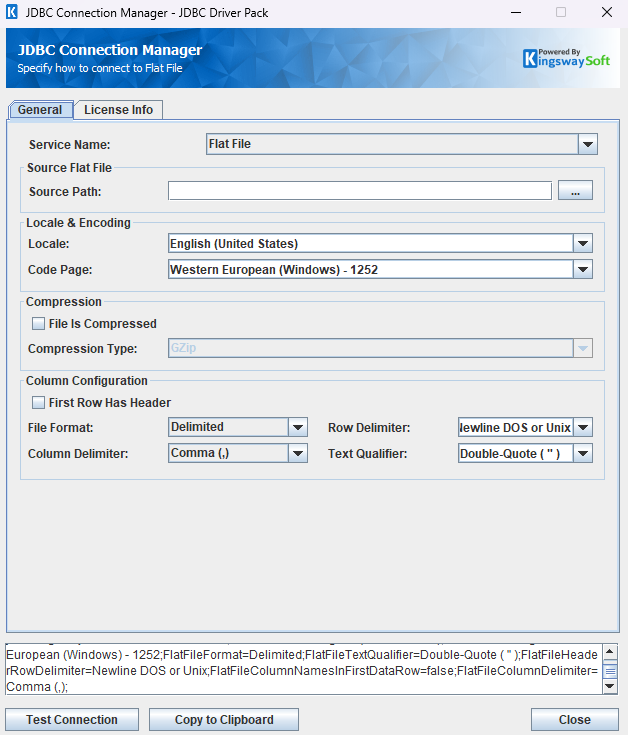
General Settings
- Source Path
-
The folder that contains the flat files to be queried or updated. The connection manager validates that the selected folder contains at least one
.csvor.txtfile.
- Locale
-
Controls locale-aware formatting behavior used while parsing file content.
- Code Page
-
Specifies the file encoding. For example, use
Unicode (UTF-8) - 65001for UTF-8 files.
- File Is Compressed
-
Enables reading and writing compressed flat files.
- Compression Type
-
Specifies the compression format. The current Flat File connection manager exposes
GZip.
- First Row Has Header
-
When enabled, the first data row is treated as column names.
- File Format
-
Determines whether the driver interprets the file as
DelimitedorFixed Width. - Row Delimiter
-
Defines how rows are separated in the file, such as DOS/Unix newlines or an explicit delimiter character.
- Column Delimiter
-
Defines the delimiter used between columns for delimited files.
- Text Qualifier
-
Specifies the text qualifier used for quoted field values, such as double quotes.
Using the JDBC Driver
Explore the examples below to see how the Flat File driver can be used with JDBC Connection, Statement, ResultSet, and metadata APIs to query and modify flat files.
Executing Statements
After you have connected from your code, you can execute SQL statements using the Statement class. For connection details, see Connecting with DriverManager or Connecting with DataSource.
SELECT
Use the executeQuery method to retrieve data from a flat file table.
String sql = "SELECT * FROM test";
try {
    ResultSet resultSet = statement.executeQuery(sql);
    LOGGER.info(resultSet.toString());
} catch (SQLException e) {
    LOGGER.severe(e.toString());
}
String sql = "SELECT name, age FROM test WHERE age = '40' AND name = 'Charlie'";
try {
    ResultSet resultSet = statement.executeQuery(sql);
    LOGGER.info(resultSet.toString());
} catch (SQLException e) {
    LOGGER.severe(e.toString());
}
INSERT
Use the executeUpdate method to append rows to a flat file.
String sql = "INSERT INTO test (id, name, age) VALUES ('4', 'David', '50')";
try {
    int rows = statement.executeUpdate(sql);
    LOGGER.info("Inserted rows: " + rows);
    LOGGER.info(statement.getResultSet().toString());
} catch (SQLException e) {
    LOGGER.severe(e.toString());
}
INFO: id,errorcode,errormessage,processdata,haserrors
5,null,null,{name=David, id=4, age=50},false
UPDATE
Use the executeUpdate method to update existing rows in a flat file.
String sql = "UPDATE test SET age = '26' WHERE name = 'David'";
try {
    int rows = statement.executeUpdate(sql);
    LOGGER.info("Updated rows: " + rows);
    LOGGER.info(statement.getResultSet().toString());
} catch (SQLException e) {
    LOGGER.severe(e.toString());
}
INFO: id,errorcode,errormessage,processdata,haserrors
2,null,null,{age=26},false
DELETE
Use the executeUpdate method to remove rows from a flat file.
String sql = "DELETE FROM test WHERE name = 'David'";
try {
    int rows = statement.executeUpdate(sql);
    LOGGER.info("Deleted rows: " + rows);
    LOGGER.info(statement.getResultSet().toString());
} catch (SQLException e) {
    LOGGER.severe(e.toString());
}
INFO: id,errorcode,errormessage,processdata,haserrors
2,null,null,{name=David},false
Executing Prepared Statements
Use a PreparedStatement when the same SQL pattern needs to be executed with different values. For the Flat File driver, call the no-argument methods such as executeQuery(), executeUpdate(), or execute() after binding parameters.
Note: As with standard JDBC prepared statements, parameter indices start at 1. For this driver, avoid calling overloads such as executeQuery(sql) or executeUpdate(sql) on a PreparedStatement.
SELECT
Use PreparedStatement.executeQuery() to run parameterized read queries.
String sql = "SELECT name, age FROM test WHERE name = ?";
try (PreparedStatement ps = connection.prepareStatement(sql)) {
    ps.setString(1, "Charlie");

    try (ResultSet resultSet = ps.executeQuery()) {
        LOGGER.info(resultSet.toString());
    }
} catch (SQLException e) {
    LOGGER.severe(e.toString());
}
INSERT
Use PreparedStatement.executeUpdate() to insert parameterized values.
String sql = "INSERT INTO test (id, name, age) VALUES (?, ?, ?)";
try (PreparedStatement ps = connection.prepareStatement(sql)) {
    ps.setString(1, "4");
    ps.setString(2, "David");
    ps.setString(3, "50");

    int rows = ps.executeUpdate();
    LOGGER.info("Inserted rows: " + rows);
    LOGGER.info(ps.getResultSet().toString());
} catch (SQLException e) {
    LOGGER.severe(e.toString());
}
INFO: id,errorcode,errormessage,processdata,haserrors
5,null,null,{name=David, id=4, age=50},false
UPDATE
Use PreparedStatement.executeUpdate() to update parameterized row values.
String sql = "UPDATE test SET age = ? WHERE name = ?";
try (PreparedStatement ps = connection.prepareStatement(sql)) {
    ps.setString(1, "26");
    ps.setString(2, "Bob");

    int rows = ps.executeUpdate();
    LOGGER.info("Updated rows: " + rows);
    LOGGER.info(ps.getResultSet().toString());
} catch (SQLException e) {
    LOGGER.severe(e.toString());
}
INFO: id,errorcode,errormessage,processdata,haserrors
1,null,null,{name=Bob, id=2, age=40},false
DELETE
Use PreparedStatement.executeUpdate() to delete parameterized rows.
String sql = "DELETE FROM test WHERE name = ?";
try (PreparedStatement ps = connection.prepareStatement(sql)) {
    ps.setString(1, "Bob");

    int rows = ps.executeUpdate();
    LOGGER.info("Deleted rows: " + rows);
    LOGGER.info(ps.getResultSet().toString());
} catch (SQLException e) {
    LOGGER.severe(e.toString());
}
INFO: id,errorcode,errormessage,processdata,haserrors
2,null,null,{name=Bob},false
USING OPTIONS Support
The Flat File driver supports query-level USING OPTIONS (...) clauses for both read and write scenarios. These options affect only the current SQL statement.
Connection Setting Overrides
Flat File connection settings can also be supplied in a USING OPTIONS (...) clause for the current SQL statement. When the same setting is configured in both the JDBC connection URL and USING OPTIONS, the value in USING OPTIONS takes precedence for that statement only.
Use the same property names and values as the JDBC connection URL. The following Flat File connection settings can be overridden at statement level:
| Option | Type | Description |
|---|---|---|
| FlatFileLocale | String | Overrides the locale used for parsing flat file content. |
| FlatFileCodePage | String | Overrides the code page / encoding used to read and write the file. |
| FlatFileFormat | String | Overrides the file format. Valid values are Delimited and Fixed Width. |
| FlatFileTextQualifier | String | Overrides the text qualifier used for quoted field values in delimited files. Valid values are Double-Quote ( " ), Single-Quote ( ' ), Tick ( ` ), and None ( ). |
| FlatFileHeaderRowDelimiter | String | Overrides the row delimiter used in the file. Valid values are Newline DOS or Unix, Carriage Return and Line Feed (\r\n), Newline DOS (\r\n), Newline Unix (\n), Line Feed (\n), Carriage Return (\r), Semicolon (;), Colon (:), Comma (,), Tab (\t), and Vertical Bar (|). |
| FlatFileHeaderRowsToSkip | Integer | Overrides the number of physical rows to skip before data discovery and reading begin. |
| FlatFileColumnNamesInFirstDataRow | Boolean | Overrides whether the first data row contains column names. |
| FlatFileIsCompressed | Boolean | Overrides whether the flat file is compressed. |
| FlatFileCompressionType | String | Overrides the compression type. Valid values are GZip and Deflate. |
| FlatFileNullifyEmptyStrings | Boolean | Overrides whether empty string field values are returned as null for SELECT statements. |
| FlatFileColumnDelimiter | String | Overrides the column delimiter used in delimited files. Valid values are Comma (,), Newline (\n), Carriage Return (\r), Semicolon (;), Colon (:), Tab (\t), and Vertical Bar (|). |
| FlatFilePaddingCharacter | String | Overrides the padding character used in fixed-width files. Valid values are Space ( ), Hyphen (-), and NULL (\0). |
Some statement-level overrides must be used with their related settings. FlatFileColumnDelimiter and FlatFileTextQualifier require the effective FlatFileFormat to be Delimited. FlatFilePaddingCharacter requires the effective FlatFileFormat to be Fixed Width. FlatFileCompressionType requires the effective FlatFileIsCompressed value to be true.
String sql = "SELECT * FROM people "
           + "USING OPTIONS (FlatFileColumnDelimiter = 'Semicolon (;)', "
           + "FlatFileColumnNamesInFirstDataRow = true)";
try (ResultSet resultSet = statement.executeQuery(sql)) {
    LOGGER.info(resultSet.toString());
} catch (SQLException e) {
    LOGGER.severe(e.toString());
}
String sql = "INSERT INTO people (Id, Name) VALUES ('2', 'Bob') "
           + "USING OPTIONS (FlatFileColumnDelimiter = 'Semicolon (;)', "
           + "FlatFileColumnNamesInFirstDataRow = true)";
try {
    int rows = statement.executeUpdate(sql);
    LOGGER.info("Inserted rows: " + rows);
} catch (SQLException e) {
    LOGGER.severe(e.toString());
}
SELECT USING OPTIONS
Use query-level read options to adjust how the driver interprets the source file.
The same clause can also be used with a PreparedStatement. Bind your parameters first, then call executeQuery() without passing the SQL string again.
| Option | Type | Default | Description |
|---|---|---|---|
| skipCommentedRows | Boolean | true | Skips physical rows that begin with #. To use a different comment character, use the option 'commentChar'. Rows skipped do not count towards 'Skip Leading Rows' count. |
| commentChar | String | # | Set the character used to indicate the physical row is commented. |
| skipEmptyRows | Boolean | true | Skips empty physical rows while reading. Rows skipped do not count towards 'Skip Leading Rows' count. |
| skipLeadingRows | Integer | 0 | Skips the specified number of qualifying rows from the beginning of the file. |
| skipTrailingRows | Integer | 0 | Skips the specified number of qualifying rows from the end of the file. |
| nullifyEmptyStrings | Boolean | Value of FlatFileNullifyEmptyStrings |
Converts empty string field values to null for the current SELECT statement. |
| TrimPadding | Boolean | true | For fixed-width files, removes the configured padding character from parsed values. |
String sql = "SELECT * FROM community "
           + "USING OPTIONS (skipCommentedRows = true, skipLeadingRows = 1, skipTrailingRows = 1) LIMIT 2";
try (ResultSet resultSet = statement.executeQuery(sql)) {
    while (resultSet.next()) {
        LOGGER.info(resultSet.getString("id") + "," + resultSet.getString("name"));
    }
} catch (SQLException e) {
    LOGGER.severe(e.toString());
}
String sql = "SELECT * FROM community "
           + "USING OPTIONS (nullifyEmptyStrings = true)";
try (ResultSet resultSet = statement.executeQuery(sql)) {
    while (resultSet.next()) {
        LOGGER.info("name=" + resultSet.getString("name") + ", age=" + resultSet.getString("age"));
    }
} catch (SQLException e) {
    LOGGER.severe(e.toString());
}
String sql = "SELECT * FROM community "
           + "WHERE id = ? "
           + "USING OPTIONS (skipCommentedRows = true)";
try (PreparedStatement ps = connection.prepareStatement(sql)) {
    ps.setString(1, "2");
    try (ResultSet resultSet = ps.executeQuery()) {
        LOGGER.info(resultSet.toString());
    }
} catch (SQLException e) {
    LOGGER.severe(e.toString());
}
Note: nullifyEmptyStrings is the SELECT-specific alias for FlatFileNullifyEmptyStrings. When specified in USING OPTIONS, it overrides the connection URL value for the current statement.
INSERT / UPDATE / DELETE USING OPTIONS
Use query-level write options to control how the target file is produced for the current write statement.
These write options also work with PreparedStatement. After setting parameter values, call executeUpdate() without passing the SQL string again.
| Option | Type | Default | Description |
|---|---|---|---|
| appendToFile | Boolean | true | When false, an INSERT rewrites the target file instead of appending to it. |
| useBomEncoding | Boolean | false | Writes a BOM for supported Unicode encodings such as UTF-8, UTF-16, and UTF-32. |
| MultipleMatchAction | String | All Matches | Allows you to set the behavior for UPDATE/DELETE queries when multiple matches are found.
Valid values are:
|
| TextAlignment | String | Automatic | Controls fixed-width value alignment when writing. Valid values are Left, Center, and Right. When omitted, numeric values are right-aligned and other values are left-aligned. |
| ValueOverflowHandling | String | Truncate | Controls fixed-width write behavior when a value is longer than the target column width. Valid values are Error, Truncate, Skip, and Ignore. |
| Dividers | String | None | Controls fixed-width divider rows or columns. Valid values are None, Top, Bottom, Left, Right, Columns, Header, and Rows. Multiple values can be separated by commas. |
| HorizontalDivider | String | Required when Dividers contains Top, Bottom, Header, or Rows. Valid values are Space ( ), Hyphen (-), Underscore (_), Equals (=), and Plus (+). |
|
| VerticalDivider | String | Required when Dividers contains Left, Right, or Columns. Valid values are Space ( ), Vertical Bar (|), and Plus (+). |
Fixed-width write options such as TextAlignment, ValueOverflowHandling, Dividers, HorizontalDivider, and VerticalDivider require the effective FlatFileFormat to be Fixed Width.
String sql = "INSERT INTO overwrite_test (id, name, age) VALUES ('2', 'Bob', '40') "
           + "USING OPTIONS (appendToFile = false)";
try {
    int rows = statement.executeUpdate(sql);
    LOGGER.info("Inserted rows: " + rows);
} catch (SQLException e) {
    LOGGER.severe(e.toString());
}
String sql = "INSERT INTO bom_test (id, name, age) VALUES ('1', 'Alice', '30') "
           + "USING OPTIONS (useBomEncoding = true)";
try {
    int rows = statement.executeUpdate(sql);
    LOGGER.info("Inserted rows: " + rows);
} catch (SQLException e) {
    LOGGER.severe(e.toString());
}
String sql = "INSERT INTO overwrite_test (id, name, age) VALUES (?, ?, ?) "
           + "USING OPTIONS (appendToFile = false)";
try (PreparedStatement ps = connection.prepareStatement(sql)) {
    ps.setString(1, "2");
    ps.setString(2, "Bob");
    ps.setString(3, "40");
    int rows = ps.executeUpdate();
    LOGGER.info("Inserted rows: " + rows);
} catch (SQLException e) {
    LOGGER.severe(e.toString());
}
The same clause can also be used with UPDATE and DELETE statements, for example:
UPDATE test
SETname = 'Bob'
USING OPTIONS (useBomEncoding = true)
WHERE id = '1'
Metadata Discovery
The Flat File driver supports standard JDBC metadata discovery for the files available in the configured folder.
Tables
Use DatabaseMetaData.getTables to enumerate available flat file tables.
try {
    DatabaseMetaData metaData = connection.getMetaData();
    ResultSet rs = metaData.getTables(null, null, null, null);
    LOGGER.info("\r\n" + rs.toString());
} catch (SQLException e) {
    LOGGER.severe(e.toString());
}
INFO: TABLE_CAT,TABLE_SCHEM,TABLE_NAME,TABLE_TYPE,REMARKS,TYPE_CAT,TYPE_SCHEM,TYPE_NAME,SELF_REFERENCING_COL_NAME,REF_GENERATION
null,null,compressed_test,TABLE,null,null,null,null,null,null
null,null,deflate_test,TABLE,null,null,null,null,null,null
null,null,fixed_width_test,TABLE,null,null,null,null,null,null
null,null,locale_decimal_fr_test,TABLE,null,null,null,null,null,null
null,null,no_header_test,TABLE,null,null,null,null,null,null
null,null,nullify_test,TABLE,null,null,null,null,null,null
null,null,pipe_delimiter_test,TABLE,null,null,null,null,null,null
null,null,qualifier_test,TABLE,null,null,null,null,null,null
null,null,semicolon_delimiter_test,TABLE,null,null,null,null,null,null
null,null,skip_rows_test,TABLE,null,null,null,null,null,null
null,null,tab_delimiter_test,TABLE,null,null,null,null,null,null
null,null,test,TABLE,null,null,null,null,null,null
null,null,using_options_test,TABLE,null,null,null,null,null,null
null,null,utf8_test,TABLE,null,null,null,null,null,null
The getTables method returns the following metadata columns:
| Column Name | Data Type | Description |
|---|---|---|
| TABLE_CAT | String | The catalog that contains the table. |
| TABLE_SCHEM | String | The schema of the table. |
| TABLE_NAME | String | The name of the table. |
| TABLE_TYPE | String | The type of the table (e.g., TABLE or VIEW). |
| REMARKS | String | An optional description of the table. |
Columns
Use DatabaseMetaData.getColumns to retrieve column metadata for a flat file table.
try {
    DatabaseMetaData metaData = connection.getMetaData();
    ResultSet rs = metaData.getColumns(null, null, "test", null);
    LOGGER.info("\r\n" + rs.toString());
} catch (SQLException e) {
    LOGGER.severe(e.toString());
}
INFO: TABLE_CAT,TABLE_SCHEM,TABLE_NAME,COLUMN_NAME,DATA_TYPE,TYPE_NAME,COLUMN_SIZE,BUFFER_LENGTH,DECIMAL_DIGITS,NUM_PREC_RADIX,NULLABLE,REMARKS,COLUMN_DEF,SQL_DATA_TYPE,SQL_DATETIME_SUB,CHAR_OCTET_LENGTH,ORDINAL_POSITION,IS_NULLABLE,SCOPE_CATALOG,SCOPE_SCHEMA,SCOPE_TABLE,SOURCE_DATA_TYPE,IS_AUTOINCREMENT,IS_GENERATEDCOLUMN,DTS_TYPE
null,null,test,id,-5,BIGINT,null,null,0,0,null,null,null,-5,null,null,null,null,null,null,null,null,null,null,DT_I8
null,null,test,name,12,VARCHAR,null,null,0,0,null,null,null,12,null,null,null,null,null,null,null,null,null,null,DT_WSTR
null,null,test,age,-5,BIGINT,null,null,0,0,null,null,null,-5,null,null,null,null,null,null,null,null,null,null,DT_I8
The getColumns method returns the following columns:
| Column Name | Data Type | Description |
|---|---|---|
| TABLE_CAT | String | The database name. |
| TABLE_SCHEM | String | The table schema. |
| TABLE_NAME | String | The table name. |
| COLUMN_NAME | String | The column name. |
| DATA_TYPE | Integer | The data type represented by a constant value from java.sql.Types. |
| TYPE_NAME | String | The data type name used by the driver. |
| COLUMN_SIZE | Integer | The length in characters of the column or the numeric precision. |
| BUFFER_LENGTH | Integer | The buffer length. |
| DECIMAL_DIGITS | Integer | The column scale or number of digits to the right of the decimal point. |
| NUM_PREC_RADIX | Integer | The radix, or base. |
| NULLABLE | Integer | Whether the column can contain null as defined by the following JDBC DatabaseMetaData constants: columnNoNulls (0) or columnNullable (1). |
| REMARKS | String | The comment or note associated with the object. |
| COLUMN_DEF | String | The default value for the column. |
| SQL_DATA_TYPE | Integer | Reserved by the specification. |
| SQL_DATETIME_SUB | Integer | Reserved by the specification. |
| CHAR_OCTET_LENGTH | Integer | The maximum length of binary and character-based columns. |
| ORDINAL_POSITION | Integer | The position of the column in the table, starting at 1. |
| IS_NULLABLE | String | Whether a null value is allowed: YES or NO. |
| SCOPE_CATALOG | String | The catalog of the table referenced by a reference attribute (null if DATA_TYPE is not REF). |
| SCOPE_SCHEMA | String | The schema of the table referenced by a reference attribute (null if DATA_TYPE is not REF). |
| SCOPE_TABLE | String | The name of the table referenced by a reference attribute (null if DATA_TYPE is not REF). |
| SOURCE_DATA_TYPE | Short | The source type of a distinct type or user-defined REF type (null if DATA_TYPE is neither DISTINCT nor a user-defined REF). |
| IS_AUTOINCREMENT | String | Whether the column value is assigned by Freshbooks in fixed increments. |
| IS_GENERATEDCOLUMN | String | Whether the column is generated: YES or NO. |
| DTS_TYPE | String | Object DTS attribute type. |
Connection Settings
Note: The Flat File settings shown in the Connection Setting Overrides section can be overridden for an individual SQL statement by specifying the same property name in USING OPTIONS (...). Statement-level values take precedence over values from the JDBC connection URL.
| Connection Setting | Type | Default Value | Description |
|---|---|---|---|
| ConcurrentWritingThreads | Integer | 1 | The configured number of threads for write execution. Flat File write operations currently fall back to single-threaded execution. |
| ConnectionTimeout | Integer | 30 | The maximum amount of time the program will wait to establish a connection. |
| FlatFileFolder | String | "" | The folder that contains the flat file tables. |
| FlatFileLocale | String | "English (United States)" | The locale used for parsing flat file content. |
| FlatFileCodePage | String | "Western European (Windows) - 1252" | The code page / encoding used to read and write the file. |
| FlatFileFormat | String | "Delimited" | The file format. Valid values are Delimited and Fixed Width. |
| FlatFileTextQualifier | String | "Double-Quote ( " )" | The text qualifier used for quoted field values in delimited files. Valid values are Double-Quote ( " ), Single-Quote ( ' ), Tick ( ` ), and None ( ). |
| FlatFileHeaderRowDelimiter | String | "Newline DOS or Unix" | The row delimiter used in the file. Valid values are Newline DOS or Unix, Carriage Return and Line Feed (\r\n), Newline DOS (\r\n), Newline Unix (\n), Line Feed (\n), Carriage Return (\r), Semicolon (;), Colon (:), Comma (,), Tab (\t), and Vertical Bar (|). |
| FlatFileHeaderRowsToSkip | Integer | 0 | The number of physical rows to skip before data discovery and reading begin. |
| FlatFileColumnNamesInFirstDataRow | Boolean | true | Indicates whether the first data row contains column names. |
| FlatFileIsCompressed | Boolean | false | Indicates whether the flat files are compressed. |
| FlatFileCompressionType | String | "GZip" | The compression type used for compressed flat files. Valid values are GZip and Deflate. |
| FlatFileNullifyEmptyStrings | Boolean | false | Indicates whether empty string field values are returned as null for Flat File queries. |
| FlatFileColumnDelimiter | String | "Comma (,)" | The column delimiter used in delimited files. Valid values are Comma (,), Newline (\n), Carriage Return (\r), Semicolon (;), Colon (:), Tab (\t), and Vertical Bar (|). |
| FlatFilePaddingCharacter | String | "Space ( )" | The padding character used in fixed-width files. Valid values are Space ( ), Hyphen (-), and NULL (\0). |
| IgnoreCertificateErrors | Boolean | false | Specifies whether SSL certificate errors should be ignored. |
| ContinueOnErrors | Boolean | false | Determines whether the driver continues executing SQL statements after encountering an error. |
| LogFileSize | String | "10000000" | The maximum size in bytes for a log file. |
| LogLevel | String | "INFO" | The logging level used by the JDBC driver. |
| LogPath | String | "./jdbcLogs" | The directory where log files are stored. |
| OemKey | String | "" | The OEM license key. |
| ProxyMode | String | "NoProxy" | The proxy mode. Allowed values are NoProxy, AutoDetect, and Manual. |
| ProxyPassword | String | "" | The password used for proxy authentication. |
| ProxyServer | String | "" | The proxy server host. |
| ProxyServerPort | Integer | -1 | The proxy server port. |
| ProxyUsername | String | "" | The username used for proxy authentication. |
| ReadBatchSize | Integer | 100 | The number of rows to read per internal batch. |
| ResultPath | String | "" | The path where execution result files are saved. |
| RetryOnIntermittentErrors | Boolean | true | Indicates whether transient failures should be retried automatically. |
| SaveResult | Boolean | false | Indicates whether execution results are persisted to a file. |
| ServiceName | String | "" | The selected service name. Use FlatFile for the Flat File driver. |
| ServiceTimeout | Integer | 120 | The timeout in seconds to receive the full response from the service. |
| WriteBatchSize | Integer | 200 | The number of rows to write per internal batch. |