

Azure Blob Storage
Building the JDBC URL
After installing the license, open the connection management page by running java -jar kingswaysoft.jdbc.jar. Enter the required details to generate the JDBC connection URL. Click Test Connection to test the generated URL, or Copy to Clipboard to copy the connection string for use in your application.
Note: If the license is not installed, you can still use the connection manager to generate a JDBC URL; however, the 'Test Connection' feature will be disabled.
General Page
The General page allows you to specify the storage endpoint and login credentials for the Azure Blob Storage account.
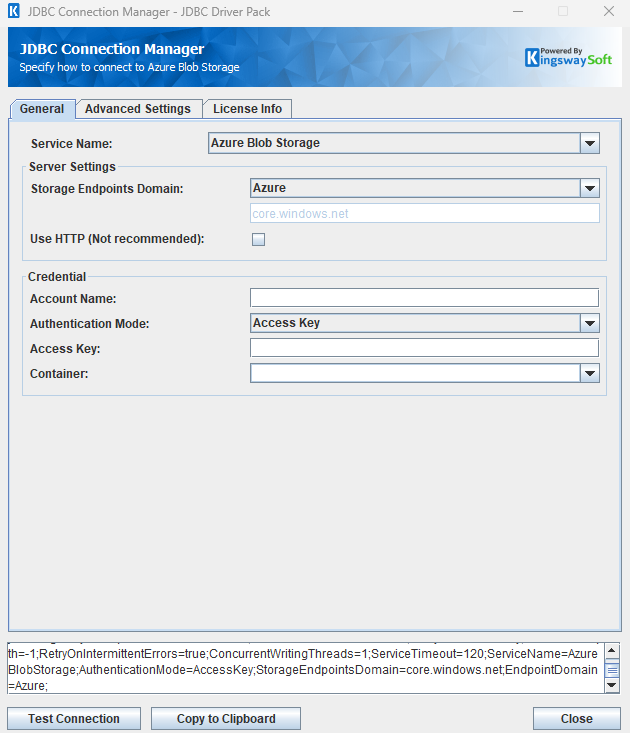
Server Settings
- Storage Endpoints Domain
-
The Storage Endpoints Domain option specifies the Azure cloud that hosts the storage account. Available options are:
- Azure (
core.windows.net) - Azure China (
core.chinacloudapi.cn) - Azure Germany (
core.cloudapi.de) - US Government (
core.usgovcloudapi.net) - Other (enter below)
- Azure (
- Use HTTP (Not recommended)
-
Select the Use HTTP option to force the use of HTTP when interacting with Azure Blob Storage. Azure Storage services support both HTTP and HTTPS; however, HTTPS is highly recommended.
Credential
- Account Name
-
The Account Name option allows you to specify the storage account you created in Azure Storage Services. You can find this in the Azure portal by navigating to All Services -> Storage accounts -> \{Your storage account name\} -> Access Keys.
- Authentication Mode
-
The Authentication Mode option selects how the driver authenticates to Azure Blob Storage. Available options are:
- Access Key
- SAS Token
- SAS URL
- OAuth Authorization Code
- OAuth Client Credentials (service to service authentication)
- Anonymous Read Access for Public Containers and Blobs
- Managed Identity
- Container
-
An optional container that scopes paths and folder discovery. When a container is selected, blob paths are relative to that container, and metadata discovery lists folders in that container only. Click the field to load containers from the account after the account credentials are filled in.
This field is hidden for SAS URL. A container embedded in the SAS URL is used instead. Anonymous authentication requires a container.
- Start Path
-
The virtual folder where metadata discovery begins. Azure Blob Storage has no directory resource, so this value is a blob-name prefix. Leave it blank to start at the container root, or at every container when Container is also blank.
When Container is set, Start Path is a prefix inside that container.
Container=documentsandStartPath=receiptsdiscovers folders underdocuments/receiptsonly. The start prefix itself is not exposed as a table. A path that already begins with the container name, such asdocuments/receipts, is accepted and the container segment is removed.When Container is blank, the first segment of Start Path is the container and the remainder is the prefix. A value with no slash, or a value equal to Container, starts at that container and registers its child folders. Files in that folder stay rows of
Files,Items, and the folder table. They are not separate tables.When Start Path is set, a
SELECTfromFiles,Folders, orItemscan omitpathand lists that folder. Apathin the query overrides it. When Start Path is blank,pathstays required on those tables.
Authentication Methods for Azure Blob Storage
Access Key
Authenticate with the storage account name and one of its access keys. This is the default authentication mode.
- Access Key
- The Access Key option allows you to specify the access key for your Azure storage account. Like the previous option, you can find this in the Azure portal by navigating to All Services -> Storage accounts -> \{Your storage account name\} -> Access Keys page.
SAS Token
Authenticate with a shared access signature token for the storage account.
- SAS Token
- A shared access signature (SAS) is a URI that grants restricted access rights to Azure Storage resources. This can be found within Azure Portal by navigating to All Services -> Storage accounts -> \{Your storage account name\} -> Shared Access Signature page.
SAS URL
Authenticate with a full shared access signature URL. The account name, and the container when the URL path includes one, are read from the URL.
- SAS Url
- The full SAS URL, for example
https://\{account\}.blob.core.windows.net/\{container\}?\{sas\}.
OAuth Authorization Code
Use a saved token file and its password to establish a connection. Click Generate Token File... to sign in and create a new token file.
- Path To Token File
- The path to the token file (
.tok) on the file system. A Shared Access Signature (SAS) URL for Azure Blob Storage or Azure Files is also accepted. - Token File Password
- The password used to read the token file.
- Generate Token File
-
Opens the sign-in dialog and completes the OAuth authorization code flow. The default scope is
https://storage.azure.com/.default offline_access.- Tenant ID: The Azure AD tenant in which the application is registered. Use
commonwhen a specific tenant is not required. - Client ID: The application (client) ID of the app registration.
- Client Secret: The client secret of the app registration.
- Redirect URL: The redirect URI registered on the app.
- Scope: The OAuth scopes requested when the token file is generated.
- Tenant ID: The Azure AD tenant in which the application is registered. Use
OAuth Client Credentials
Authenticate as an application with a tenant ID, client ID, and client secret. The token is requested for https://storage.azure.com/.default.
- Tenant Id
- The Azure AD tenant ID where the application is registered.
- Client Id
- The application (client) ID.
- Client Secret
- The client secret belonging to the application.
Anonymous Read Access for Public Containers and Blobs
Read containers and blobs that allow anonymous public access. No key or token is sent. Account Name and Container are required.
Managed Identity
Obtain an access token from the Azure instance metadata service or the App Service identity endpoint. This mode is available only when the driver runs on an Azure resource such as a virtual machine, App Service, or Azure-SSIS IR.
- Tenant Id
- Optional Azure AD tenant ID associated with the identity.
- Client Id
- Optional client ID of a user-assigned managed identity. Leave this blank to use the system-assigned managed identity.
After completing the configuration for all required connection and authentication settings in the JDBC Connection Manager, you can use the Test Connection button to validate your configuration and verify API requests will authenticate successfully.
Advanced Settings Page
The Advanced Settings page allows you to specify advanced settings for the connection.
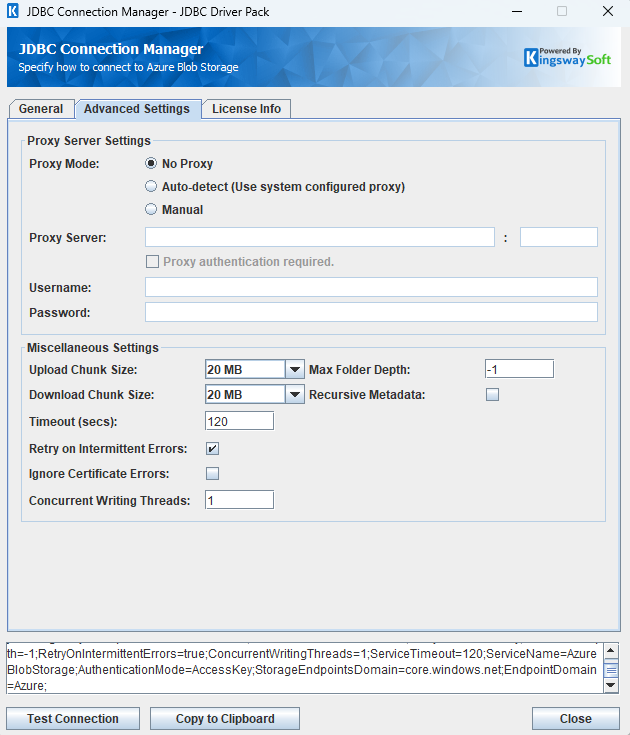
Proxy Server Settings
- Proxy Mode
-
The Proxy Mode option allows you to specify how you want to configure the proxy server setting. There are three options available.
- No Proxy
- Auto-detect (Use system configured proxy)
- Manual
- Proxy Server
-
Using the Proxy Server option allows you to specify the name of the proxy server for the connection.
- Port
-
The Port option allows you to specify the port number of the proxy server for the connection.
- Username (Proxy Server Authentication)
-
The Username option (under Proxy Server Authentication) allows you to specify the proxy user account.
- Password (Proxy Server Authentication)
-
The Password option (under Proxy Server Authentication) allows you to specify the proxy user's password.
Miscellaneous Settings
- Upload Chunk Size
-
The size of each block written when a block blob is uploaded in chunks. The default is
20 MB. Set this to0 MBto send the file in a single request. The value must be a whole number of megabytes from 0 through 4000. Suggested values are 0 MB, 2 MB, 5 MB, 10 MB, 20 MB, 40 MB, and 100 MB. A custom value such as64 MBis accepted. - Download Chunk Size
-
The size of each range read when file content is downloaded. The default is
20 MB. Set this to0 MBto download the blob in a single request. The value must be a whole number of megabytes from 0 through 2047. - Timeout (secs)
-
The Timeout (secs) option allows you to specify a timeout value in seconds for the connection. The default value is 120 seconds. Specify 0 for an infinite timeout.
- Retry on Intermittent Errors
-
The retry on intermittent errors determines if requests will be retried when there is an error. If this option is checked, requests will be retried up to 3 times.
- Ignore Certificate Errors
-
This option can be used to ignore those SSL certificate errors when connecting to the target server.
Warning: Enabling the "Ignore Certificate Errors" option is generally NOT recommended, particularly for production instances. Unless there is a strong reason to believe the connection is secure - such as the network communication is only happening in an internal infrastructure, this option should be unchecked for best security.
Note: When this option is enabled, it applies to all HTTP-based SSL connections in the same job process.
- Concurrent Writing Threads
-
This option can be used to set the number of threads to be used during write operations. This can improve performance during large-volume write operations.
- Max Folder Depth
-
The depth to scan when listing or discovering child folders. A value of -1 indicates unlimited depth. Lower values reduce the number of list requests. A recursive read uses this depth. A selected-level read lists only the immediate children.
- Recursive Metadata
-
When selected, folder discovery walks child folders and exposes each one as a
Folder.\{path\}table, limited by Max Folder Depth. When cleared, discovery registers the container roots (Folder.\{container\}) and loads a deeper folder table when that table is queried. When Start Path names a container, the first scan registers that container and its child folders. When it names a folder prefix, the prefix itself is not registered and the first scan registers its child folders.
Using the JDBC Driver
This section provides examples that use JDBC classes such as Connection, Statement, and ResultSet to manage interactions with Azure Blob Storage. It covers regular statements and prepared statements for complex or frequently executed queries.
Paths
Blob locations are written as container/blob-name. Backslashes are treated as slashes, and a leading slash is ignored.
When the connection Container property is empty, the first path segment is the container name and the remainder is the blob name. A path with no slash refers to the container itself.
When Container is set, paths are inside that container. If the path starts with the configured container name, that prefix is removed. Otherwise the whole path is the blob name.
When Start Path is also set, paths are relative to that prefix inside the container. A path that already begins with the prefix is left unchanged. A path that does not is placed under the prefix. A SELECT from Files, Folders, or Items can omit path and lists that prefix. A path in the query overrides it. When Start Path is blank, path stays required on those tables.
-- List items in the receipts folder of the documents containerSELECT * FROM Items WHERE path = 'documents/receipts'-- The same folder when the connection Container is documentsSELECT * FROM Items WHERE path = 'receipts'-- Read one file from a folder table. The path is relative to that folder.SELECTName, [Content-Length] FROM [Folder.documents/receipts] WHERE path = 'invoice.txt'
On a folder table such as Folder.documents or Folder.documents/receipts, a path that does not start with / is relative to that folder. A path that starts with / must be that folder or one of its descendants.
Tables and Functions
The driver exposes containers, blobs, and virtual folders as tables.
Containers
Use the Containers table to list, create, update, and delete containers. Create, update, and delete of containers is supported only on this table.
A container name is 3 to 63 characters, lowercase letters, numbers, and hyphens, and cannot start or end with a hyphen or contain two hyphens in a row.
PublicAccess accepts blob, container, or private. It can be set only on Containers.
Files
Use the Files table to read and write blobs. A SELECT requires path unless Start Path is set, in which case the query lists that folder. A path in the query overrides Start Path. Reads return files only.
FileContent is the blob bytes. Provide it as a Base64 string on write. A value that is not valid Base64 is stored as UTF-8 bytes. SELECT * does not return FileContent. Select that column explicitly when you need the bytes.
x-ms-blob-type accepts BlockBlob (the default), AppendBlob, and PageBlob. PageBlob is not supported on an account that has hierarchical namespace enabled. The blob type can be set on insert and cannot be changed later.
Updating FileContent replaces a block blob or page blob. Updating FileContent on an append blob appends the new bytes. Content-Type and Metadata can be set on insert and update. Metadata is a JSON object, for example {"env":"test"}.
Folders
Azure Blob Storage has no directory resource. A folder exists only as the prefix of a blob name, so an empty folder cannot be created. Upload a blob under that prefix instead. Use the Folders table to list those prefixes. A SELECT requires path unless Start Path is set, in which case the query lists that folder. A path in the query overrides Start Path. The query returns folders only. INSERT and UPSERT into Folders are rejected.
Folders cannot be updated. Use CALL Copy or CALL Move to relocate a folder that contains blobs. Deleting a folder deletes every blob under that prefix.
Items
Use the Items table to work with both files and folders. A SELECT requires path unless Start Path is set, in which case the query lists that folder. A path in the query overrides Start Path. Set _isFolder to true when deleting a folder. Inserting or upserting a folder is rejected, including a row with _isFolder set to true or a row that includes FileContent, Content-Type, Metadata, or x-ms-blob-type for a folder. Provide either path or Name as the location, not two different locations.
Folders as Tables
Each discovered container, and each child folder when recursive metadata is enabled, is also a table named Folder.{path}. For example, the container documents is Folder.documents, and a child folder is Folder.documents/receipts. When Start Path is receipts in container documents, discovery lists child folders such as Folder.documents/receipts/2024 and does not expose Folder.documents/receipts. Insert a file with Name and FileContent. Creating a folder on a Folder.* table is rejected.
Copy and Move
Copy and Move are functions, not tables. Query system.functions and system.functions.columns for their parameters. They copy or move a blob, or every blob under a folder prefix. A prefix with no blobs is rejected. Containers cannot be copied or moved, and the destination cannot be a container root.
Query Level Options
Append USING OPTIONS (option=value) to a statement. The clause is optional.
For SELECT, SelectionMode controls which items are returned. Valid values are Selected Item, Recursive, Selected Level, Recursive (Files Only), and Selected Level (Files Only). The default is Recursive. Files Only modes are not valid on the Folders table. Recursive reads honor Max Folder Depth.
List filters can be set in the WHERE clause: Include_Snapshots, Include_Copy, and Include_Uncommitted_Blobs.
For CALL Copy and CALL Move, OverwriteMode (also accepted as FileOverwriteMode) controls an existing destination. Valid values are Overwrite, SkipExisting, and RaiseError. The default is Overwrite. SkipExisting leaves the destination in place and does not count the row. OverwriteMode is rejected on INSERT, UPDATE, DELETE, and UPSERT.
Write batching is not supported. BatchSizeForWriting must remain 1.
Executing Statements
After you have connected from your code, you can execute SQL statements using the Statement class. For connection details, see Connecting with DriverManager or Connecting with DataSource. For parameterized statements, see Executing Prepared Statements.
SELECT
Use the Statement class's generic execute method or the executeQuery method to execute SQL statements that return data. To retrieve the results of a query, call the getResultSet method of the Statement.
String sql = "SELECT Name, path, [Content-Length], [x-ms-blob-type] FROM Files "
        + "WHERE path = 'documents/receipts' USING OPTIONS (SelectionMode='Selected Level')";
try {
    ResultSet resultSet = statement.executeQuery(sql);
    LOGGER.info(resultSet.toString());
} catch (SQLException e) {
    LOGGER.severe(e.toString());
}
String sql = "SELECT path, FileContent FROM Files WHERE path = 'documents/receipts/invoice.txt' "
        + "USING OPTIONS (SelectionMode='Selected Item')";
try {
    ResultSet resultSet = statement.executeQuery(sql);
    LOGGER.info(resultSet.toString());
} catch (SQLException e) {
    LOGGER.severe(e.toString());
}
INSERT
Use either the generic execute method or the executeUpdate method of the Statement class to execute an INSERT operation.
The results of SQL queries are saved in a ResultSet. You can retrieve the ResultSet after execution to view the affected path, exceptions raised during execution, and details of the affected data.
An insert fails when the blob or container already exists. Use UPSERT to create or replace it.
String sql = "INSERT INTO Files (path, FileContent, [Content-Type], Metadata) "
        + "VALUES ('documents/notes.txt', 'aGVsbG8=', 'text/plain', '{\"env\":\"test\"}')";
try {
    statement.executeUpdate(sql);
    LOGGER.info(statement.getResultSet().toString());
} catch (SQLException e) {
    LOGGER.severe(e.toString());
}
id,errorcode,errormessage,processdata,haserrors
documents/notes.txt,null,null,null,false
String fileSql = "INSERT INTO Files (path, FileContent) VALUES ('documents/receipts/invoice.txt', 'aGVsbG8=')";
String containerSql = "INSERT INTO Containers (Name, PublicAccess) VALUES ('documents', 'private')";
UPDATE
Use either the generic execute method or the executeUpdate method of the Statement class to execute an UPDATE operation.
path and Name identify the row and cannot be changed. A container cannot be renamed. x-ms-blob-type cannot be changed. The Folders table does not support update.
Updating a container sets PublicAccess. Updating a file can set FileContent, Content-Type, and Metadata.
String sql = "UPDATE Files SET FileContent = 'dXBkYXRlZA==', [Content-Type] = 'text/plain' "
        + "WHERE path = 'documents/notes.txt'";
try {
    statement.executeUpdate(sql);
    LOGGER.info(statement.getResultSet().toString());
} catch (SQLException e) {
    LOGGER.severe(e.toString());
}
id,errorcode,errormessage,processdata,haserrors
documents/notes.txt,null,null,null,false
CALL
Use either the generic execute method or the executeUpdate method of the Statement class to execute a CALL operation.
Provide from_path and either to_path, or PathToParent together with an optional name. to_path cannot be combined with PathToParent or name. When name is omitted, the source name is kept. The source and destination must be different, and a folder cannot be moved into itself.
String sql = "CALL Copy (from_path, to_path) VALUES ('documents/notes.txt', 'documents/archive/notes.txt') "
        + "USING OPTIONS (OverwriteMode='RaiseError')";
try {
    statement.executeUpdate(sql);
    LOGGER.info(statement.getResultSet().toString());
} catch (SQLException e) {
    LOGGER.severe(e.toString());
}
id,errorcode,errormessage,processdata,haserrors
documents/archive/notes.txt,null,null,null,false
String sql = "CALL Move (from_path, PathToParent, name) "
        + "VALUES ('documents/receipts', 'documents/archive', 'receipts')";
try {
    statement.executeUpdate(sql);
    LOGGER.info(statement.getResultSet().toString());
} catch (SQLException e) {
    LOGGER.severe(e.toString());
}
DELETE
Use either the generic execute method or the executeUpdate method of the Statement class to execute a DELETE operation.
Deleting a folder removes the blobs stored under that prefix. Deleting a container removes the container. Identify a container by Name or path.
String sql = "DELETE FROM Files WHERE path = 'documents/notes.txt'";
try {
    statement.executeUpdate(sql);
    LOGGER.info(statement.getResultSet().toString());
} catch (SQLException e) {
    LOGGER.severe(e.toString());
}
id,errorcode,errormessage,processdata,haserrors
documents/notes.txt,null,null,null,false
UPSERT
Using the UPSERT operation, you can either insert or update an existing record in one call. Containers, Files, Items, and Folder.* tables support upsert of containers and blobs. Upserting a folder is rejected.
Upserting an existing append blob keeps the append blob type and appends FileContent. Upserting an existing block blob replaces it.
The results of SQL queries are saved in a ResultSet. You can retrieve the ResultSet after execution to view the affected path, exceptions raised during execution, and the data affected by the upsert.
String sql = "UPSERT INTO Files (path, FileContent) VALUES ('documents/notes.txt', 'dXBzZXJ0')";
try {
    statement.executeUpdate(sql);
    LOGGER.info(statement.getResultSet().toString());
} catch (SQLException e) {
    LOGGER.severe(e.toString());
}
id,errorcode,errormessage,processdata,haserrors,isnew
documents/notes.txt,null,null,null,false,false
UPSERT results include an isnew column. The driver does not set it from the Azure response, so do not use it to tell a create apart from a replace.
Executing Prepared Statements
Using a PreparedStatement can improve performance when you need to execute a SQL statement multiple times with different parameters. Unlike a Statement object, a PreparedStatement object is provided with a SQL statement when it is created, which can then be executed with different values each time. This special type of statement is derived from the more general Statement class.
Below are the steps outlining how to execute a prepared statement:
Creating and Executing a Prepared Statement
- Create a PreparedStatement
-
Use the
prepareStatementmethod of theConnectionclass to instantiate aPreparedStatement.For connection details, see Connecting with DriverManager or Connecting with DataSource.
- Set Parameters
- Declare parameters by calling the corresponding setter method of the
PreparedStatement. - NOTE: The parameter indices start at 1.
- Execute the PreparedStatement
- Use the generic
executeorexecuteUpdatemethod of thePreparedStatement. - Retrieve Results
- Call the
getResultSetmethod of thePreparedStatementto obtain the query results, which are returned as aResultSet. - Iterate Over the Result Set
- Use the
nextmethod of theResultSetto iterate through the results. To obtain column information, use theResultSetMetaDataclass. Instantiate aResultSetMetaDataobject by calling thegetMetaDatamethod of theResultSet.
SELECT
Use the PreparedStatement class's generic execute method or the executeQuery method to execute SQL statements that return data.
String sql = "SELECT * FROM Containers WHERE Name = ?";
try {
    PreparedStatement ps = connection.prepareStatement(sql);
    ps.setString(1, "documents");
    boolean ret = ps.execute();
    if (ret) {
        ResultSet rs = ps.getResultSet();
        LOGGER.info(rs.toString());
    }
} catch (SQLException e) {
    LOGGER.severe(e.toString());
}
INSERT
String sql = "INSERT INTO Files (path, FileContent) VALUES (?, ?)";
try {
    PreparedStatement ps = connection.prepareStatement(sql);
    ps.setString(1, "documents/notes.txt");
    ps.setString(2, "aGVsbG8=");
    ps.executeUpdate();
    LOGGER.info(ps.getResultSet().toString());
} catch (SQLException e) {
    LOGGER.severe(e.toString());
}
id,errorcode,errormessage,processdata,haserrors
jdbcc24148a7/documents/notes.txt,null,null,null,false
UPDATE
String sql = "UPDATE Containers SET PublicAccess = ? WHERE Name = ?";
try {
    PreparedStatement ps = connection.prepareStatement(sql);
    ps.setString(1, "blob");
    ps.setString(2, "documents");
    ps.executeUpdate();
    LOGGER.info(ps.getResultSet().toString());
} catch (SQLException e) {
    LOGGER.severe(e.toString());
}
id,errorcode,errormessage,processdata,haserrors
documents,null,null,null,false
CALL
String sql = "CALL Copy (from_path, to_path) VALUES (?, ?)";
try {
    PreparedStatement ps = connection.prepareStatement(sql);
    ps.setString(1, "jdbc-append-695ea595.txt");
    ps.setString(2, "jdbc-folder-520bc1bd/notes.txt");
    ps.executeUpdate();
    LOGGER.info(ps.getResultSet().toString());
} catch (SQLException e) {
    LOGGER.severe(e.toString());
}
id,errorcode,errormessage,processdata,haserrors
jdbcc24148a7/jdbc-folder-520bc1bd/notes.txt,null,null,null,false
DELETE
String sql = "DELETE FROM Folders WHERE path = ?";
try {
    PreparedStatement ps = connection.prepareStatement(sql);
    ps.setString(1, "documents/receipts");
    ps.executeUpdate();
    LOGGER.info(ps.getResultSet().toString());
} catch (SQLException e) {
    LOGGER.severe(e.toString());
}
id,errorcode,errormessage,processdata,haserrors
documents/receipts,null,null,null,false
UPSERT
String sql = "UPSERT INTO Files (path, FileContent, [x-ms-blob-type]) VALUES (?, ?, ?)";
try {
    PreparedStatement ps = connection.prepareStatement(sql);
    ps.setString(1, "documents/log.txt");
    ps.setString(2, "b25l");
    ps.setString(3, "AppendBlob");
    ps.executeUpdate();
    LOGGER.info(ps.getResultSet().toString());
} catch (SQLException e) {
    LOGGER.severe(e.toString());
}
id,errorcode,errormessage,processdata,haserrors,isnew
jdbcc24148a7/documents/log.txt,null,null,null,false,false
Metadata Discovery
This section provides examples on how to retrieve table and column metadata using the getTables, getColumns, and getPrimaryKeys methods from the DatabaseMetaData interface. These are essential for discovering database structures.
Tables
The getTables method from the DatabaseMetaData interface can be used to retrieve a list of tables.
Containers, Files, Folders, and Items are always available, together with the system tables. Folder.{container} tables are added for each container the credentials can list. Child folder tables are added when Recursive Metadata is enabled, or when that folder table is queried. When Start Path names a container, Folder.{container} and its child folders are added. When it names a folder prefix, folder tables are added only under that prefix, and the start prefix itself is not a table. Copy and Move are functions and are listed by system.functions.
try {
    ResultSet rs = connection.getMetaData().getTables(null, null, null, null);
    LOGGER.info("\r\n" + rs.toString());
} catch (SQLException e) {
    LOGGER.severe(e.getMessage());
}
TABLE_CAT,TABLE_SCHEM,TABLE_NAME,TABLE_TYPE,REMARKS
AzureBlobStorage,AzureBlobStorage,Containers,TABLE,null,null,null,null,null,null
AzureBlobStorage,AzureBlobStorage,Files,TABLE,null,null,null,null,null,null
AzureBlobStorage,AzureBlobStorage,Folder.jdbcc24148a7,TABLE,null,null,null,null,null,null
AzureBlobStorage,AzureBlobStorage,Folders,TABLE,null,null,null,null,null,null
The getTables method returns the following metadata columns:
| Column Name | Data Type | Description |
|---|---|---|
| TABLE_CAT | String | The catalog that contains the table. |
| TABLE_SCHEM | String | The schema of the table. |
| TABLE_NAME | String | The name of the table. |
| TABLE_TYPE | String | The type of the table (e.g., TABLE or VIEW). |
| REMARKS | String | An optional description of the table. |
Columns
Use the getColumns method of the DatabaseMetaData interface to retrieve detailed information about columns. Containers columns include Name, path, PublicAccess, LastModified, ETag, LeaseStatus, LeaseState, LeaseDuration, HasImmutabilityPolicy, HasLegalHold, DefaultEncryptionScope, DenyEncryptionScopeOverride, ImmutableStorageWithVersioningEnabled, and Metadata. File, folder, item, and Folder.* tables share the current Blob property columns, including path, Name, FileContent, Content-Type, Content-Language, Content-Length, Metadata, x-ms-blob-type, x-ms-access-tier, x-ms-smart-access-tier, x-ms-encryption-scope, and _isFolder. The Folders table does not include FileContent.
try {
    ResultSet rs = connection.getMetaData().getColumns(null, null, "Containers", null);
    LOGGER.info(rs.toString());
} catch (SQLException e) {
    e.printStackTrace();
}
TABLE_CAT,TABLE_SCHEM,TABLE_NAME,COLUMN_NAME,DATA_TYPE,TYPE_NAME,COLUMN_SIZE,BUFFER_LENGTH,DECIMAL_DIGITS,NUM_PREC_RADIX,NULLABLE,REMARKS,COLUMN_DEF,SQL_DATA_TYPE,SQL_DATETIME_SUB,CHAR_OCTET_LENGTH,ORDINAL_POSITION,IS_NULLABLE,SCOPE_CATALOG,SCOPE_SCHEMA,SCOPE_TABLE,SOURCE_DATA_TYPE,IS_AUTOINCREMENT,IS_GENERATEDCOLUMN,DTS_TYPE
AzureBlobStorage,AzureBlobStorage,Containers,ETag,12,VARCHAR,255,null,0,0,null,null,null,12,null,null,null,null,null,null,null,null,null,null,DT_WSTR
AzureBlobStorage,AzureBlobStorage,Containers,LastModified,93,TIMESTAMP,29,null,0,0,null,null,null,93,null,null,null,null,null,null,null,null,null,null,DT_DBTIMESTAMP
AzureBlobStorage,AzureBlobStorage,Containers,Name,12,VARCHAR,255,null,0,0,null,null,null,12,null,null,null,null,null,null,null,null,null,null,DT_WSTR
AzureBlobStorage,AzureBlobStorage,Containers,path,12,VARCHAR,255,null,0,0,null,null,null,12,null,null,null,null,null,null,null,null,null,null,DT_WSTR
The getColumns method returns the following columns:
| Column Name | Data Type | Description |
|---|---|---|
| TABLE_CAT | String | The database name. |
| TABLE_SCHEM | String | The table schema. |
| TABLE_NAME | String | The table name. |
| COLUMN_NAME | String | The column name. |
| DATA_TYPE | Integer | The data type represented by a constant value from java.sql.Types. |
| TYPE_NAME | String | The data type name used by the driver. |
| COLUMN_SIZE | Integer | The length in characters of the column or the numeric precision. |
| BUFFER_LENGTH | Integer | The buffer length. |
| DECIMAL_DIGITS | Integer | The column scale or number of digits to the right of the decimal point. |
| NUM_PREC_RADIX | Integer | The radix, or base. |
| NULLABLE | Integer | Whether the column can contain null as defined by the following JDBC DatabaseMetaData constants: columnNoNulls (0) or columnNullable (1). |
| REMARKS | String | The comment or note associated with the object. |
| COLUMN_DEF | String | The default value for the column. |
| SQL_DATA_TYPE | Integer | Reserved by the specification. |
| SQL_DATETIME_SUB | Integer | Reserved by the specification. |
| CHAR_OCTET_LENGTH | Integer | The maximum length of binary and character-based columns. |
| ORDINAL_POSITION | Integer | The position of the column in the table, starting at 1. |
| IS_NULLABLE | String | Whether a null value is allowed: YES or NO. |
| SCOPE_CATALOG | String | The catalog of the table referenced by a reference attribute (null if DATA_TYPE is not REF). |
| SCOPE_SCHEMA | String | The schema of the table referenced by a reference attribute (null if DATA_TYPE is not REF). |
| SCOPE_TABLE | String | The name of the table referenced by a reference attribute (null if DATA_TYPE is not REF). |
| SOURCE_DATA_TYPE | Short | The source type of a distinct type or user-defined REF type (null if DATA_TYPE is neither DISTINCT nor a user-defined REF). |
| IS_AUTOINCREMENT | String | Whether the column value is assigned by Azure Blob Storage in fixed increments. |
| IS_GENERATEDCOLUMN | String | Whether the column is generated: YES or NO. |
| DTS_TYPE | String | Object DTS attribute type. |
Primary Keys
The getPrimaryKeys method in the DatabaseMetaData interface is used to retrieve metadata about primary keys for a given table in Azure Blob Storage.
Containers uses Name. Files, Folders, Items, and Folder.* tables use path.
try {
    ResultSet resultSet = connection.getMetaData().getPrimaryKeys(null, null, "Files");
    LOGGER.info("\r\n" + resultSet.toString());
} catch (SQLException e) {
    LOGGER.severe(e.getMessage());
}
TABLE_CAT,TABLE_SCHEM,TABLE_NAME,COLUMN_NAME,KEY_SEQ,PK_NAME
null,null,Files,path,1,null
The getPrimaryKeys method returns the following columns:
| Column Name | Data Type | Description |
|---|---|---|
| TABLE_CAT | String | The catalog name. |
| TABLE_SCHEM | String | The schema name. |
| TABLE_NAME | String | The name of the table that contains the primary key. |
| COLUMN_NAME | String | The name of the column that serves as the primary key for the table. |
| KEY_SEQ | Short | The sequence number within the primary key. |
| PK_NAME | String | The primary key name. |
Connection Settings
| Connection Setting | Type | Default Value | Description |
|---|---|---|---|
| AccessKey | String | "" | The storage account access key used when AuthenticationMode is AccessKey. |
| AuthenticationMode | String | "AccessKey" | The method used to authenticate to Azure Blob Storage. Allowed values are "AccessKey", "SASToken", "SASUrl", "AuthorizationCode", "ClientCredentials", "Anonymous", and "ManagedIdentity". |
| BatchSizeForReading | Integer | 100 | How many blobs can be returned in one list request. The service maximum is 5000. |
| BatchSizeForWriting | Integer | 1 | How many records can be written in a single call. Azure Blob Storage does not support write batching, so this value must be 1. |
| CacheExpirationTime | Integer | 30 | Defines the expiration time for cache. A value of 0 disables caching. |
| ClientId | String | "" | The application ID used by OAuth client credentials, or the client ID of a user-assigned managed identity. |
| ClientSecret | String | "" | The client secret used by OAuth client credentials. |
| ConcurrentWritingThreads | Integer | 1 | The number of threads for executing operations in parallel. A value of 0 will disable multi threading. |
| ConnectionTimeout | Integer | 30 | The maximum amount of time the program will wait to set up a connection to Azure Blob Storage. |
| Container | String | "" | Optional container that scopes paths and folder discovery. Required when AuthenticationMode is Anonymous. |
| ContinueOnErrors | Boolean | false | Determines if the program continues executing SQL statements after encountering an error. |
| DownloadChunkSize | String | "20 MB" | The size of each range read when downloading file content. Use 0 MB to download in a single request. The maximum is 2047 MB. |
| EndpointDomain | String | "Azure" | The storage cloud selected in the connection manager. Allowed values are "Azure", "Azure China", "Azure Germany", "US Government", and "Other (enter below)". |
| IgnoreCertificateErrors | Boolean | false | Specifies whether to verify the certificate when connecting to Azure Blob Storage. If certificate verification is not required, you can set this value to 'true'. |
| LogFileSize | String | "10485760" | A string specifying the maximum size in bytes for a log file. |
| LogLevel | String | "INFO" | The logging level for the JDBC driver. |
| LogPath | String | "./jdbcLogs" | The directory where log files are stored. |
| MaxFolderDepth | Integer | -1 | The depth to scan folders for child folders. A value of -1 indicates unlimited depth. |
| OemKey | String | "" | The OEM license key. |
| PathToTokenFile | String | "" | The path to the OAuth token file. A SAS URL for Azure Blob Storage or Azure Files is also accepted. |
| ProxyMode | String | "NoProxy" | This setting configures the proxy. Allowed values are "NoProxy", "AutoDetect" and "Manual". |
| ProxyPassword | String | "" | The password to be used to authenticate to the proxy. |
| ProxyServer | String | "" | The host of the proxy server. |
| ProxyServerPort | Integer | 0 | The port of the proxy server. |
| ProxyUsername | String | "" | The username to be used to authenticate to the proxy. |
| RecursiveMetadata | Boolean | false | When true, folder discovery walks child folders and registers each as a Folder.{path} table. |
| ResultPath | String | "" | The path where the execution result files are saved. |
| RetryOnIntermittentErrors | Boolean | true | Indicates whether to retry the connection when it might occasionally fail due to temporary issues. |
| SASToken | String | "" | The shared access signature token used when AuthenticationMode is SASToken. |
| SASUrl | String | "" | The full shared access signature URL used when AuthenticationMode is SASUrl. |
| SaveResult | Boolean | false | Indicates whether to save the execution results to a file. |
| ServiceName | String | "" | The name of the service API selected by the user. Set this to AzureBlobStorage. |
| ServiceTimeout | Integer | 120 | The timeout to receive the full response from Azure Blob Storage. |
| StartPath | String | "" | Virtual folder where metadata discovery begins. When it names a container, or equals Container, child folders of that container are registered. A deeper prefix is not itself a folder table. When set, a SELECT from Files, Folders, or Items can omit path and lists this folder. A path in the query overrides it. When blank, path stays required on those tables. |
| StorageAccount | String | "" | The storage account name. Required for every authentication mode except SASUrl. |
| StorageEndpointsDomain | String | "core.windows.net" | The endpoint suffix. Azure uses core.windows.net, Azure China uses core.chinacloudapi.cn, Azure Germany uses core.cloudapi.de, and US Government uses core.usgovcloudapi.net. |
| Suppress404NotFoundError | Boolean | true | When set to true, if a query results in an HTTP 404 error, a result set will still be created. When set to false, an error is logged instead and no result set is created. |
| TenantId | String | "" | The Azure AD tenant ID used by OAuth authorization code, client credentials, or managed identity. |
| TokenPassword | String | "" | The password used to read the token file. |
| UploadChunkSize | String | "20 MB" | The size of each block written during a chunked block blob upload. Use 0 MB to upload in a single request. The maximum is 4000 MB. |
| UseHttp | Boolean | false | When true, the driver uses HTTP. Leave this false to use HTTPS. |