

Customer information often passes through multiple systems before it reaches Dataverse. Along the way, seemingly minor inconsistencies such as extra spaces, inconsistent capitalization, missing required values, or improperly formatted email addresses can affect the quality and reliability of the data. For Customer Engagement users, who depend on accurate customer information for communications, relationship management, and day-to-day activities, ensuring data quality before it is ingested into Dataverse is an important part of the integration process.
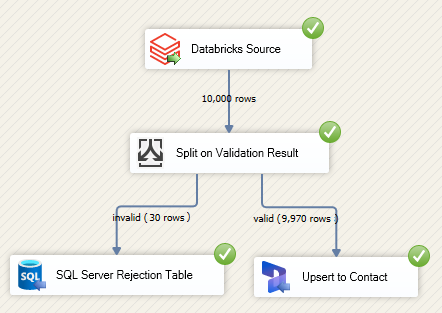
In this example, customer data is staged in a Databricks Lakehouse and prepared using a Databricks SQL View. The view applies reusable cleansing and validation rules and adds a ValidationResult value to each record. KingswaySoft's Databricks Source then retrieves the prepared records into SSIS, where valid customers are ingested into Dataverse and invalid customers are routed to a persistent SQL Server error table for further review.
This approach provides a useful separation of responsibilities. Databricks handles the data preparation and quality rules close to the source data, while SSIS coordinates the downstream ingestion process. This means that the cleansing and validation logic can be maintained independently from the integration package, while the SSIS dataflow remains focused on moving the resulting data to the appropriate destinations.
The overall process can be summarized as follows:
- Stage: Customer records are ingested into a Databricks-managed Delta table.
- Prepare: A Databricks SQL View standardizes selected fields and evaluates data-quality rules.
- Extract: The KingswaySoft Databricks Source retrieves the prepared records into SSIS.
- Route: A Conditional Split separates valid and invalid records.
- Ingest: Valid customer records are written to Dataverse.
- Preserve: Invalid records are written to SQL Server for investigation and potential remediation.
Preparing Customer Data in Databricks
The source data for this example is stored in a managed Delta table within our Databricks catalog.
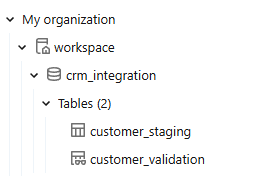
The customer_staging table represents the raw or staged customer data that has been prepared for downstream ingestion. In a real-world integration, this staging layer may be populated by an upstream application, database, file-based process, API, or another ingestion pipeline.
For this example, the staged data has deliberately been populated with several common data-quality issues, including unintended spaces, inconsistent capitalization, missing required values, and incorrectly formatted email addresses. These issues provide a useful illustration of how business-specific cleansing and validation rules can be centralized in Databricks before the records are passed to downstream systems.
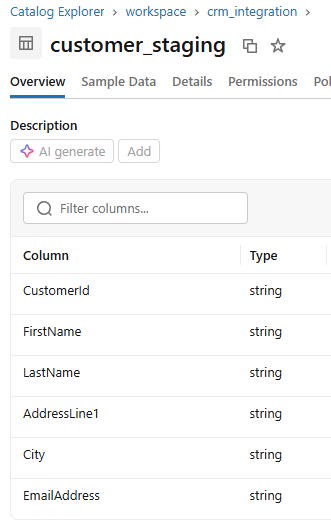
There is an important distinction between ingesting data into a staging layer and loading it into a business application. The staging process is primarily concerned with bringing the source data into the Lakehouse reliably. The subsequent preparation step can then standardize and validate that data before it is consumed by downstream applications such as Dataverse.
This separation can be particularly useful when the same prepared customer dataset needs to be consumed by more than one downstream process. Instead of embedding the same cleansing rules into multiple SSIS packages or other integration processes, the rules can be maintained centrally in Databricks.
Creating the Customer Validation View
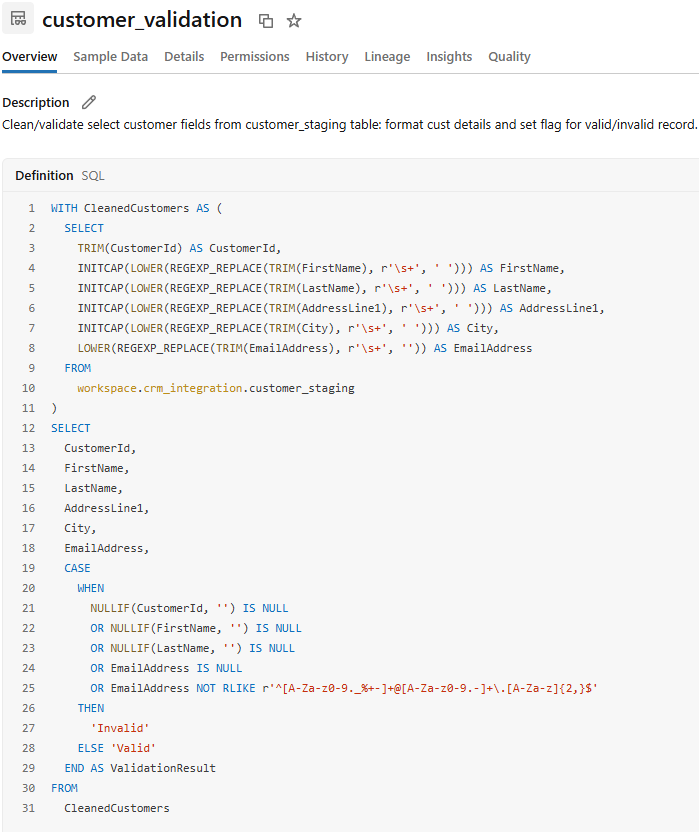
The cleaning and validation logic in this example is contained in a Databricks SQL View. The view reads the customer_staging table, standardizes selected values, and evaluates each record against the integration requirements. Each record is then assigned a ValidationResult value of either Valid or Invalid.
Because a standard Databricks view stores the SQL definition rather than a separate copy of the query results, the preparation logic remains reusable without creating another physical copy of the customer dataset. When the view is queried by the downstream integration, Databricks evaluates the underlying query and returns the prepared result set.
For this scenario, the view performs two related tasks. First, it standardizes the data so that downstream systems receive a more consistent representation of the customer. Second, it evaluates the resulting values against a set of validation rules and exposes the outcome through the ValidationResult column.
The SQL used for this example is shown below:
WITH CleanedCustomers AS (
    SELECT
        TRIM(CustomerId) AS CustomerId,
        INITCAP(LOWER(REGEXP_REPLACE(TRIM(FirstName), r'\s+', ' '))) AS FirstName,
        INITCAP(LOWER(REGEXP_REPLACE(TRIM(LastName), r'\s+', ' '))) AS LastName,
        INITCAP(LOWER(REGEXP_REPLACE(TRIM(AddressLine1), r'\s+', ' '))) AS AddressLine1,
        INITCAP(LOWER(REGEXP_REPLACE(TRIM(City), r'\s+', ' '))) AS City,
        LOWER(REGEXP_REPLACE(TRIM(EmailAddress), r'\s+', '')) AS EmailAddress
    FROM workspace.crm_integration.customer_staging
)
SELECT
    CustomerId,
    FirstName,
    LastName,
    AddressLine1,
    City,
    EmailAddress,
    CASE
        WHEN NULLIF(CustomerId, '') IS NULL
          OR NULLIF(FirstName, '') IS NULL
          OR NULLIF(LastName, '') IS NULL
          OR NULLIF(EmailAddress, '') IS NULL
          OR EmailAddress NOT RLIKE r'^[A-Za-z0-9._%+-]+@[A-Za-z0-9.-]+\.[A-Za-z]{2,}$'
        THEN 'Invalid'
        ELSE 'Valid'
    END AS ValidationResult
FROM CleanedCustomers;
Although the example contains only a handful of rules, the same pattern can be extended to accommodate more sophisticated business requirements. For example, additional rules could validate phone numbers, postal codes, country-specific address requirements, customer identifiers, field lengths, reference data, or other application-specific constraints.
It is also possible to make the validation output more descriptive. Instead of returning only Valid or Invalid, a production implementation could expose one or more additional columns such as ValidationReason, allowing downstream processes or support users to understand why a particular record was rejected. This can be especially helpful when invalid records are retained for remediation.
For example, a validation layer could identify whether a record failed because the customer ID was missing, a required name was not supplied, or the email address did not satisfy the expected format. The exact rules should ultimately reflect the requirements of the target Dataverse environment and the business process.
The image below provides an example of how the cleaning and validation rules are actually defined within the Databricks view.
Ingesting the Prepared Data with the Databricks Source
Once the validation view is available, we can move on to the downstream ingestion process. The KingswaySoft Databricks Source component can be added to the SSIS dataflow and connected to the required Databricks SQL warehouse to facilitate the data extraction.
Because the preparation logic already resides in Databricks, there is no need to reproduce the cleansing and validation SQL inside the SSIS package. Instead, the source component can consume the view directly. The Source Object Type is set to Table, after which we can drill down and select the customer_validation view.
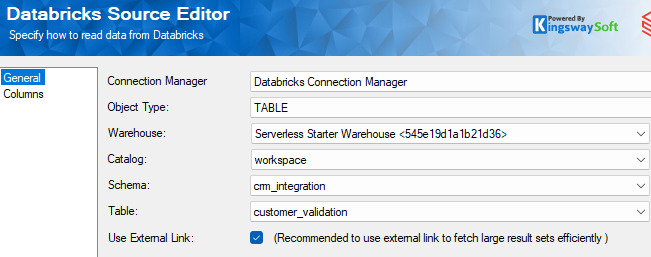
This is one of the key benefits of putting the preparation logic into a reusable Databricks view. From the SSIS package's perspective, the view behaves as the prepared source dataset. If the business rules change, the Databricks view can be updated without necessarily changing the source configuration or downstream routing logic in the SSIS package.
For larger ingestion workloads, the same architecture can also be extended with incremental processing. For example, the staging and preparation layers could incorporate a source-system timestamp, watermark, or other change indicator so that the downstream integration only consumes records that are new or have changed since the previous run. This can help reduce the volume of data that needs to be queried and subsequently written to Dataverse.
Separating Valid and Invalid Customers
At this point, the source dataflow contains both valid and invalid customer records. Rather than allowing the target system to determine whether a record is acceptable, we can use the ValidationResult column generated by Databricks to make the routing decision explicitly within the SSIS dataflow.
A Conditional Split component can separate the records into two paths:
- Valid: Records where ValidationResult equals Valid continue to the Dataverse destination.
- Invalid: Records where ValidationResult equals Invalid are redirected to a SQL Server table for review.
This pattern keeps data-quality failures from unnecessarily reaching the target application. Instead, invalid records become an explicit part of the integration workflow and can be retained for investigation, correction, and subsequent reprocessing.
Loading Valid Customers into Dataverse
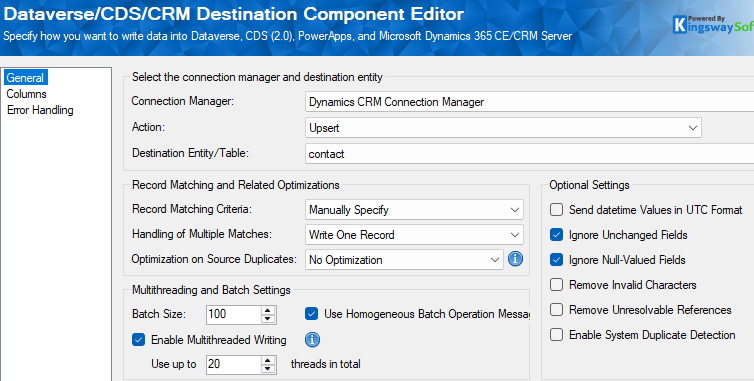
The valid records can be connected to the Dataverse/Dynamics CRM Destination component and written to the appropriate Dataverse table, such as the Contact table used in this example.
There are several destination settings that can be considered when optimizing the ingestion process. For this scenario, we can select the Upsert action so that both new records and updates to existing records can be processed through the same destination. This avoids having to maintain separate destinations for inserts and updates.
We can also consider enabling the Use Homogeneous Batch Operation Messages feature when the target entity and integration requirements support it. This option can improve Dataverse write throughput by using homogeneous batch operations. However, because the batch operation has different error-handling behavior, it is particularly important that the upstream validation process is thorough. If a record within a batch fails, the batch can be affected as a whole rather than allowing individual records to be processed independently.
Since the records in this example have already passed through the validation layer, this approach can be a good fit when the integration has sufficient confidence in the quality of the records being submitted to Dataverse. The appropriate batch size and other performance settings should still be determined based on the target table, workload, environment, and overall integration behavior.
Lastly, to reduce unnecessary payload and processing, we can enable Ignore Unchanged Fields. This allows the destination to avoid submitting fields where the incoming value has not actually changed, which can be beneficial when processing existing customer records through an Upsert operation.
For more information about optimizing Dataverse write performance with homogeneous batch operation messages, see our dedicated article: Use Homogeneous Batch Operation Messages for Greater Dataverse/CRM Writing Performance.
Preserving Invalid Records for Review
Not every record should necessarily be discarded simply because it fails validation. In many integration scenarios, an invalid record is valuable because it identifies a problem that needs to be investigated and corrected at the source or within the data preparation process.
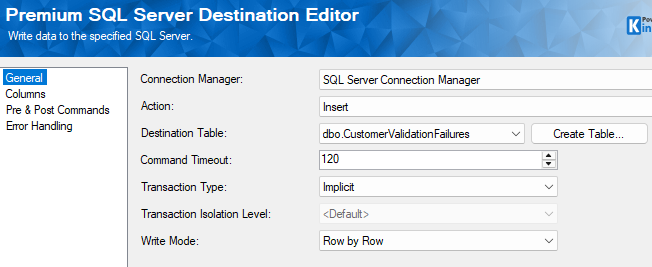
For that reason, the invalid branch of our dataflow is directed to a persistent SQL Server error table. The table can preserve the rejected customer data and provide an operational record of the validation failures.
From the view, we can see a subset of the fields that have been identified as invalid:

The Premium SQL Server components are part of our SSIS Integration Toolkit and can connect to the SQL Server instance. An existing table can be selected, or a new table can be created using the Create Table option, which can prepopulate the table schema based on the columns coming from the upstream dataflow.
Keeping rejected records in a persistent table provides several benefits. Support or data-management users can investigate the records after the integration completes, identify recurring data-quality problems, and potentially correct the records before they are processed again. In a more advanced implementation, the error table could also include additional operational information such as the integration run identifier, validation reason, processing timestamp, or source-system identifier.
Building a More Reliable Data Ingestion Process
The pattern demonstrated here is more than simply moving records from Databricks to Dataverse. It establishes a clear boundary between data preparation, data-quality validation, and data ingestion.
Databricks provides the Lakehouse environment where the customer data can be staged and prepared. The SQL view provides a reusable layer for standardizing values and applying business rules. KingswaySoft's Databricks Source then consumes that prepared dataset through SSIS, while the SSIS dataflow determines how each record should proceed.
This architecture also provides a useful foundation for operational improvements as the integration grows. For example, a production implementation could introduce incremental ingestion, additional validation rules, validation reason codes, data-quality metrics, retry handling, and reconciliation reporting. These capabilities can be added without fundamentally changing the basic pattern of staging, preparing, validating, and ingesting the data.
Tying It All Together
The completed process divides responsibility between Databricks and SSIS according to their respective strengths. Databricks stores the reusable data preparation and validation logic and evaluates that logic when the view is queried. SSIS retrieves the prepared records through the Databricks Source, separates valid and invalid customers, and coordinates the downstream ingestion process.
Valid records are loaded into Dataverse using the Dataverse/Dynamics CRM Destination, while invalid records are preserved in a SQL Server error table for investigation and potential remediation. This provides a controlled path for both successful and unsuccessful records rather than relying on the target application to reject problematic data after it has already reached the final stage of the integration.
For organizations that already have customer data in a Databricks Lakehouse, this approach provides a practical way to incorporate data quality into the ingestion pipeline before the data reaches Dataverse. It also allows the same prepared dataset to serve other downstream processes, helping organizations centralize data-quality rules instead of duplicating them across individual integration packages.
By combining Databricks for scalable data preparation with KingswaySoft for SSIS-based integration and Dataverse ingestion, organizations can build a flexible pipeline that is easier to maintain, monitor, and extend as their data-quality and integration requirements evolve.
We hope this example has helped illustrate how Databricks and KingswaySoft can work together to prepare, validate, and ingest customer data into Dataverse while maintaining a clear path for handling records that do not meet the required quality standards.