

When integrating MongoDB with other applications, data warehouses, or reporting platforms, retrieving an entire collection during every execution may be unnecessary and inefficient. In many integration scenarios, only the changes made since the previous execution need to be processed. For example, an organization may need to synchronize MongoDB records with another system, update reporting data when documents change, maintain an audit trail of database activity, or trigger downstream processing when new information becomes available.
Without a way to identify these incremental changes, an integration may need to repeatedly extract and compare the entire collection. MongoDB Change Streams provide a more efficient approach by exposing changes as individual events that can be consumed as part of an integration workflow.
Using the Change Stream source type, the MongoDB Source component in KingswaySoft's SSIS Integration Toolkit can retrieve events when documents in a selected collection are inserted, updated, replaced, or deleted. These events include information about the change, such as the operation type, affected document, document key, collection, and resume token.
In this blog post, we will demonstrate how to configure the MongoDB Source to retrieve incremental changes, consume the returned change-event data within an SSIS data flow, persist the resume token returned through its Output Variable, and reuse the stored token during subsequent executions.
Understanding MongoDB Change Streams
A MongoDB Change Stream tracks changes that occur within a collection and returns information about each change as an event. Instead of retrieving the entire collection to determine what has changed, the MongoDB Source component using the Change Stream source type option can retrieve the events generated as documents are inserted, updated, replaced, or deleted.
This approach is particularly useful when MongoDB data must remain synchronized with another platform or when downstream processing should occur only when a change is detected. Each change is returned as a separate event, allowing the SSIS data flow to determine what happened and process the event accordingly.
A Change Stream does not return all documents that already exist in the collection as an initial extraction. When a new stream is opened, it begins retrieving changes from its selected starting point. If the existing collection data is also required, it can be retrieved separately using the Collection source type before the Change Stream source type is used for ongoing incremental processing.
MongoDB Change Streams are available for replica sets and sharded clusters. The MongoDB Source Component provides three Input Variable Type options that determine how the change stream begins:
- None: Opens a new change stream without using an Input Variable.
- Operation Time: Uses a datetime variable to begin retrieving changes from a specified time.
- Resume Token: Uses a resume token returned by an earlier change stream execution and attempts to retrieve changes that occurred after the operation represented by that token.
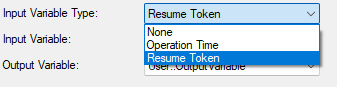
When using an Operation Time in the past, the corresponding operation must still be available in MongoDB's retained operation history. MongoDB maintains a limited, rolling history of database operations, so older starting times may no longer be available. The same limitation applies when attempting to resume from an older resume token.
In this example, the Resume Token option will be used for both the initial and subsequent executions. In our use case, the resume token will be stored in a SQL Server control table and loaded into an SSIS variable before the MongoDB Change Stream runs. Before the initial execution, the stored token will be empty. After the Data Flow runs, the token returned through the MongoDB Source component's Output Variable will be saved to the control table and reused during the next execution.
Design Overview
To implement this incremental process, the package uses a control flow similar to the pattern demonstrated in the Achieve Incremental/Delta Data Load Logic in Any Data Flow with KingswaySoft blog post. Instead of reading and saving an execution timestamp, this example reads and saves the resume token returned by the MongoDB Source component.
The overall process consists of three steps:
- A Premium SQL Server Command Task reads the stored resume token and assigns it to an SSIS variable.
- The MongoDB Source within the Data Flow Task retrieves change events and writes a new resume token to its configured Output Variable.
- A second Premium SQL Server Command Task saves the new resume token to the control table for the next execution.
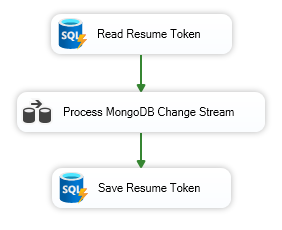
While the resume-token handling provides the incremental processing mechanism, the change-event rows returned by the MongoDB Source are what make the process useful for downstream integration. Once the events enter the SSIS data flow, they can be filtered, transformed, routed, or written to another system based on the type of change and the data associated with the event.
Creating the Control Table and SSIS Variables
Before configuring the SSIS package, create an SQL Server control table containing the following columns:
- ProcessName: Identifies the change stream process.
- ResumeToken: Stores the token that will be used during the next package execution.
Add a row for the MongoDB Change Stream process and leave the ResumeToken value empty before the initial execution.

The ProcessName column allows the command tasks to identify the row associated with this change stream. It may not be required when the table is dedicated to a single process. However, it can be useful when the same control table stores resume tokens for multiple change streams or integration processes, similar to the process-name approach used in the incremental-load blog post.
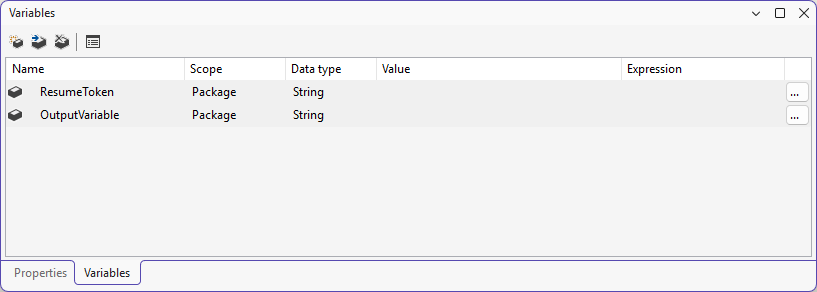
Next, create two SSIS variables using the String data type:
@[User::ResumeToken]@[User::OutputVariable]
Both variables can initially be left empty. The User::ResumeToken variable will receive the value read from the control table and will be used as the MongoDB Source Input Variable. The User::OutputVariable variable will receive the resume token returned by the MongoDB Source.
Reading the Stored Resume Token
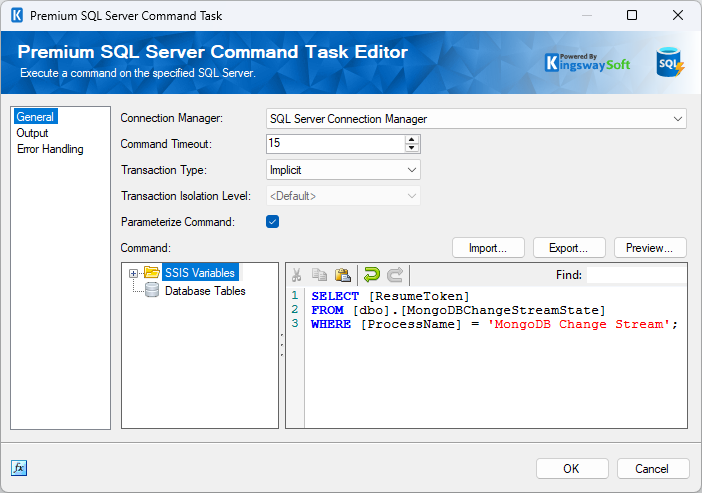
Add a Premium SQL Server Command Task to the Control Flow and rename it Read Resume Token. On the General page, select the appropriate SQL Server Connection Manager and enter the following command:
SELECT [ResumeToken]
FROM [dbo].[MongoDBChangeStreamState]
WHERE [ProcessName] = 'MongoDB Change Stream';
This command retrieves the resume token associated with the MongoDB Change Stream process. Before the initial execution, the returned value will be empty. During subsequent executions, it will contain the token saved by the previous package run.
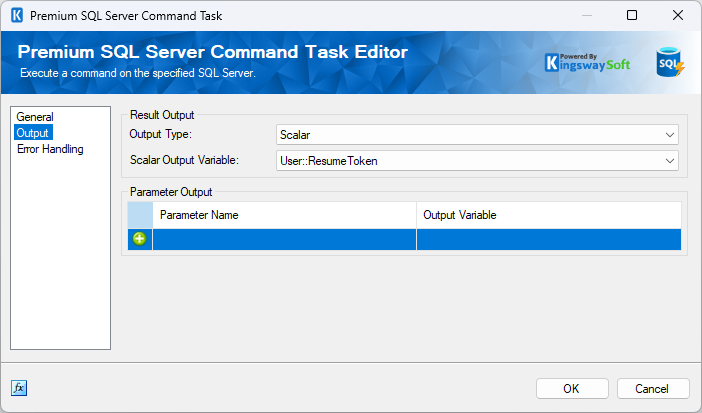
Navigate to the Output page and set Output Type to Scalar. Since the query returns one value, select User::ResumeToken as the Scalar Output Variable. The value retrieved from the table will now be assigned to this variable when the task runs.
Configuring the MongoDB Source
Add a Data Flow Task after the Read Resume Token task. A MongoDB Connection Manager must also be available in the SSIS package. The Connection Manager contains the connection and authentication information required to access the MongoDB deployment.
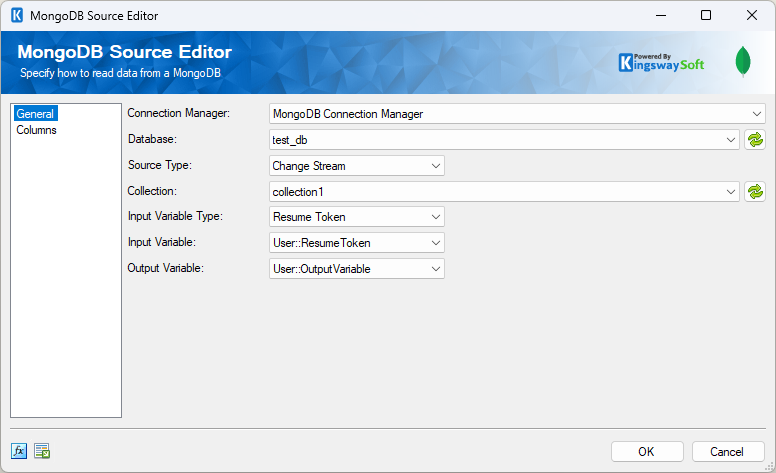
Add the MongoDB Source component to the Data Flow and open its editor. On the General page, select the appropriate MongoDB Connection Manager. Next, select the database that contains the collection you want to monitor. Set Source Type to Change Stream, and then select the appropriate collection.
Configure the resume token settings as follows:
- Input Variable Type:
Resume Token - Input Variable:
User::ResumeToken - Output Variable:
User::OutputVariable
During the initial execution, the User::ResumeToken variable contains the empty value read from the control table. The MongoDB Source opens the initial change stream and returns a resume token through User::OutputVariable. During subsequent executions, the first command task assigns the previously saved token to the User::ResumeToken variable, allowing the source to continue after the operation represented by that token.
Understanding and Consuming Change Stream Data
After configuring the General page, navigate to the Columns page to review the fields returned by the change stream. The MongoDB Source exposes the change event and several of its properties as SSIS pipeline columns. The available fields can include:
- FullDocument: The affected MongoDB document when it is available for the operation.
- BackingDocument: The complete change event returned by MongoDB.
- ClusterTime: The cluster time associated with the operation.
- Namespace.DatabaseName: The database in which the change occurred.
- Namespace.CollectionName: The collection in which the change occurred.
- RenameTo.DatabaseName: The destination database for a rename event.
- RenameTo.CollectionName: The destination collection for a rename event.
- DocumentKey: The key that identifies the affected document.
- OperationType: The type of change, such as Insert, Update, Replace, or Delete.
- ResumeToken: The resume token associated with the individual change event.
- UpdateDescription.UpdatedFields: The fields modified by an update.
- UpdateDescription.RemovedFields: The fields removed by an update.
- UpdateDescription.TruncatedArrays: Information about arrays shortened by an update.
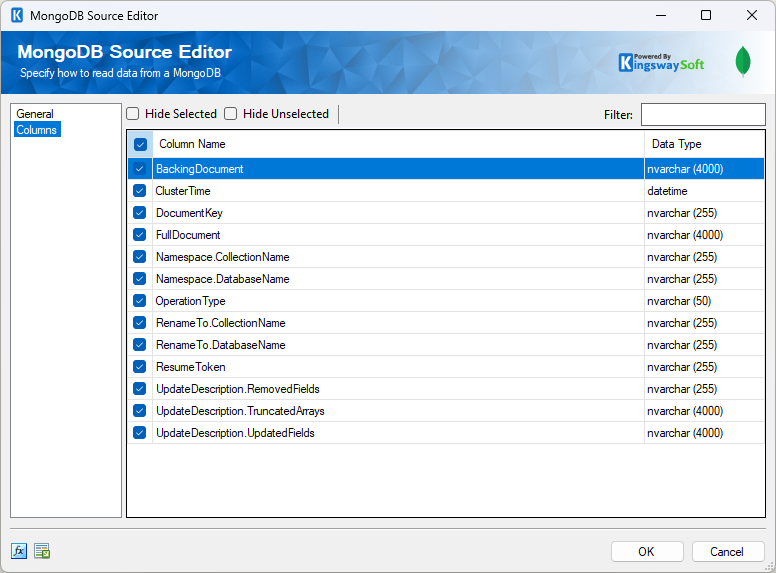
The fields populated for each row depend on the type of operation that occurred. For example, an insert event may include the inserted document in FullDocument, while fields related to updates or collection renaming will remain null. Update events may instead provide information about fields that were modified, removed, or truncated through UpdateDescription.
This event-based structure also makes it possible to use the returned data differently depending on the operation. For example, the OperationType can be used to determine whether a row represents an insert, update, replace, or delete. The DocumentKey can then be used to identify the affected record in a downstream system, while FullDocument can provide the document data needed to create or replace a destination record when that information is available.
For update events, the values under UpdateDescription can provide additional information about what changed. This can be useful when the downstream process needs to apply only the modified fields rather than treating every event as a complete document replacement.
In an SSIS data flow, these event properties can be used with transformations and downstream components to implement different processing paths. For example, change events can be filtered or routed based on OperationType, while document values can be extracted and mapped into individual destination columns when required.
MongoDB stores documents using BSON, so some returned values contain nested, JSON-like document structures and may include MongoDB-specific data types such as ObjectId. Columns such as FullDocument, BackingDocument, DocumentKey, ResumeToken, and UpdateDescription may therefore contain document values rather than individual scalar values.
When individual properties from these document values are required as separate SSIS columns, an additional transformation such as the KingswaySoft JSON Extract component may be used to extract the required values, depending on the returned format and downstream requirements.
Select the fields required in the pipeline from the Columns page. Keeping only the columns needed by the downstream process can also make the data flow easier to understand and maintain.
Each pipeline row returned by the MongoDB Source includes a ResumeToken associated with that individual change event. The MongoDB Source also returns a resume token through its configured Output Variable. Although both values are resume tokens, they are exposed in different contexts and may not contain the same value. The pipeline ResumeToken belongs to a specific event, while the Output Variable is provided by the component for continuing the change stream. This example persists the value returned through User::OutputVariable.
For demonstration purposes, User::OutputVariable is also added as a pipeline column using the Premium Derived Column component. This is not required for persisting the resume token.
Once the package begins running, changes from the selected MongoDB collection are returned as separate pipeline rows.
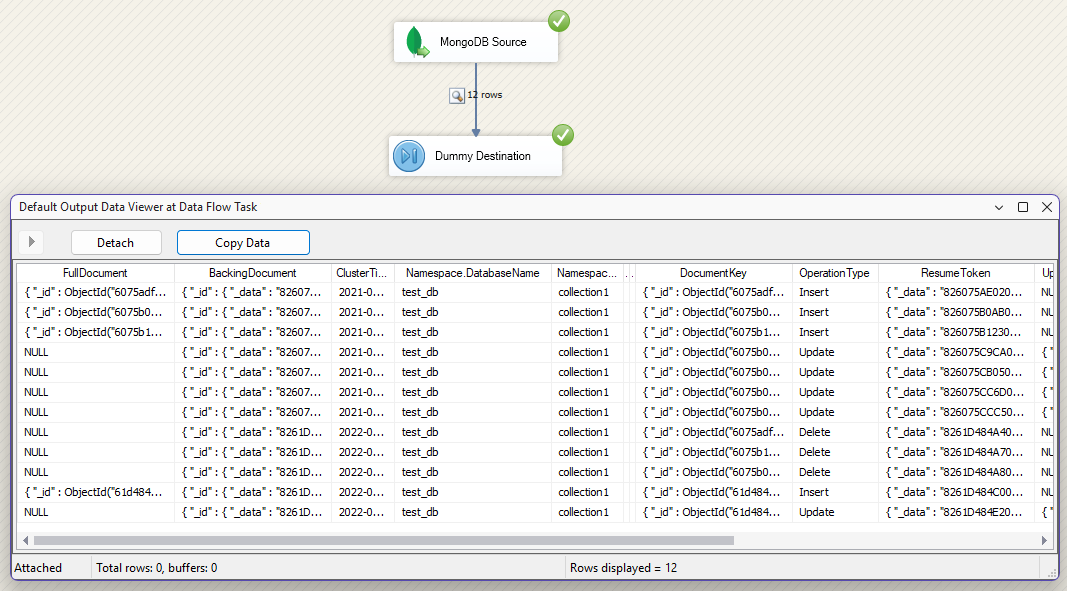
In the example above, the Data Viewer includes insert, update, and delete events. The OperationType column identifies the type of change, while DocumentKey identifies the affected document.
The fields populated in each row depend on the event type. For example, FullDocument is populated for the insert events shown, while it is null for the update and delete events. Update events may instead return information about modified, removed, or truncated fields under UpdateDescription.
From here, the change events can be consumed according to the integration requirements. For example, insert and replace events may be mapped to an insert-or-upsert process in a destination system, delete events can be used to remove corresponding records, and update events can be routed through a process that applies the relevant changes. The MongoDB Source therefore provides the event information needed to build the appropriate downstream processing logic rather than requiring the integration to repeatedly scan the full source collection.
Saving the New Resume Token
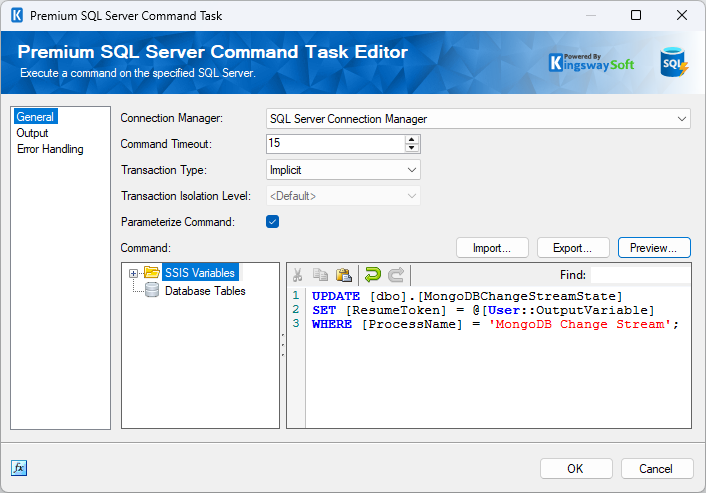
After the Data Flow Task, add a second Premium SQL Server Command Task and rename it Save Resume Token. Select the same SQL Server Connection Manager and use an UPDATE statement to write the value returned through User::OutputVariable to the control table:
UPDATE [dbo].[MongoDBChangeStreamState]
SET [ResumeToken] = @[User::OutputVariable]
WHERE [ProcessName] = 'MongoDB Change Stream';
The Premium SQL Server Command Task supports SSIS variables in the command text. Select User::OutputVariable from the SSIS Variables panel to insert its placeholder into the command. Since this task only updates the table and does not need to return a value, its Output Type can remain set to None.
After the package completes, the control table contains the token returned by the MongoDB Source:

During the next execution, the first Premium SQL Server Command Task reads this value into the User::ResumeToken variable. The MongoDB Source then uses it to continue retrieving changes after the operation represented by the saved token. Once the Data Flow finishes, the second command task replaces the stored value with the newer token returned through User::OutputVariable.
The same package configuration is therefore used for both the initial and subsequent executions. The first execution begins with an empty resume token, while each later execution automatically reads and reuses the resume token saved by the previous run.
Conclusion
MongoDB Change Streams provide an efficient way to retrieve incremental changes without repeatedly extracting and comparing an entire collection. Through the Change Stream source type, the KingswaySoft MongoDB Source component can return information about document inserts, updates, replacements, and deletes directly within an SSIS Data Flow.
Just as importantly, the returned change-event data can be consumed as part of the broader integration workflow. Fields such as OperationType, DocumentKey, FullDocument, and UpdateDescription provide the information needed to determine what changed and how the downstream process should respond. Nested document values can also be further transformed when individual properties are required by a destination system.
By combining the MongoDB Source with an SQL Server control table and two Premium SQL Server Command Tasks, the package can automatically read the previously saved resume token, retrieve newer change events, and store the latest output token for the next execution. This removes the need to manually change the MongoDB Source configuration between the initial and subsequent package runs.
With this design, SSIS developers can incorporate MongoDB change events into repeatable incremental integration processes, allowing downstream systems to respond to new and modified data without repeatedly scanning the entire MongoDB collection or manually interacting with the MongoDB Change Stream API.