

Microsoft Dataverse and Dynamics CRM audit logs provide a powerful mechanism to extract and retrieve historical change data across your enterprise, helping organizations meet strict compliance, security, and governance requirements. When auditing is enabled globally and at the entity level, Dataverse registers user actions - including create, update, delete, record access events, and relationship modifications. For administrators and developers, these logs deliver essential insights needed to refine business processes, maintain accountability, and perform forensic issue analysis.
Key advantages of leveraging Dataverse/CRM audit logs include:
- Improved Security: Track user activity and swiftly identify unauthorized or suspicious data changes.
- Regulatory Compliance: Maintain immutable audit trails required to achieve industry standards and governance regulation compliance.
- Simplified Troubleshooting: Quickly identify when data changes occurred and who performed them.
- Granular Data Change Tracking: Monitor field-level updates, record deletions, assignments, and access events over time.
- Accountability and Transparency: Provide clear visibility into user actions within the system.
- Operational Insights: Analyze system usage patterns to better understand how users interact with core business entities.
- Historical Reference: Inspect historical "before" and "after" values to restore context during issue investigations or validation audits.
To make this auditing data fully accessible and actionable, the KingswaySoft SSIS Integration Toolkit provides a streamlined, high-performance solution for extracting and parsing audit records when working with Dataverse/Dynamics 365 CRM application. With our recent release of v26.2, we have introduced significant architectural enhancements to how audit logs are processed under the hood. In this latest release, integration developers can expect:
- Exponentially Higher Throughput: The Dataverse/Dynamics CRM Source component extracts audit records substantially faster than previous versions.
- Reduced API Overhead: Optimized execution logic minimizes secondary
AuditDetailsservice calls to avoid throttling. - Enhanced Error Suppression: Expanded capabilities in the Suppress General Service Exceptions feature seamlessly handle 404s and transient server-side service errors without breaking long-running pipeline executions.
Let's take a deep dive into component configuration and review the latest performance benchmarks.
Working with Audit Logs Source Type
The Dataverse/Dynamics CRM Source component features a dedicated Audit Logs Source Type designed to extract detailed audit trails and their underlying metadata effortlessly.
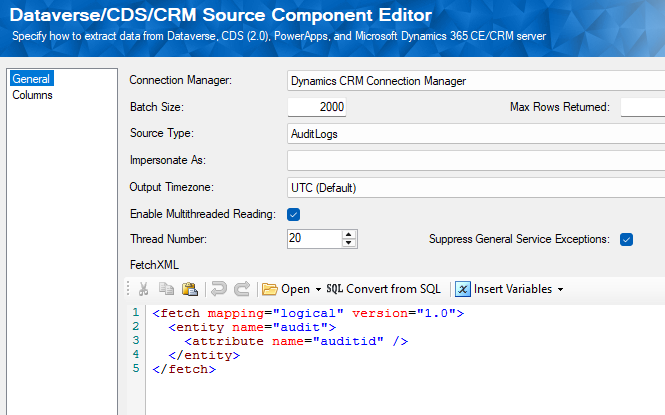
The component supports multithreaded reading capabilities, executing parallel API requests based on your configured batch size. Furthermore, the Suppress General Service Exceptions feature (introduced in v25.2 and further refined in v26.2) prevents missing audit details or transient 404 responses from interrupting execution flows.
Queries can be supplied directly via FetchXML or auto-generated from standard SQL using the built-in Convert from SQL tool. When querying the target entity specified in your FetchXML, the component parses the audit stream and exposes five distinct pipeline outputs. Each output shares a common AuditId key, allowing downstream components to easily merge related datasets:
- Primary Output: Captures high-level, entity-specific audit headers (such as timestamp, operation type, and performing user).
- Audit Details (Attribute Changes): Delivers granular, field-level change history, including side-by-side comparison of "Old Value" and "New Value".
- Audit Details (Relationship Changes): Tracks modifications made to associations between records.
- Audit Details (Record Sharing): Logs any changes or updates regarding record access and sharing permissions.
- Audit Details (Role Privileges): Tracks security role modifications and direct privilege adjustments.
In this scenario, the FetchXML targets the core Dataverse audit entity, capturing comprehensive historical modifications across records.
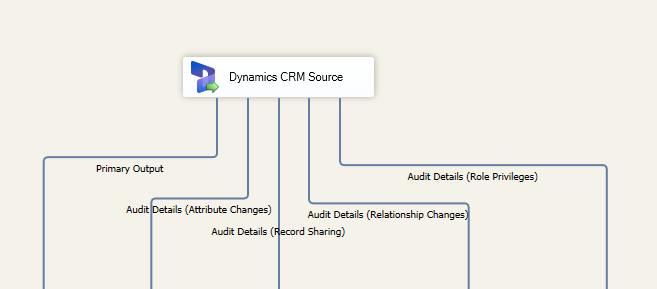
Now, let's explore how these v26.2 architectural optimizations translate into real-world extraction speed gains.
Performance Metrics
In our preliminary benchmark tests comparing v26.2 with prior releases, we observed substantial performance improvements during audit retrieval, with some extractions completing nearly 30 times faster. This translates to up to a 98% reduction in execution time for certain workloads. Below are the execution metrics captured during testing:
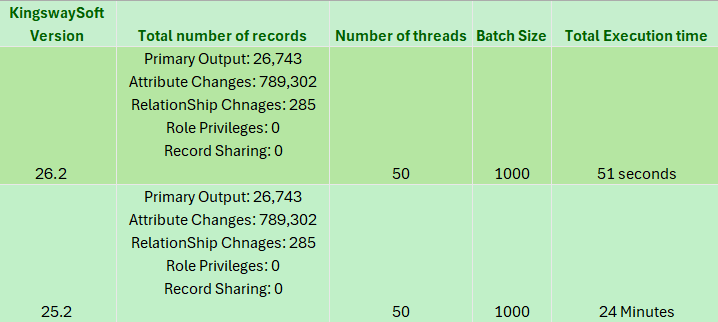
It is worth highlighting that these benchmark tests were executed in a resource-constrained trial environment with zero custom tuning applied. In dedicated production or higher-tier sandbox environments, developers can anticipate even greater speed improvements.
Conclusion
Extracting historical audit records from Microsoft Dataverse and Dynamics 365 CRM no longer has to be a slow, API-intensive bottleneck. KingswaySoft v26.2 introduces massive performance gains, enabling high-speed extraction, reduced server load, and resilient error handling within a single, easy-to-configure SSIS pipeline.