

Integrating Customer and Contact data into NetSuite requires more than simply importing records. Because Contact records depend on an existing Customer, maintaining the correct parent-child relationship is essential for preserving data integrity and avoiding orphan records. While the Customer record stores core account information, related Contact records represent important stakeholders such as billing, purchasing, and account representatives.
For a successful integration, the Customer must be created or updated before any related Contacts can be associated with it. Attempting to process Contacts first can result in orphan records, inconsistent data, and unnecessary manual cleanup. To avoid these issues, the integration should follow a two-stage process: first upsert the Customer record and capture theNetSuiteRecordID returned by the operation, then use that ID to associate all related Contact records with the appropriate Customer.
Using an Upsert operation further improves the reliability of the integration by matching records through an External ID. This allows existing records to be updated while new records are created only when necessary, helping prevent duplicate records during recurring data synchronization.
In this walkthrough, we'll demonstrate this proven integration pattern using KingswaySoft SSIS components. The package uses a single Data Flow Task for maximum efficiency while keeping the overall design straightforward. First, the Customer record is upserted into NetSuite. A Premium Service Lookup component then retrieves the related Contact records from SQL Server based on the Customer External ID. Finally, the returned NetSuite Customer ID is used to upsert the Contact records while preserving the relationship between the Customer and its Contacts.
Integration Scenario
In this example, Customer and Contact data are stored in SQL Server. The Customer source contains the information required to create or update Customer records in NetSuite, while the related Contact records reside in a separate table and can be retrieved using the Customer External ID.
The Customer data includes fields such as the Customer External ID and company name. The Contact data includes fields such as the Contact External ID, first name, last name, and email address.
Both Customer and Contact records use External IDs to support idempotent Upsert operations. This ensures that existing records are updated while new records are created only when necessary, preventing duplicate records when the integration is executed repeatedly.
The Customer is processed first so that the package can capture the returned NetSuite Customer ID and pass it to the Contact upsert step. This enables each Contact to be associated with the correct Customer. When multiple Contacts belong to the same Customer, the same returned Customer ID can be used to establish the relationship for every related Contact.
Overall Data Flow Design
With the source data prepared, the package uses a single linear Data Flow Task to process Customers before their related Contacts. Customer records are first read from SQL Server and passed to a NetSuite Destination component configured to upsert Customer records. The successful output is then passed to a Premium Service Lookup component, which retrieves the related Contact rows from SQL Server. Finally, the lookup results are sent to a second NetSuite Destination component that upserts the Contact records.
This design keeps the package simple while avoiding unnecessary Customer upsert operations. Each Customer is processed only once, and the returnedNetSuiteRecordID is immediately available before any related Contacts are written to NetSuite.
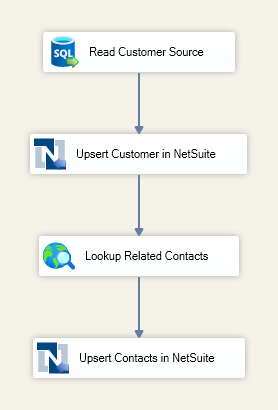
Processing the Customer first ensures that the NetSuite Customer ID is available for mapping to the Contact company reference. By retrieving the related Contact records only after the Customer has been successfully upserted, the package preserves the relationship between the two record types while keeping the data flow efficient and easy to maintain.
Data Flow: Upsert Customer and Related Contacts
The Data Flow Task begins by reading Customer source data from SQL Server and passing it to a NetSuite Destination component configured to upsert Customer records. In this example, the source includes the Customer External ID and company name, which are mapped to the corresponding Customer fields in NetSuite.
On the General page of the first NetSuite Destination component, the action is set to Upsert and the object is set to customer. On the Columns page, the Customer source fields are mapped to the appropriate NetSuite Customer fields. The Customer External ID is included so that the component can determine whether an existing Customer should be updated or a new Customer should be created.
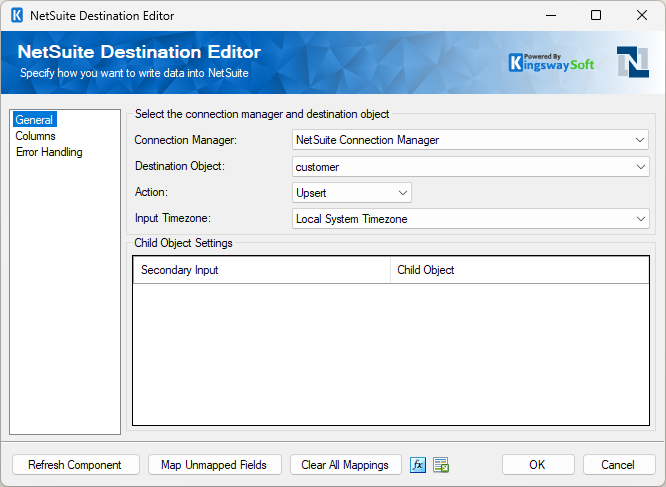
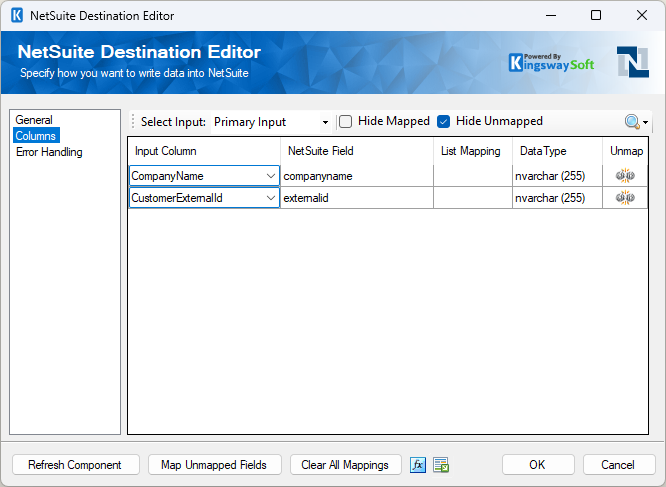
Configuring the destination for an Upsert operation enables the package to update existing Customer records when a matching External ID already exists, while automatically creating new records when no match is found. This helps eliminate duplicate Customer records when the package is rerun or when recurring integrations process previously synchronized data.
After the Customer record has been successfully upserted, the NetSuite Destination component returns theNetSuiteRecordID through its successful output. Because the ID is immediately available in the data flow, the package can continue processing without performing an additional lookup against NetSuite.
The successful Customer output is then passed to a Premium Service Lookup component named Lookup Related Contacts. The lookup uses the CustomerExternalId from the Customer output to retrieve the related Contact records from SQL Server. In this example, the lookup returns fields including the Contact External ID, first name, last name, and email address.
On the General page, the Max Returned Matches value is set to 0, allowing the lookup to return every Contact associated with the Customer. This is particularly useful when a Customer has multiple related Contacts that all need to be synchronized. The cache mode can also be adjusted to meet the performance requirements of the integration. For more information about the available cache modes, refer to the Premium Service Lookup component help manual.
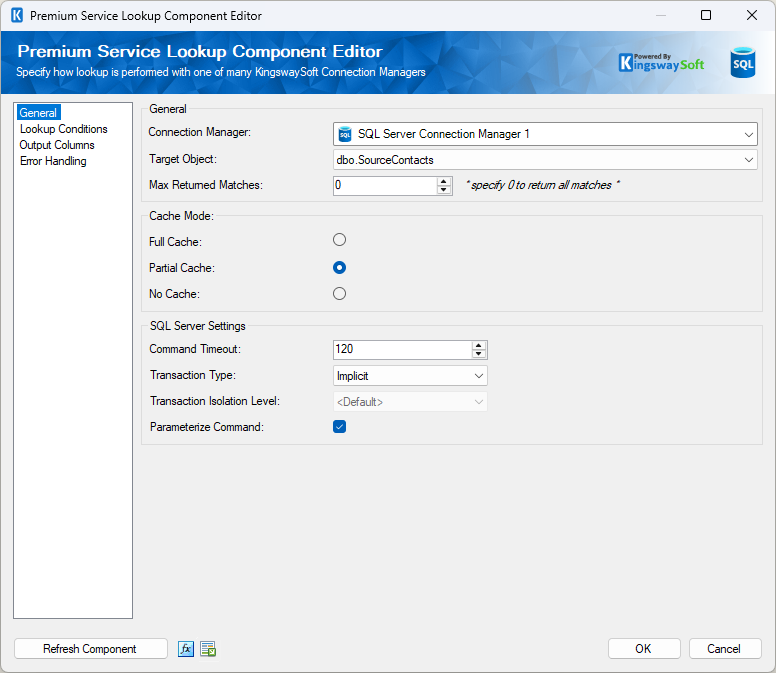
On the Lookup Conditions page, the component matches Contact rows by comparing the CustomerExternalId in the Contact source with the CustomerExternalId from the incoming Customer row. This ensures that only the Contacts belonging to the Customer that was just processed are returned.
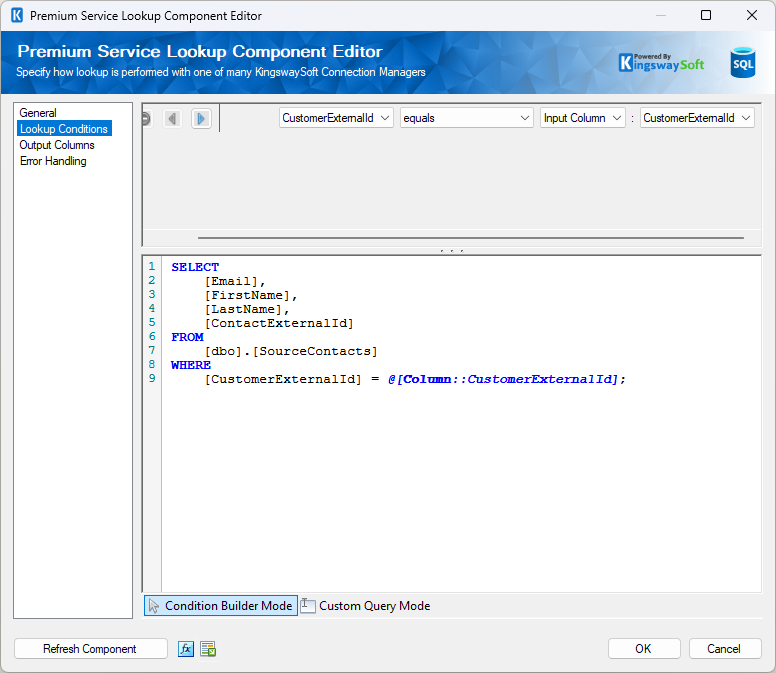
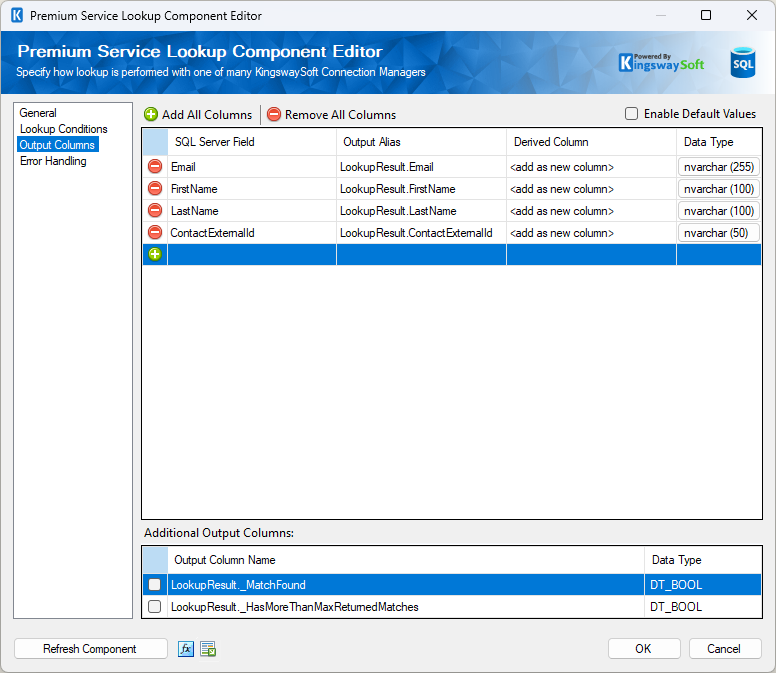
On the Output Columns page, the retrieved Contact fields are made available to the downstream NetSuite Destination component. At the same time, the NetSuite Customer ID returned during the Customer upsert remains available within the data flow and is used as the Customer reference when processing the Contact records.
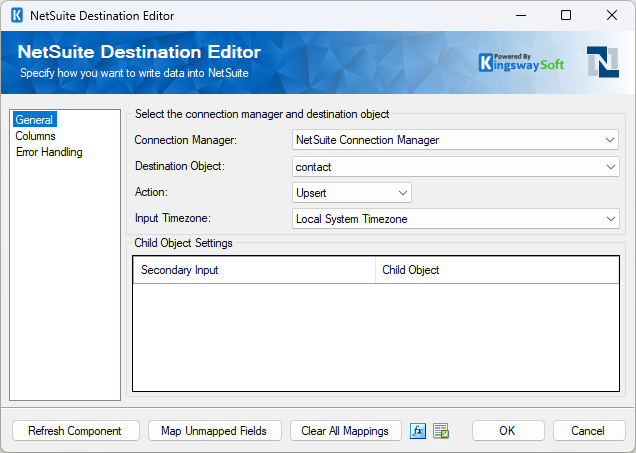
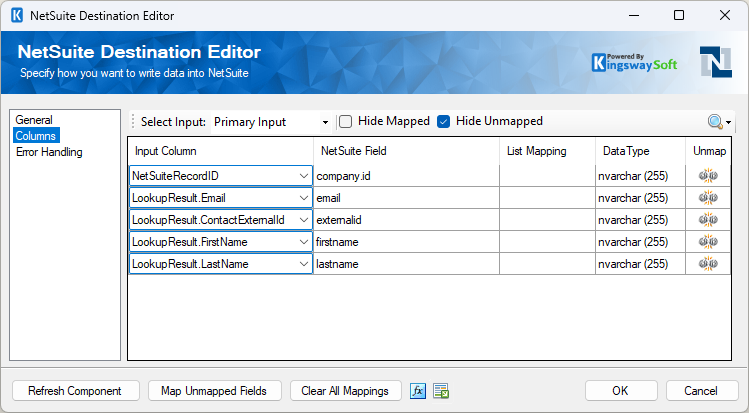
The lookup output is then passed to a second NetSuite Destination component configured to upsert Contact records. On the General page, the action is set to Upsert and the object is set to contact. On the Columns page, the Contact fields returned by the lookup are mapped to the corresponding NetSuite Contact fields.
One of the most important mappings is NetSuite Record ID to company.id, which establishes the relationship between each Contact and its parent Customer. The Contact External ID is also mapped so that existing Contacts can be updated while new Contacts are created only when necessary.
Once the data flow completes, both the Customer and its related Contact records have been created or updated in NetSuite while preserving the correct parent-child relationship.
Verifying the Results in NetSuite
After the package has completed successfully, the results can be verified by opening the Customer record in NetSuite. In this example, the Customer has been upserted as a company-type Customer, and the Contacts sublist displays the related Contact records that were created or updated by the package.
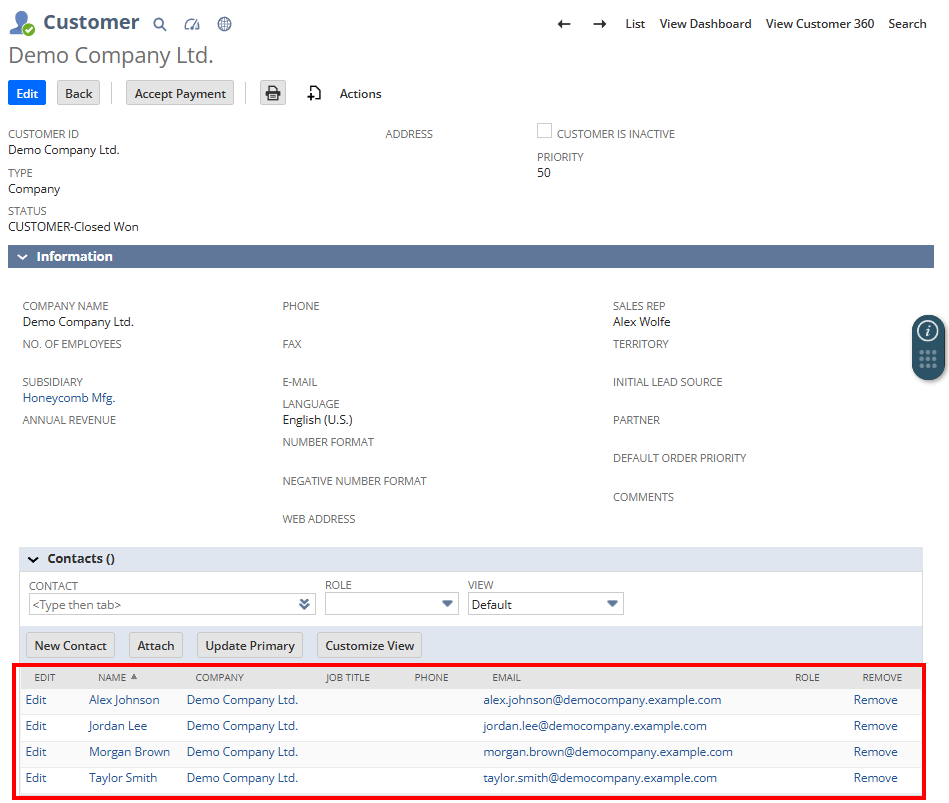
This confirms that the integration successfully upserted the Customer, retrieved the related Contact records, and associated each Contact with the correct Customer using the returnedNetSuiteRecordID.
Conclusion
Maintaining parent-child relationships is a common challenge in NetSuite integrations. By upserting Customer records first, capturing the returnedNetSuiteRecordID, and then using that value when upserting related Contact records, you can build reliable and repeatable integration workflows that preserve data integrity while eliminating orphan records.
Although this walkthrough focuses on Customers and Contacts, the same integration pattern can be applied to many other NetSuite scenarios where dependent records require a parent reference. Combined with the Upsert capability of the NetSuite Destination component and the flexibility of the Premium Service Lookup component, this approach enables efficient, scalable SSIS integrations that are easy to maintain while ensuring data remains accurate and consistently synchronized.