

In many integration projects, the same source data might be used multiple times at different stages of an SSIS package. You might have a data flow that retrieves records from an API endpoint, while another data flow can consume the same data again. Repeatedly calling the same endpoint or introducing loop-based logic can make packages more difficult to maintain, increase execution time, and add unnecessary complexity.
Data consistency is another important consideration. When a service endpoint is called multiple times, each request may return the source system's current state at that moment. Shopify provides a great example of why capturing and reusing a consistent dataset can be beneficial. As a transactional system, Shopify is a very busy application, and its data is constantly updated. If an order is updated, fulfilled, edited, cancelled, or partially refunded between API calls, the second retrieval may not have the same data that was processed in the original data flow.
By retrieving the data once and storing the required records in an SSIS object variable, the package can work from a single, consistent snapshot of the source data. This is especially useful when working with parent-child responses such as Shopify orders object, which has its associated line_items. Instead of retrieving the two objects in two separate service calls, we can make a single service call to capture both the parent and child records at the same time and use them for downstream data flow tasks. By doing this, you can prevent data discrepancies that could occur from using two service calls.
KingswaySoft offers the Premium Recordset Source component as part of our SSIS Integration Toolkit. This component allows you to efficiently reuse data stored in SSIS object variables, reducing repeated reads from the same endpoint, while maintaining a fully pipeline-based design.
In this example, we will retrieve Shopify orders along with their child line_items just once, and then reuse the saved recordset for various downstream processes.
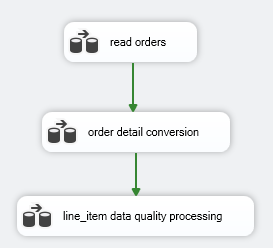
Setup in the SSIS Control Flow and data flow
In this demo, we will use a Shopify order integration scenario. A Shopify order represents the overall customer transaction, while each record in line_items represents an individual product item purchased or sold in the order.
The order data contains information such as customer details, order date, financial status, currency, subtotal, tax, shipping, and total amount. This data can be processed directly within the initial data flow. The line_items data, however, often requires separate product-level validation and additional data quality checks before loading into downstream systems.
In the first data flow, the order output continues through the pipeline for order-level processing. The line item output is directed into a Recordset Destination, where the rows are stored in an SSIS object variable.
The captured line item recordset should include all fields needed for downstream processing, such as line item ID, parent order ID, product ID, SKU, title, quantity, and price.
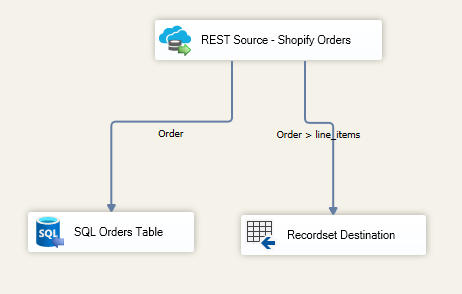
If you have not previously worked with the out-of-the-box Recordset Destination, this component allows records to be stored in an object variable with indexed columns that can later be retrieved and reused.
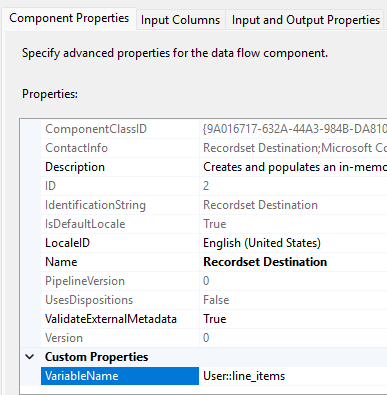
In the image below, the highlighted VariableName property specifies the object variable where the dataset will be stored. The variable must use the Object data type.
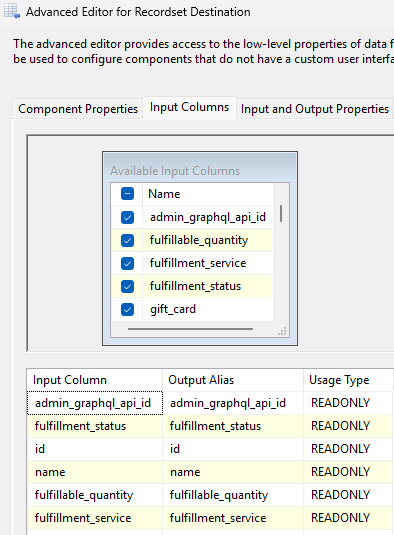
On the Input Columns page, you can select specific upstream columns or store the entire record structure. Note that the usage type is READONLY, meaning the values can be read later from the object variable but not modified.
For this use case, we only need to read the captured line_items data, so this configuration is sufficient.
Premium Recordset Source Retrieval
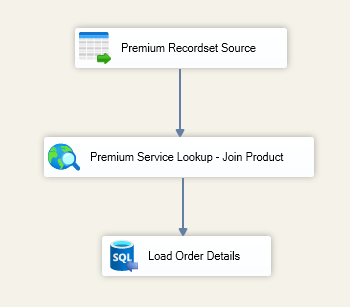
Once the dataset has been captured in the object variable, the Premium Recordset Source can be used to read the saved line_items recordset and push all rows back through the pipeline without requiring any looping mechanism, such as a ForEach Loop, or a separate service call to retrieve those child records.
Instead of starting a new data flow with another Shopify Source call, the data flow reads directly from the SSIS object variable that serves as the data flow's source component.
After the records are restored into the pipeline, a Premium Service Lookup component can enrich the data using fields such as product_id or SKU. This allows the package to join line items against a product reference table or external product object before loading the data into the order details destination.
Because the line items originate from the same original Shopify order retrieval, they remain fully aligned with the order records processed earlier in the package.
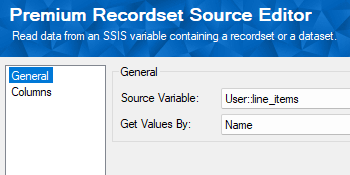
The Premium Recordset Source is simple to configure. You only need to specify the source object variable that contains the stored recordset, and map the columns either by name or by index.
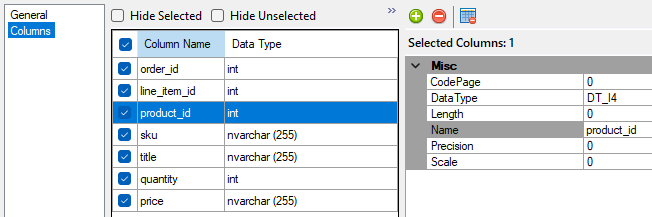
On the Columns page, the previously stored fields are automatically populated, ensuring that every downstream data flow works against the same snapshot of data.
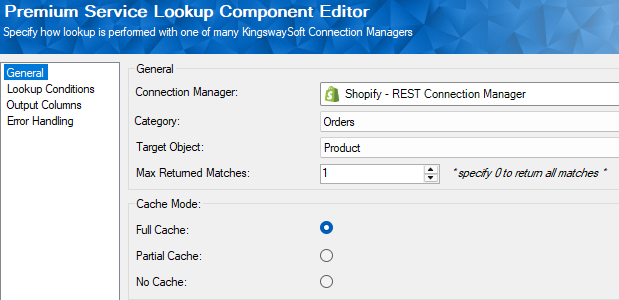
You may also notice the Premium Service Lookup Lookup component positioned after the Recordset Source in the data flow. This component can be used to enrich records by performing lookups against related objects or tables.
In this example, the lookup uses Shopify product data, and because Shopify is one of many services supported by the Premium Service Lookup component, we are reusing the same connection manager available in the same package.
The next configuration page allows you to define the lookup condition used to relate the two objects. As records flow through the pipeline, the lookup evaluates each row against the configured matching criteria.
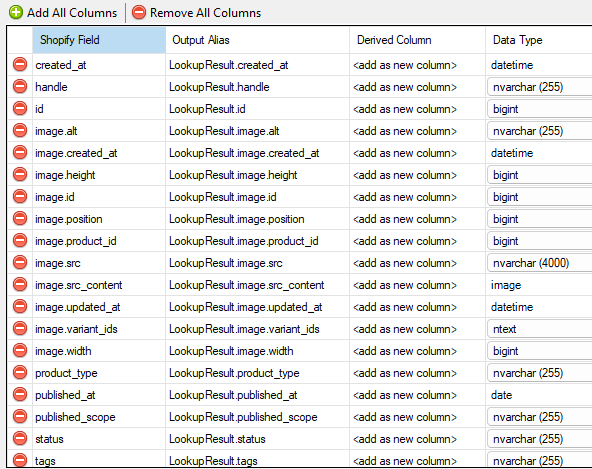
The final configuration page displays the fields returned from the lookup operation. To avoid naming conflicts, the returned columns are automatically prefixed with LookupResult.

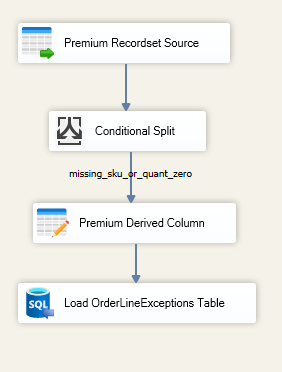
In another data flow, we may need to isolate line item records that do not violate system constraints but fail internal business validation rules. These records can create downstream reporting or operational issues if not properly reviewed.
The Premium Recordset Source can once again read the saved line_items recordset and pass the rows into a Conditional Split component for data quality validation. For example, rows with missing SKUs or zero quantities can be separated from valid line items and loaded into an OrderLineExceptions table for further investigation.
Considerations
An alternative approach would be to iterate through the stored line_items data using a ForEach Loop. However, this method processes records one row at a time and can introduce unnecessary complexity and excessive service calls, especially for larger datasets.
By storing the line item output once and reusing it later through the Premium Recordset Source component, the package remains fully pipeline-based, easier to maintain, and more scalable.
This pattern is not intended to replace simple multi-destination designs. If the same rows only need to be written to multiple destinations within a single data flow, connecting additional destination components may still be the best option.
The Premium Recordset Source component becomes especially valuable when portions of a service response, such as Shopify line_items, need to be reused across separate data flows or at later stages of the package.
Conclusion
The Premium Recordset Source component provides a practical and scalable way to reuse previously captured SSIS recordsets across multiple stages of a package.
In this Shopify example, the package retrieves order data once, processes the order header records immediately, and stores the child line_items output in an SSIS object variable for later reuse. Additional data flows can then consume the saved recordset without issuing additional Shopify API calls.
For integration teams working with parent-child service responses, this approach simplifies package design, improves maintainability, reduces repeated retrieval logic, and ensures consistent processing across SSIS data flows.