

In modern data integration, maintaining historical accuracy is non-negotiable. To ensure your analytics reflect the true state of business entities at any specific point in time, you must prevent new data from overwriting the past. This is achieved through Slowly Changing Dimensions (SCD), a set of data engineering techniques used to track how descriptive data, such as a customer’s address or a supplier’s name, evolves over time in a data warehouse.
A standard SCD implementation involves managing the relationship between two primary data sets:
- The Source Data: The incoming "fresh" data from operational systems (CRM, ERP, etc.) containing the latest values for your business entities.
- The Dimension Table: The reference table in your data warehouse that must be updated with new data while simultaneously detecting and archiving changes from existing records.
By systematically managing these changes, businesses can perform point-in-time analysis. This ensures that a procurement record from three years ago remains associated with the supplier's name as it existed then, maintaining a reliable source of truth even as operational data evolves. The most common SCD strategies include:
- Type 0 (Fixed): Attributes that never change once entered (e.g., an original "Created Date").
- Type 1 (Overwrite): Old data is replaced with new data. No history is kept; only the current state is visible.
- Type 2 (Track History): The gold standard for auditing. A new row is created for every change, typically managed via Versioning, Effective Dates, and "Current" flags.
However, implementing SCDs manually can be a formidable task. Developers must manage surrogate keys to maintain unique records when IDs repeat across historical rows, and handle the "performance tax" that occurs as tables grow exponentially. Furthermore, choosing which attributes to track and managing complex back-dating logic can quickly complicate a project.
Why the Native SSIS SCD Component Falls Short
While SSIS includes a native Slowly Changing Dimension transformation, it is often avoided by seasoned developers due to several critical limitations. Below is a comparison of why KingswaySoft's Premium SCD is the preferred choice for enterprise-grade ETL:
| Feature | Native SSIS SCD Component | KingswaySoft Premium SCD |
|---|---|---|
| Performance | Executes row-by-row lookups and updates, causing significant bottlenecks. | Uses high-performance, set-based processing with bulk writing support. |
| Ease of Use | Relies on a rigid wizard that is difficult to modify once configured. | Features a modern, user-friendly editor that allows for easy changes at any time. |
| Data Connectivity | Limited primarily to OLE DB connections. | Works with virtually any data input (ADO.NET, OData, Excel, etc.). |
| Pipeline Complexity | Generates many downstream components (OLE DB Commands, etc.) making the package hard to read. | Consolidates all logic into a single component, keeping your data flow clean and transparent. |
| Surrogate Keys | Manual setup required for key generation and management. | Built-in support for automatic surrogate key incrementing and handling. |
The Premium SCD Component (part of the SSIS Productivity Pack) eliminates these hurdles. We provide a high-performance approach to historical tracking that handles the heavy lifting for you. You can download our free sample package to see it in action.
The Source and Dimension Data Definition
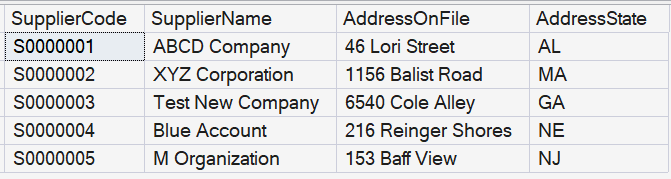
For our demonstration, we have a Supplier table called SupplierSource (New Source) and a dimension table called DimSupplier (Existing Reference). Our goal is to track changes in SupplierSource and reflect them in DimSupplier while preserving historical details.

Premium Slowly Changing Dimension Component Configuration
First, use two Premium SQL Server Source components to read your tables and connect them to the Premium SCD component. Choose SupplierCode as your Business Key. We assign AddressState as Type 1 (Overwrite) and SupplierName as Type 2 (Historical) to track name changes over time.

Premium SCD Writing Strategies
There are two methods to commit your dimensional data changes. We recommend Method 1 for the most streamlined and performant development experience.
Method 1: Writing Directly Within the Component (Recommended)
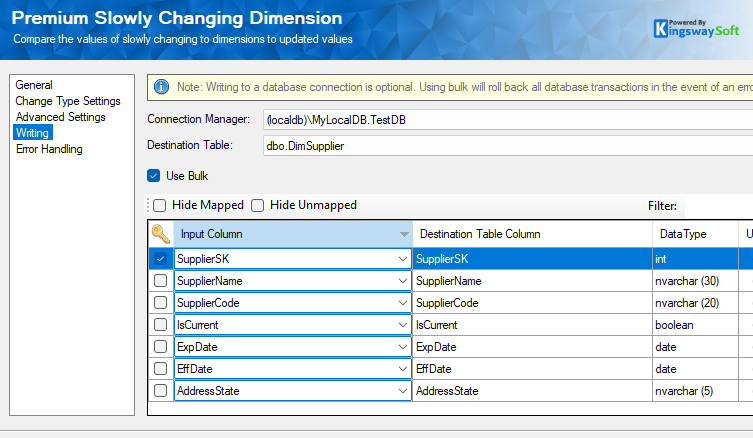
Unlike the native SSIS component that forces you to add OLE DB Command transformation components to your canvas, the Premium SCD component can write directly to your database. By using the Writing page, you can map fields and keys directly to your target table.
The Advantages:
- Minimal Pipeline Clutter: You don't need to manage separate Destination components or Command components; the entire SCD cycle happens inside one component.
- Performance: Supports Bulk Writing for ADO.NET providers, which is exponentially faster than row-by-row updates.
- Simplicity: One location to manage both the comparison logic and the final write action.
Method 2: Writing Using Default Outputs
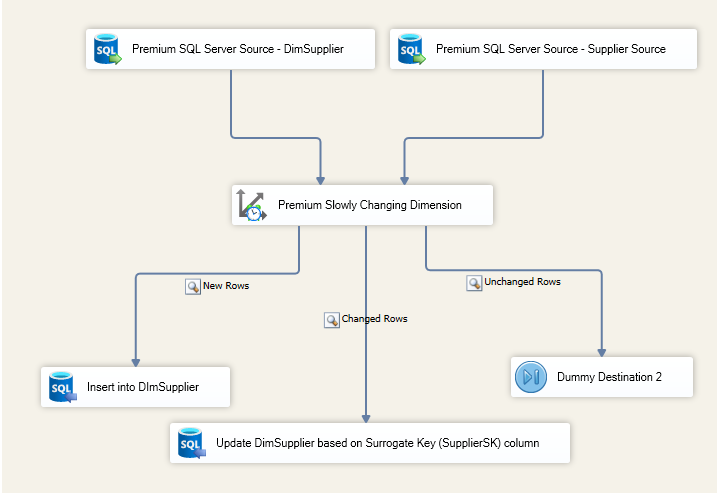
If you have unique requirements - such as passing changed rows through additional transformation logic (e.g., encryption or data scrubbing) before they hit the database - you can use the default outputs (New Rows, Changed Rows, and Unchanged Rows), each of which connects to a separate destination component to perform the writing. In our example below, we are using the Premium SQL Server Destination Component to facilitate such writing so that we can leverage some advanced features available for fast, large-scale writing when needed.
Conclusion
KingswaySoft's Premium Slowly Changing Dimensions component simplifies the management of historical data by offering set-based performance and a clean, single-component design. By choosing the direct writing strategy, you can significantly reduce package complexity while ensuring your data warehouse scales effectively.
We hope this has helped!