

Using the Wave Accounting Destination Component
The Wave Accounting Destination Component is an SSIS data flow destination component that can be used to write data to endpoints.
See Wave Accounting Connection Manager for how to connect to Wave Accounting and Wave Accounting REST Source Component for how to read from Wave Accounting.
The following pages can be configured in the component:
- General
- Columns
- Error Handling
General
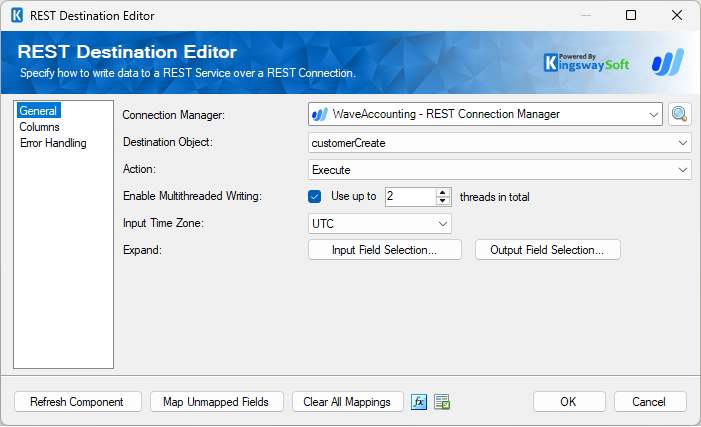
The General page can be used to configure the general settings for the Wave Accounting Destination component.
-
- Connection Manager
-
A Connection Manager is required for the Wave Accounting Source component to connect to the endpoint. A list of available connection managers will populate the drop-down.
- Destination Object
-
The Destination Object option allows you to specify which object to write data to. The Destination Object drop-down lists all the available objects that you can write data to.
- Action
-
The Action option allows you to specify how data should be written to ActiveCampaign.
-
Note: Supported actions may vary from object to object depending on Wave Accounting's API documentation.
- Enable Multithreaded Writing (Since v26.3)
-
Enable this option to perform multithreaded writing to the endpoint. The "Use Up to _ threads in total" determines how many threads can be processed concurrently.
- Input Time Zone
-
The Input Time Zone option specifies the timezone of all incoming datetime fields. Available options are:
- Local
- UTC
- Expand
-
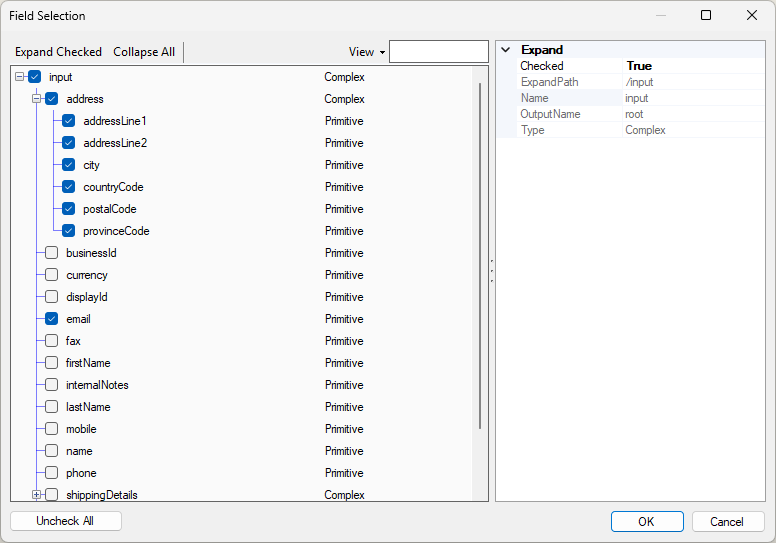
The Expand button allows you to view and select nested input fields for the API request for both input and output.
- Input Field Selection: The Expand button allows you to view and select nested input fields for the API request.
- Output Field Selection: The Expand button allows you to view and select nested output fields returned by the API.
- Refresh Component Button
-
Clicking the Refresh Component button retrieves the latest metadata and updates each field to its most recent metadata.
- Map Unmapped Fields Button
-
By clicking this button, the component will try to map any unmapped attributes by matching their names with the input columns from upstream components.
- Clear All Mappings Button
-
By clicking this button, the component will reset (clear) all your mappings in the destination component.
- Expression fx Button
-
Click the fx button to open the SSIS Expression Editor, which allows you to dynamically update the property at runtime.
- Generate Documentation Button
-
Click the Generate Documentation button to generate a Word document describing the component's metadata, including relevant mappings.
Columns
The Columns page provides metadata-related details for the Wave Accounting Destination component based on the connected endpoint and the properties previously specified on the General page.
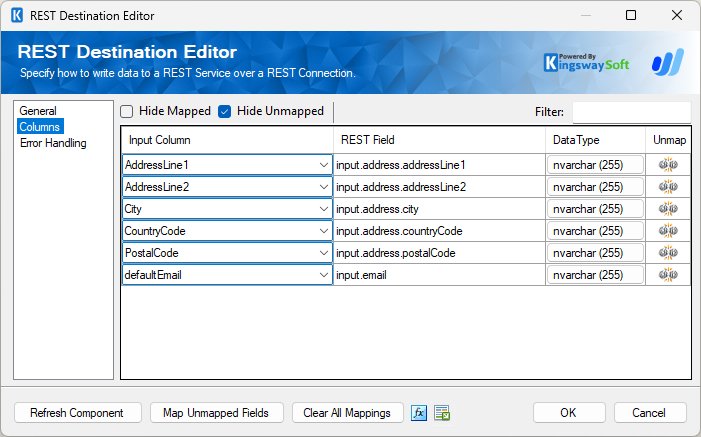
The Columns page grid consists of the following columns:
- Input Column: Allows you to select an input column from an upstream component to map to the corresponding Wave Accounting field.
- REST Field: Specifies the field to which data will be written.
- Data Type: Displays the data type of the field.
- Unmap: This column can be used to unmap the field from the upstream input column. If the field is not currently mapped, you can use this option to map it to an upstream input column with a matching name.
Error Handling
The Error Handling page allows you to specify how errors should be handled.
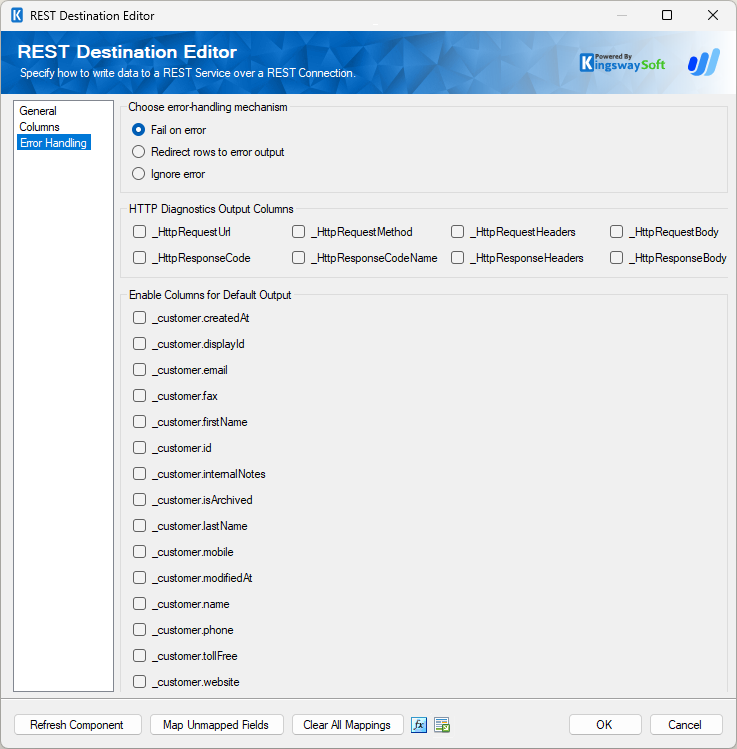
Three options are available:
- Fail on error
- Redirect rows to error output
- Ignore error
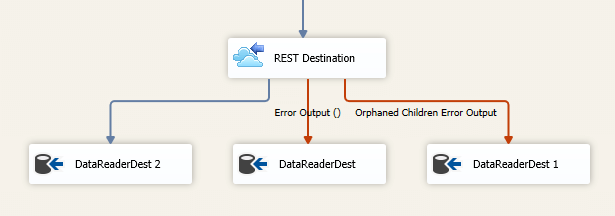
When Redirect rows to error output is selected, rows that fail to write to the Wave Accounting endpoint are redirected to the 'Error Output({PrimaryInputName})' output of the Destination Component; rows from the Child Input that failed to find the parent records will be redirected to the 'Orphaned Children Error Output' output of the Destination Component. As shown in the screenshot below, the blue output connection represents rows that were successfully written, while the red output connections represent rows redirected to 'Error Output{PrimaryInputName}' and 'Orphaned Children Error Output'.
- HTTP Diagnostics Output Columns
-
The below columns are available on the Error Handling page in the default output in order to view and work with the HTTP requests sent by our component and the response received so that these could be used in the downstream data flow.
- _HttpRequestUrl: The URL of the request
- _HttpRequestMethod: The HTTP method of the request
- _HttpRequestHeaders: All of the HTTP headers of the request
- _HttpRequestBody: The text body of the request
- _HttpResponseCode: The HTTP status code of the response
- _HttpResponseCodeName: The name of the HTTP status code of the response
- _HttpResponseHeaders: All of the HTTP headers of the response
- _HttpResponseBody: The text body of the response
The buttons under "Default Output Columns..." can be used to add the default Wave Accounting fields to the default output. Any Columns not required we would recommend to keep unchecked.