


The Final Countdown: Your GP Data Deserves a Smoother Landing
Dynamics GP is entering its final chapter, and for many organizations, the real question is how to protect their data and keep operations moving without disruption. Let's face it, Dynamics GP has been the unsung hero of your financial world. It’s been so solid, so reliable, you might have forgotten it even existed. But like any great star, it’s coming to an end.
Recently, Microsoft announced the official end-of-life timeline for Dynamics GP, making it clear that support and updates will be discontinued. As a result, many customers, including both Dynamics GP users and long-standing GP users, are now facing the challenge of transitioning to new ERP solutions and require strong support throughout this process.
Microsoft has officially put a line in the sand, and if you’ve been ignoring the hints, this is your wake-up call. The good news? You have time. The better news? We have the tool to make the inevitable data migration headache disappear.
KingswaySoft is here to turn this mandatory move into a powerful opportunity for modernization, starting with the most stressful part: moving your data without breaking everything. Our solution provides a complete migration experience, ensuring no gaps or limitations in your transition. Whether you are migrating to modern ERPs like Dynamics 365 Business Central, Finance & Operations, NetSuite, and Acumatica; enterprise systems such as SAP and Oracle CRM On Demand; industry-specific platforms like Blackbaud and QuickBooks; or even cloud data warehouses like Snowflake and Amazon Redshift, our integration solutions ensure your historical data remains intact while empowering your new system from day one. Many organizations have already successfully migrated using this approach, maintaining business continuity and access to critical data.

The GP Retirement Reality Check: Key Dates and Implications
Organizations relying on Dynamics GP ERP must now prepare for a structured transition to a modern platform. The dates are firm, and while they sound far away, they define the transition window you have to operate within.
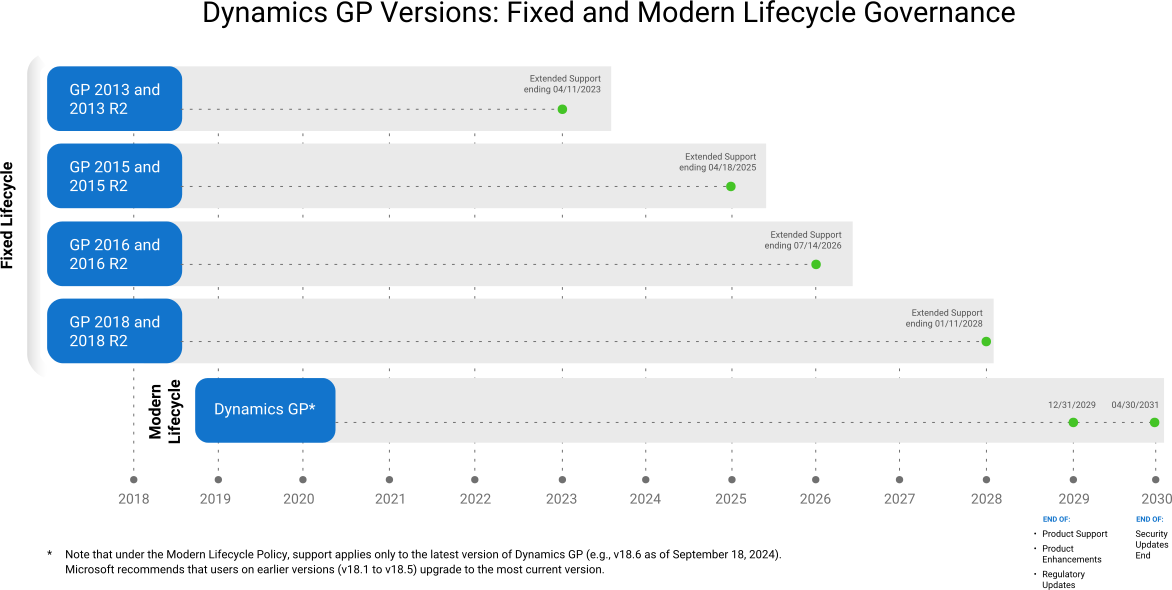
The core dates announced by Microsoft for the Modern Lifecycle Policy are definitive:
- End of Product Updates and Enhancements for Dynamics GP on December 31, 2029: This means no new features, no service packs, and critically, no regulatory updates (think: payroll, tax) will be released after this date. Your system becomes immediately obsolete and non-compliant in a changing world, directly impacting GP customers and existing users who rely on Great Plains for daily operations.
- End of Extended Support, including security updates and patches, on April 30, 2031: Operating past this date is a massive liability, leaving your core financials vulnerable to cyber threats.
These dates mark a clear endpoint for receiving vital updates and support. For GP customers and existing users, continuing to operate on an unsupported Great Plains platform beyond this timeline exposes a business to significant risks, including compliance issues, security vulnerabilities, and compatibility problems with other modern systems. The time to plan your migration is now.
Sources:
Microsoft’s official support timeline for Dynamics GP: Microsoft Dynamics GP Lifecycle Policy
More information: Microsoft Modern Lifecycle Policy FAQ
Why Does Microsoft Care About
Moving You Off this ERP System?
They want you in the future: cloud, AI, and connectivity. Staying on GP
limits your ability to innovate and compete.
Why Migrate Early?
End-of-support for Dynamics GP brings rising costs, security risks, and potential business disruption. Migrating early ensures continuity, protects your data, and positions your business to take advantage of modern technology and future growth opportunities.
The Maintenance Trap
Support is going to get exponentially more expensive and frustrating. Why pour money into patching an old system?
The Security Gap
No patches means you’re running without a safety net. Your data integrity and compliance are constantly at risk.
The Innovation Cap
GP is a brilliant anchor, but it’s an anchor nonetheless. It limits your use of modern BI, automation, and cloud apps that competitors already use.
The Quality of Migration
A rushed job leads to messy data, broken integrations, and operational chaos. A deliberate plan ensures your new ERP starts with clean, high-quality data.
Secure your systems, reduce costs, and stay ahead.
Strategy is Key: Navigating the Transition
The Challenge: Extracting the Good Stuff.
Moving from GP to a new ERP (like Dynamics 365 Business Central, Finance & Operations, or even NetSuite/Acumatica) is complicated. It's not just a copy-and-paste job. You're moving decades of transactions, customizations, and logic.
A comprehensive migration playbook should include the following phases:
- Current System Assessment: Conduct a thorough review of your existing Dynamics GP environment. Document all critical modules, customizations, and third-party add-ons, as these represent the core complexity of your migration.
- Target ERP Evaluation: While Dynamics 365 Business Central is the natural successor, evaluate alternative cloud ERPs, other ERP systems, or a new solution based on your business'’s current needs, industry requirements, and future scalability goals.
- Data Strategy and Cleanup: Legacy data often contains inconsistencies or requires restructuring for the new system. A dedicated phase for data cleansing and preparation is essential to avoid migrating low quality data to your new system, as this inevitably leads to low quality results. Pay special attention to ensuring vendor and purchase order data is accurately migrated.
- Integration and Testing: Thorough, real-world testing is the most crucial phase. You must ensure that all external applications, from payroll to warehousing systems, can integrate flawlessly with the new ERP. Pay special attention to ensuring vendor and purchase order data is accurately migrated.
It is critical to migrate all relevant Dynamics GP data, including database tables and historical information, to ensure business continuity and compliance in the new environment.
KingswaySoft's Role in a Seamless GP Migration
Data is the lifeblood of your business, and a successful migration hinges on its precise, efficient, and reliable transfer. This is where KingswaySoft's SSIS Integration Toolkit for Microsoft Dynamics GP provides an unparalleled advantage.
KingswaySoft's solution is designed to eliminate the complexity, custom coding, and high risk often associated with ERP data migration and integration. The toolkit utilizes Microsoft SQL Server Integration Services (SSIS), a familiar platform for many Dynamics users, offering a reliable, high-performance bridge for your data.

Dynamics GP Toolkit: Key Advantages That Simplify Your Life
- Zero-Code Extraction: Forget custom scripts. KingswaySoft's Dynamics GP Source Component effortlessly reads even the most complex historical and transactional records directly from your GP database. It just works.
- Drag-and-Drop Power: Manage the entire extraction, transformation, and load (ETL) process using intuitive, zero-code, drag-and-drop SSIS components. Your team focuses on mapping, not coding.
- The Any-to-Any Solution: Moving to Business Central? D365 F&O? Salesforce? Our comprehensive toolkit gives you the necessary components to write that cleaned-up data accurately to virtually any target ERP.
- Complete Migration and Integration: The toolkit provides a complete solution for migration and integration, ensuring full functionality and continuity across your systems.
- Easily Access Migrated Data: After migration, your team can easily access all migrated data through a straightforward interface, supporting efficient workflows and reporting.
- Reliable for Data Clean-up and Archiving: Use our toolkit before the migration for essential data cleanup, and after the go-live to easily archive your historical GP data for compliance and reporting.
Do not allow the end-of-life deadline for Dynamics GP to create uncertainty or force a rushed decision. We turn your highest-risk migration task (moving the data) into the most reliable part of your transition plan. By implementing a proactive strategy and utilizing a specialized data migration solution such as SSIS Integration Toolkit for Microsoft Dynamics GP, you can transform a potential challenge into a powerful opportunity for modernization and future growth. Start planning your seamless data journey today.
What Now: Don't Rush, Just Start
GP's data structure is complex. Getting that historical data out, cleaning it up, and mapping it to fit a shiny new system is the number one project killer. This is where KingswaySoft turns a "difficult, high-risk project" into a "controlled, predictable process": We are the bridge.
Before you begin, make sure to address any concerns or misconceptions about the migration process, especially regarding moving from Dynamics GP to Business Central. Clarifying these early will help ensure a smoother transition.
- Audit First: Get a clear picture of your current GP environment.
- Evaluate Targets: Look at Business Central and other modern ERPs.
- Contact KingswaySoft: Before you finalize the migration project plan, talk to us about the data strategy.
Would you like to connect with a KingswaySoft expert to discuss your specific GP migration scenario?
Get In TouchAbout KingswaySoft
KingswaySoft offers robust data enablement solutions that simplify complex integration scenarios and enhance data connectivity. These include our recently introduced JDBC Driver Pack, and over 300 SSIS components across diverse categories, such as data masking and anonymization, duplicate detection, data comparison, data profiling, advanced expression, encryption and compression, JSON & XML processing, SFTP/FTPS, and message queuing, to name a few. Many other premium components support in delivering a rapid ETL development experience using Microsoft Visual Studio and SQL Server Integration Services (SSIS) as the platform. These solutions are particularly well-suited for medium sized businesses looking to streamline their data integration and connectivity needs.
Our solution also includes support for connecting to NoSQL databases, cloud storage services, REST APIs, and virtually any other API or web service endpoint (SOAP or REST). Connectivity solutions are also available for facilitating data integration with enterprise applications such as Microsoft Dynamics 365, Active Directory, HubSpot, Microsoft SharePoint, Salesforce, SAP, and many more. Similarly, REST connections are available for numerous applications, including LinkedIn, Facebook Messenger, Acumatica, Zoom, Shopify, ServiceNow, and Zendesk, to name a few.
Get in touch with an expert to secure
your risk-free Dynamics GP migration plan.
Our expert team will be available to answer any questions.
FAQ
Microsoft has announced two definitive dates for Dynamics GP under the Modern Lifecycle Policy. End of Product Updates and Enhancements: December 31, 2029 (no new features or regulatory updates). End of Extended Support: April 30, 2031 (security updates and patches stop). To continue to receive support and updates from Microsoft, it is important to stay current with the latest software versions and comply with the Modern Lifecycle policy. Organizations must transition before these deadlines to maintain security and compliance.
The risks include significant security vulnerabilities due to missing critical patches, exposure to compliance issues (such as un-updated payroll/tax regulations after 2029), increased operational costs for maintaining an unsupported system, and potential business disruption from system incompatibility and downtime. Additionally, users who have recently paid for GP may feel dissatisfied with its deprecation and should carefully consider the costs and benefits of migrating to a new solution that better meets their business needs.
The KingswaySoft SSIS Integration Toolkit for Microsoft Dynamics GP provides a reliable, high-performance, zero-code solution for data migration. It enables users to easily extract complex data from their GP SQL database and seamlessly transfer cleaned and transformed data to a new ERP, such as Dynamics 365 Business Central, using the familiar SSIS platform. This reduces risk and eliminates the complexity of custom coding.
While each business should evaluate options based on its needs, Microsoft’s preferred replacement, and the natural successor in its cloud-first strategy, is Dynamics 365 Business Central. KingswaySoft’s toolkit is designed to facilitate migration to this and other modern ERP platforms.