

Using the GP Next Document Number Generator Component
The Dynamics GP NextDocNumber Editor / Generator is used to help you generate the next sequential ID number for given records that do not have automatic ID number generation. For example, you can use this component to generate an ID for a new Sales Order transaction.
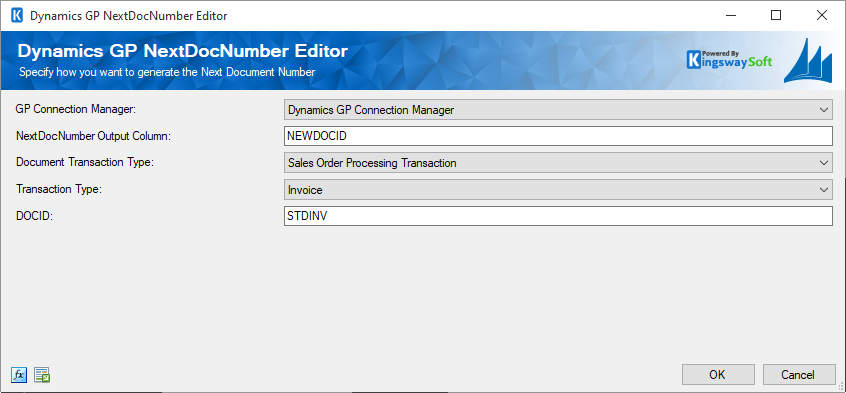
- GP Connection Manager
-
Specify the Connection Manager to use so that we can call the appropriate stored procedures against the desired Dynamics GP instance.
- NextDocNumber Output Column
-
This is the name for the output column to create in the output buffer of the NextDocNumber SSIS component. The resulting output column can be used in the mapping of downstream components and will contain the ID that you wish to generate.
- Document Transaction Type
-
Specify the Document Transaction Type.
- Transaction Type
-
Specify the Transaction Type.
- DOCID
-
If you selected the 'Sales Order Processing Transaction' Document Transaction Type, you will need to specify a value for the DOCID. Please see the table SOP40200 in your Dynamics GP database schema to find valid values. E.g. STDORD can be used here.
- Expression fx Icon
-
Click the blue fx icon to launch SSIS Expression Editor to enable dynamic updates of the property at run time.
- Generate Documentation Icon
-
Click the Generate Documentation icon to generate a Word document that describes the component's metadata including relevant mapping, and so on.
GP XML Schema Files
The Dynamics GP Components rely on XML Schema files to determine what objects and their field information are available for data manipulation. Upon installation, default schema files are installed into your installation folder. You may make changes to these schema files, or even indicate your own folder path to your version of the schema files via Registry key edit.
- Default Schema file location:
-
%ProgramFiles%\KingswaySoft\SSIS Integration Toolkit for Microsoft Dynamics GP\Schemas
- Registry Key:
-
HKey_Local_Machine\Software\KingswaySoft\SSIS Integration Toolkit for Microsoft Dynamics GP\SchemaDirectory