

Using the Project Server Source Component
The Project Server Source Component is an SSIS data flow pipeline component that can be used to read/retrieve data from Microsoft Project Server.
The component includes the following two pages to configure how you want to read data from Project Server.
- General
- Columns
General Page
The General page of the Project Server Source Component allows you to specify the general settings of the component.
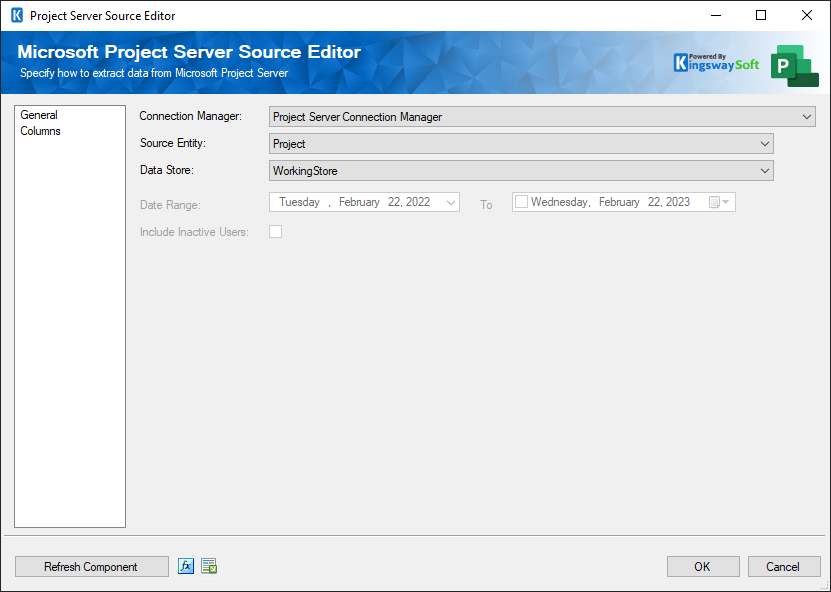
- Connection Manager
-
The Project Server Source Component requires a Project Server connection in order to connect with Microsoft Project Server. The Connection Manager drop-down will show a list of all Project Server connection managers that are available to your current SSIS package.
- Source Entity
-
The Source Entity option specifies a list of Project Server entities from which to retrieve data:
- Resource
- Project
- Task
- Timesheet
- TimesheetAction
- TimesheetLine
- TimesheetLineDetail
- Data Store
-
The Data Store option allows you to specify which data store you are working with when reading data from Microsoft Project Server. The available options include:
- PublishedStore
- VersionsStore
- WorkingStore
- ReportingStore
- PublishedStore
- Refresh Component Button
-
Clicking the Refresh Component button causes the component to retrieve the latest metadata and update each field to its most recent metadata.
Columns Page
The Columns page of the Project Server Source Component shows you all available attributes for the entity that you specified on the General page.
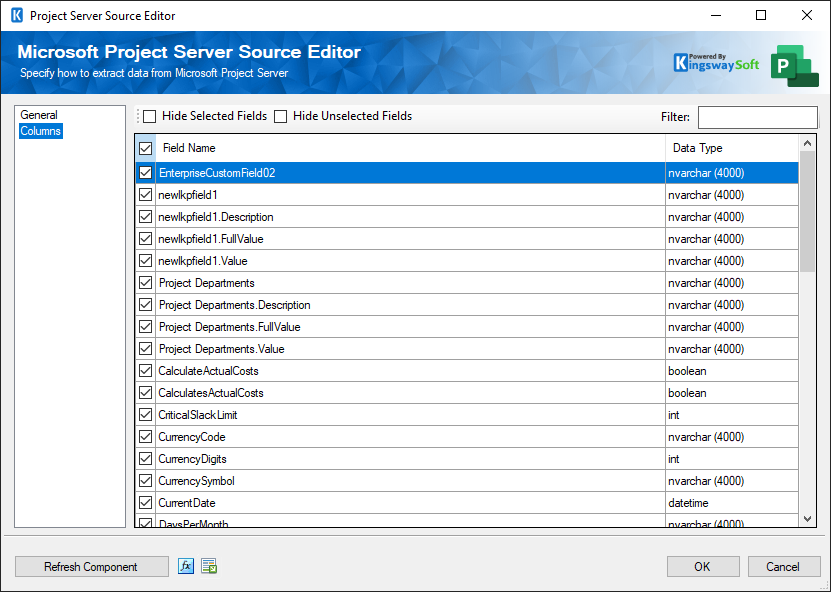
On the top left of the grid, you can see a checkbox, which can be used to toggle the selection of all available Project Server fields. This is a productive way to check or uncheck all available fields.
Note: As a general best practice, you should only select the Project Server fields that are needed for the downstream pipeline components.