

Oracle Marketing Cloud Source Component
The Oracle Marketing Cloud Source Component is an SSIS data flow pipeline component that can be used to read/retrieve data from Oracle Marketing Cloud.
The component includes the following two pages to configure how you want to read data from Oracle Marketing Cloud:
- General
- Columns
General Page
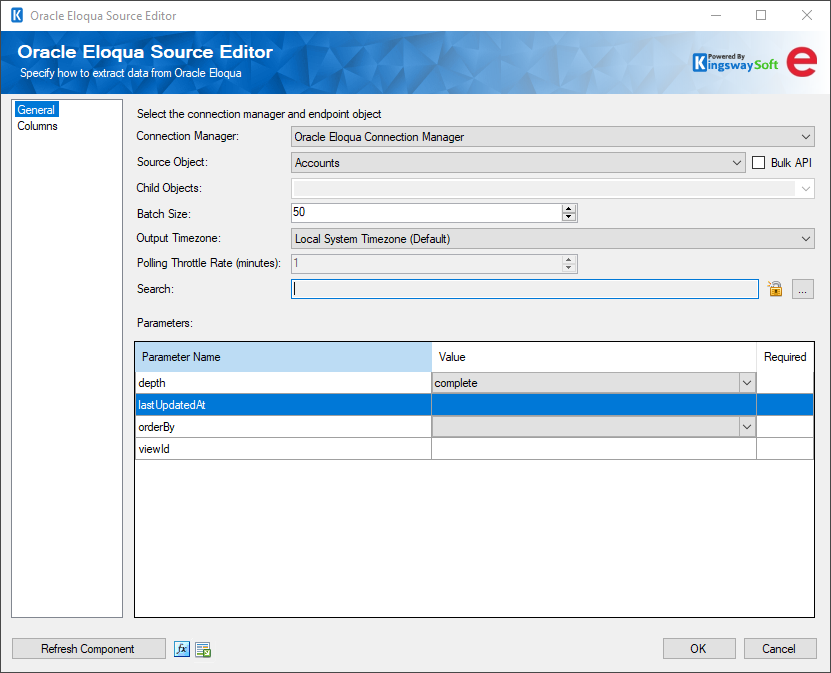
The General page of the Oracle Marketing Cloud Source Component allows you to specify the general settings of the component.
- Connection Manager
-
The Oracle Marketing Cloud Source Component requires an Oracle Marketing Cloud connection in order to connect with Oracle Marketing Cloud. The Connection Manager drop-down will show a list of all Oracle Marketing Cloud connection managers that are available to the current SSIS package.
- Source Object
-
The Source Object drop-down lists all of the currently supported objects which you can read from.
- Child Objects
-
The Child Objects drop-down lists all of the child objects supported for the selected source object. Each child object that is selected will create a new output where its data will be directed.
- Bulk API
-
The Batch API specifies whether you want to use Bulk API to read data from your Marketing Cloud system.
Note: This option will only be available to Accounts, Activities, Contacts, and Custom objects.
- Batch Size
-
The Batch Size lets you specify how many records to retrieve per service call to Oracle Marketing Cloud. The batch size can be between 1 and 1000.
- Output Timezone
-
The Output Timezone option lets you specify how all datetime fields should be retrieved. The default value is Local System Timezone. There is also the option to convert to UTC. There is no performance difference between the two options; it simply makes integration easier.
- Polling Throttle Rate (minutes)
-
The Polling Throttle Rate determines the frequency at which the status of the job is polled to determine if it has been completed.
Note: This option will only be available when the Bulk API option is enabled.
- Search
-
Specifies the search criteria used to retrieve entities. The syntax is {field name} {operator} {value} and the supported operators are:
- = (Equal To)
- != (Not equal to)
- > (Greater than)
- < (Less than)
- >= (Greater than or Equal to)
- <= (Less than or Equal to)
See the API Documentation for information about using this parameter.
- General Parameters
-
Each source object will have different parameters that you can set to determine which records are returned and in what order.
Detailed information about common parameters and the syntax of the parameter values can be found here: https://docs.oracle.com/cloud/latest/marketingcs_gs/OMCAC/APIRequests_URLParameters.html
Common parameters include:
Depth: The level of depth of the response. The default is Complete which will return all source object and child object data. Partial and Minimal depth will return less data but will be faster.
sort: Specifies the name of the property used to sort the returned entities.
dir: The sort direction of results, either asc or desc.
orderBy: Specifies the field by which list results are ordered.
lastUpdatedAt: Returns records last updated after the specified date. A date can be entered either as a text date (Jan 1, 2017) or as a Unix time integer.
- Refresh Component Button
-
Clicking the Refresh Component button causes the component to retrieve the latest metadata and update each field to its most recent metadata.
- Expression fx Icon
-
Click the blue fx icon to launch SSIS Expression Editor to enable dynamic updates of the property at run time.
- Generate Documentation Icon
-
Click the Generate Documentation icon to generate a Word document that describes the component's metadata including relevant mapping, and so on.
Columns Page
The Columns page of the Oracle Marketing Cloud Source Component shows you all available attributes from the object that you specified on the General page.
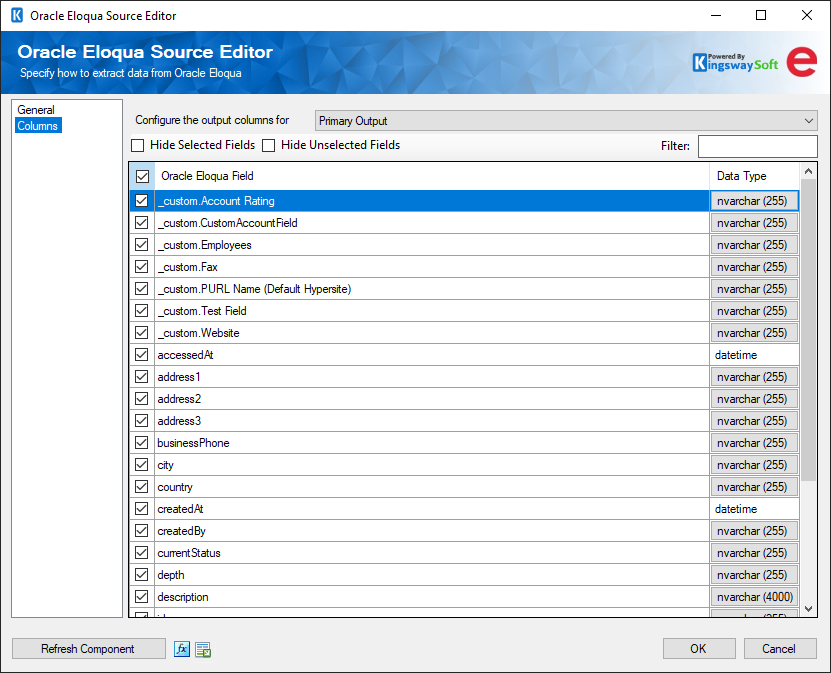
The columns page contains a drop-down that lists the source object from the general page and any available children. Output columns can be toggled on.