

Embracing Modern Authentication: Salesforce SOAP API login() Retirement and the Path Forward
Salesforce continues to strengthen its platform with security enhancements and forward-looking improvements that benefit all users. One such evolution is the planned retirement of the traditional SOAP API login() authentication, a change that aligns with broader industry shifts toward more secure, OAuth-based authentication. This update reflects Salesforce's commitment to secure-by-default practices, providing clearer guidance and robust alternatives for external integrations. If you happen to be using Salesforce APIs to run your integration, including the use of our SSIS Integration Toolkit, you need to be prepared for this critical change.
Source: Salesforce Platform SOAP API login() Retirement announcement

Salesforce's Direction: Secure by Default Authentication
Salesforce has confirmed that SOAP API login() remains supported for API versions 31.0 through 64.0 today, with support ending in the Summer '27 release. Existing integrations may continue to function for now, which can make this change easy to push down the priority list.
So why does it matter now?
Because Salesforce is already enforcing this direction across newer environments and API versions:
While the staged rollout may give the impression that the deprecation is still far away, the reality is that the available time for planning and execution is more compressed than it first appears. If not addressed with a clear plan and timely action, teams can easily find themselves in the middle of implementation when enforcement begins - potentially causing integration interruptions. Our advice is to address this proactively, the sooner the better, to fully embrace the strategic improvement in security and reliability to avoid any potential downtime.

What This Change Looks Like in Practice
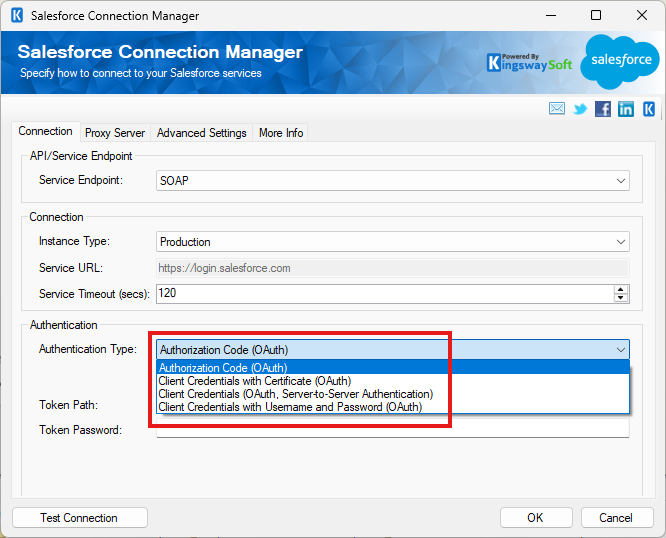
The real challenge with the SOAP API login() retirement is not the timeline. It is knowing where older authentication methods are still being used before something breaks. For some KingswaySoft users, this becomes visible when a connection still relies on legacy SOAP login authentication instead of a supported OAuth option.
In practice, the transition is already visible. Teams working with newer API versions or newly created environments may encounter scenarios where legacy authentication is no longer available. For example:
System.Web.Services.Protocols.SoapException: INVALID_OPERATION:The SOAP Login operation is not available in the API version specified (66.0).
This can be surprising at first, but the underlying change is straightforward:
- The SOAP service endpoint remains fully supported
- The legacy SOAP login() authentication method is what is being retired
- OAuth-based authentication is the recommended path forward
In other words, integrations can continue to use SOAP where appropriate - while modernizing how authentication is handled. The good news for KingswaySoft users is that you can retain your existing SOAP-based connections and simply switch the authentication method to a modern OAuth option. This minimizes disruption while delivering stronger security. It is worth mentioning that we have provided OAuth authentication support since our v11 release of the SSIS Integration Toolkit for Salesforce if you are using the REST connection. OAuth support was added to the SOAP connection in our v25.2 release, which makes it a seamless experience to make the switch. As a general best practice, we always recommend you go with the latest release (we are on v26.1 now) for more enhancements, including security improvements.
For users who look for detailed instructions, our updated blog post on modern OAuth connections for Salesforce provides additional guidance on the supported configuration approach.
A Clear Path Forward for Integration Teams
When platform changes affect authentication, the teams that stay ahead are usually the ones that focus on clarity first. Instead of reacting late, they take a few deliberate steps to understand what's in place and reduce uncertainty before enforcement begins.
- Map how integrations authenticate today
Document every integration that connects to Salesforce, including the authentication method used, the account involved, and which downstream systems rely on it. - Check for SOAP API login() usage
Use Salesforce login history and API usage data to identify where older authentication patterns are still active and link them back to the responsible application or team. - Distinguish vendor-managed tools from internal workflows
Some integrations require vendor upgrades, while others need authentication updates or connection reconfiguration to support OAuth. Separating the two helps avoid unnecessary work and delays. - Validate OAuth changes early
Test updated authentication flows in lower environments and roll them out gradually to maintain stability in production.
How KingswaySoft Helps Teams Adapt to Platform Changes
At KingswaySoft, we follow platform changes closely so customers can keep integrations reliable as requirements evolve. We stand firmly behind modern authentication standards, and our solutions are built to support OAuth-based connectivity aligned with Salesforce's direction. Just as importantly, we help customers approach the transition in a structured way.
Planning Ahead Creates Stability Later
Salesforce's SOAP API login() retirement is part of a broader shift toward secure-by-default authentication. The good news is that the path forward is clearly defined. Salesforce is providing time and guidance to move toward External Client Applications and OAuth, allowing teams to plan changes deliberately rather than react under pressure.
KingswaySoft supports this transition with practical guidance and OAuth-ready connectivity solutions designed to keep integrations reliable as platform requirements evolve.
Planning early creates flexibility. Platform requirements change, but with the right approach, integration reliability does not.
Get In Touch Download Integration ToolkitAbout KingswaySoft
KingswaySoft offers robust data enablement solutions that simplify complex integration scenarios and enhance data connectivity. These include our recently introduced JDBC Driver Pack, and over 300 SSIS components across diverse categories, such as data masking and anonymization, duplicate detection, data comparison, data profiling, advanced expression, encryption and compression, JSON & XML processing, SFTP/FTPS, and message queuing, to name a few. Many other premium components support in delivering a rapid ETL development experience using Microsoft Visual Studio and SQL Server Integration Services (SSIS) as the platform.
Our solution also includes support for connecting to NoSQL databases, cloud storage services, REST APIs, and virtually any other API or web service endpoint (SOAP or REST). Connectivity solutions are also available for facilitating data integration with enterprise applications such as Microsoft Dynamics 365, Active Directory, HubSpot, Microsoft SharePoint, Salesforce, SAP, and many more. Similarly, REST connections are available for numerous applications, including LinkedIn, Facebook Messenger, Acumatica, Zoom, Shopify, ServiceNow, and Zendesk, to name a few.
Talk to an expert about your
Salesforce authentication transition
Our expert team will be available to answer any questions.
FAQ
SOAP API login() is a legacy authentication method used by some Salesforce integrations to establish a session using a username and password. Salesforce is phasing out this approach in favor of OAuth-based authentication for improved security and control.
Salesforce has confirmed that SOAP API login() is supported for API versions 31.0 through 64.0, with support ending in the Summer '27 Salesforce release. Enforcement will occur after that release.
No. Existing integrations that rely on SOAP API login() may continue to function for now, depending on the API version and org configuration. However, once support is no longer available or legacy SOAP login authentication is still being used after upgrading, those integrations can fail to authenticate.
No. This update specifically affects SOAP API login(). Salesforce REST API integrations that already use OAuth-based authentication are not impacted.
In some cases, yes. Salesforce recommends confirming that third-party vendors support OAuth and External Client Apps, and upgrading to a compatible version if necessary. Some integrations may also require authentication updates or connection reconfiguration to align with supported OAuth approaches.
This change aligns with Salesforce's broader move toward secure-by-default authentication, stronger governance, and better visibility into how integrations access data over time.