

Using the Premium SQL Server CDC Source Component
The Premium SQL Server CDC Source Component utilizes the SQL Server Connection Manager to facilitate incremental reading from databases. The following pages are available for configuration:
- General
- Columns
Note that the Premium SQL Server CDC Source Component should be used along with the Premium SQL Server CDC Command Task for having the CDC Tokens handled as expected.
General Page
The General page of the Premium SQL Server CDC Source Component allows you to specify the component's general settings.
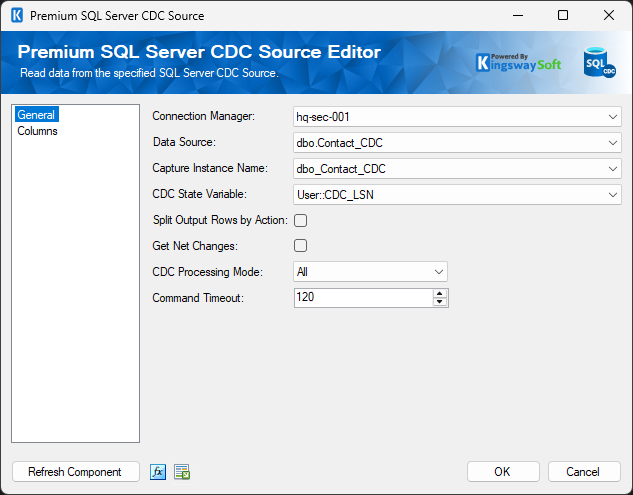
- Connection Manager
-
The Premium SQL Server CDC Source Component requires the SQL Server connection manager.
- Data Source
-
The Data Source drop-down displays a list of available tables and views from the database specified in the Connection Manager. Selecting a table here will automatically populate the Command property. This is a quick and easy way to generate a basic SELECT statement for reading from the database.
- Capture Instance Name
-
Lists all the CDC capture instances for the table chosen. You can pick the one to work with.
- CDC State Variable
-
The token value that was set previously. This would contain the token value for the incremental load.
- Split Output Rows by Action
-
Determines if the component has one output (false) or three outputs (true). 1 output will send the rows to a destination sequentially, but 3 outputs could send them to 3 destinations simultaneously.
- Net Changes
-
This setting consolidates the CDC rows into 'effective changes' and would expect exactly 1 CDC row per key that would represent the final state of the row. In most cases, this must be set to true if Split Output Rows by Action is true - without net changes, you can't reliably run the create/update/delete actions simultaneously.
- CDC Processing Mode
-
All or All with old values. All is 1 row per CDC action. All with old values returns 2 rows for every update action: the original and the new values. Some sophisticated destinations might use this information to avoid updating unchanged values.
- Command Timeout
-
The Command Timeout option allows you to specify the number of seconds before a command times out. The default value is 120 seconds.
- Refresh Component Button
-
Clicking the Refresh Component button causes the component to retrieve the latest metadata and update each field to its most recent metadata.
- Expression fx Button
-
Click the fx button to launch the SSIS Expression Editor to enable dynamic updates of the property at runtime.
- Generate Documentation Button
-
Click the Generate Documentation button to generate a Word document that describes the component's metadata, including relevant mapping and more.
Columns Page
The Columns page of the SQL Server CDC Source Component shows you the available columns based on the settings on the General page.
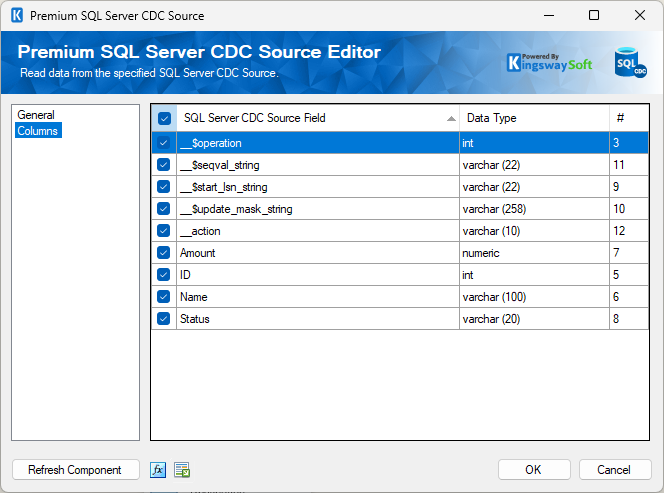
The checkbox in the top-left corner of the grid allows you to select or deselect all available SQL Server CDC Source fields at once, providing a convenient way to manage field selections.
- SQL Server CDC Source Field
-
Lists the names of the fields available from the data source.
- Data Type
-
Shows the data type of the respective field.
- Ordinal (#)
-
Shows the specific order within a table's structure starting from 1.
Note: As a general best practice, you should select only the SQL Server CDC Source fields required by downstream pipeline components. You can do this by using the checkboxes on the Columns page or by removing unnecessary columns directly from the command on the General page.