

Using the Salesforce Command Task
The Salesforce Command Task is a control flow component that can be used to execute Apex code in Salesforce directly at the control flow level.
The Salesforce Command Task includes the following two pages:
- General
- Error Handling
General Page
The General page includes the general properties of the component.
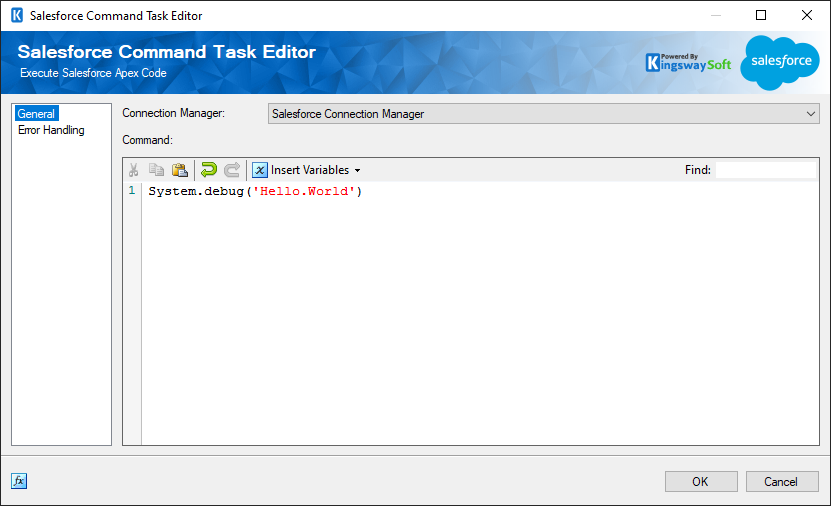
- Connection Manager
-
The Connection Manager drop-down displays a list of all relevant Salesforce connection managers that are available in the current SSIS package.
- Command
-
The Command textbox allows you to specify the Apex code that will be executed against the connected Salesforce instance.
The Command textbox supports the use of User and System Variables. Simply select a variable by clicking the Insert Variables button in the panel, and a placeholder value will be inserted into the text.
- Expression fx Button
-
Click the fx button to launch SSIS Expression Editor to enable dynamic updates of the property at run time.
Error Handling Page
The Error Handling page allows you to specify how errors should be handled when they occur.
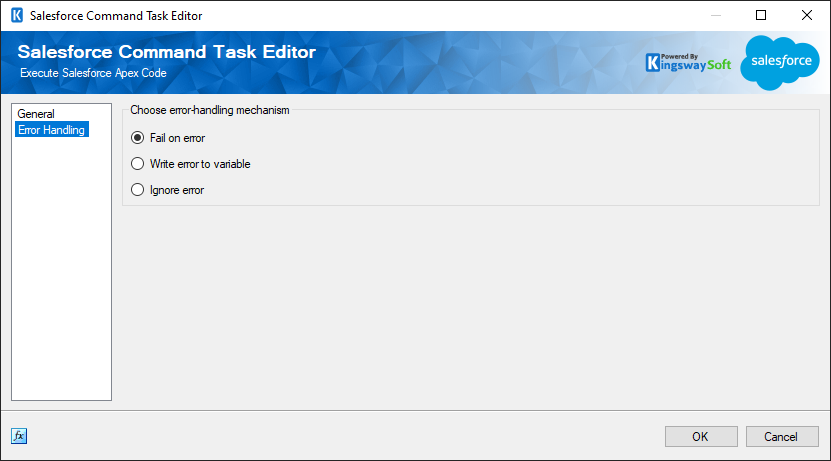
- Fail on error
-
When selected, the task will fail when an error occurs.
- Write error to variable
-
When selected, the error message will be written to an SSIS variable.
- Ignore error
-
When selected, the error will be ignored and the task will continue.