

Using the Oracle CRM On Demand Source Component
The Oracle CRM On Demand Source Component is an SSIS data flow pipeline component that can be used to read/retrieve data from Oracle CRM On Demand.
The component includes the following configuration pages:
- General
- Columns
General Page
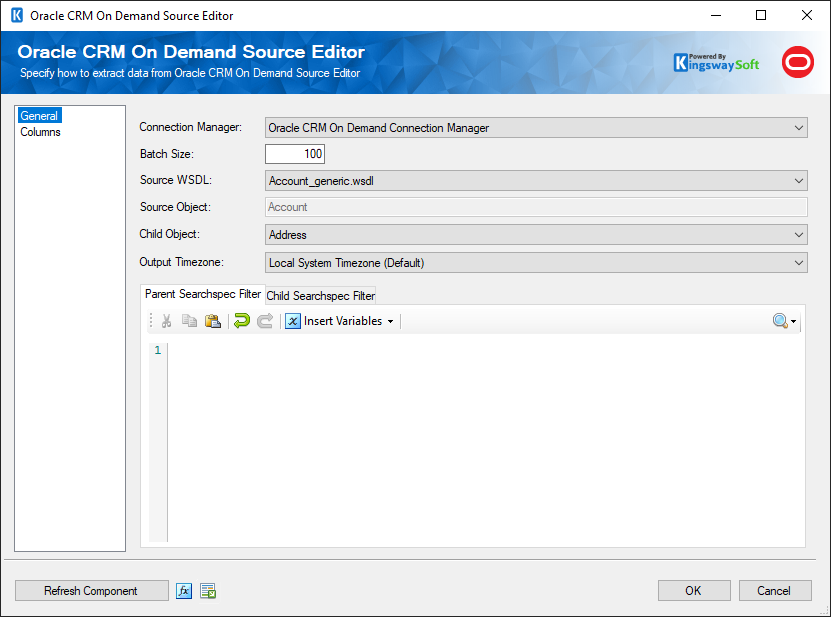
The General page allows you to configure various options that will help you retrieve the desired data from Oracle CRM On Demand.
- Connection Manager
-
The source component requires an active web service connection to Oracle CRM On Demand. The Connection Manager drop-down will show a list of all Oracle CRM On Demand Connection Managers that have been created in the current SSIS package.
- Batch Size
-
A maximum limitation of 100 records per web service result is set by Oracle CRM On Demand. You can change the batch size to suit your preferences.
- Source WSDL
-
The Source WSDL drop-down lists all available WSDL files. The folder path that is read is determined by the registry key: HKEY_LOCAL_MACHINE\SOFTWARE\KingswaySoft\SSIS Integration Toolkit for Oracle CRM On Demand\WSDLDirectory. If the registry key does not exist, the default folder path ([path to Program Files ]\KingswaySoft\SSIS Integration Toolkit for Oracle CRM On Demand\Schemas) will be used. By selecting a value from this drop-down, the component will attempt to read the metadata contained within the selected WSDL file. Additional WSDL files can be obtained from the Oracle CRM On Demand -> Admin -> Web Services Administration page.
- Source Object
-
This text box is a read-only field that displays the object detected from the WSDL file loaded from the Source Object WSDL drop-down.
- Child Object
-
This drop-down list specifies the child object to read from. By default, it is left blank, meaning only parent fields can be read. When a child object is selected, another searchspec textbox will be made available along with another table in the "Columns" page. This allows reading and filtering of both parent and child fields.
- Output Timezone (since v4.0)
-
The output timezone setting determines what format any datetime values read from Oracle should be converted to. There are three options available.
- Timezone of Connection User: Any datetime values will be converted to the timezone of the connection user based on the user's timezone setting in Oracle CRM On Demand.
- UTC
- Local System Timezone (Default): Any datetime values will be converted to the local system time where the package is run.
- (Parent/Child) Searchspec Filter
-
The Searchspec Filter allows you to specify a searchspec query to help filter for the desired records. When a child object is selected, another Searchspec field will be made available allowing you to specify a searchspec query for both the parent and the child object. Please read Oracle Documentation for further details on how to specify a searchspec query.
- Refresh Component Button
-
Clicking the Refresh Component button causes the component to retrieve the latest metadata and update each field to its most recent metadata.
- Expression fx Icon
-
Clicking the blue fx icon launches the SSIS Expression Editor to enable dynamic updates of the property at run time.
- Generate Documentation Icon
-
Clicking the Generate Documentation icon generates a Word document that describes the component's metadata including relevant mapping, and so on.
Columns Page
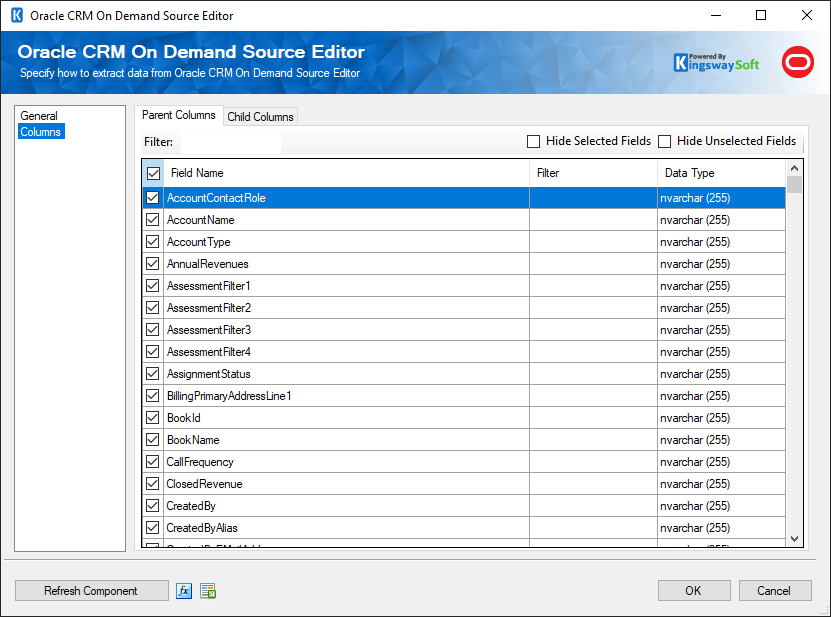
The Columns page shows you all available attributes from the object that you specified on the General page. You may indicate which attributes to include in your source component by checking or unchecking the checkbox next to each attribute. In conjunction with the searchspec filter from the General page, each attribute has a Filter column where you can enter search criteria for the attribute.
Child Objects in the Source Component
When a child is selected in the "Child Object" drop-down list on the "General" page, another table is made available here on the "Columns" page. This allows for the selection and filtering of both parent and child fields. Even though there are two tables, there is still only one output; this just makes it easier to select/deselect child and parent fields separately. One thing to note as well is that there are fields that exist in both tables. This is a problem because we only have one output. However, if you look at the output columns in the advanced editor, you will notice all of the child fields are prefixed with the child name (eg, TeamData).
Data Filtering in the Source Component
There are 2 methods for filtering for the desired data in the Oracle CRM On Demand Source Component. You may add filter criteria in the Searchspec Filter text box, and/or add filtering for each individual field. The 2 methods work together to filter for records that match both filtering techniques.
- Example for the Searchspec Filter
- In the above screenshot for the source component, you can see a filter on the CreatedDate column to filter for records created between the dates 2014-08-01 to 2014-08-17. The general structure for a filter is: [field name] {operator} {your filter value}. E.g. [CreatedDate] > '2010-01-01T00:00:00' You can also search on multiple fields by using an AND/OR E.g. ([CreatedDate] > '2010-01-01T00:00:00') AND ([AccountName] = 'Acme Company')
- Example for the Field-specific filtering
- Filtering applied on the field level will only apply to that particular field. The general structure for a filter is: {operator} '{your filter value}'. E.g., To look for all AccountName that begins with the value 'Test' using the following filter: LIKE 'Test*'.
- Reference
- The best place to find further information on filtering is to refer to the Oracle Documentation.