


JDBC Driver Pack
Connect with Your Dynamics 365 CE/CRM Data within Your Java-Based Applications
Easily integrate with BI, reporting, and ETL solutions using structured querying.
Retrieve and write data using SQL-based queries, with the driver handling API interactions.
Product Features
Seamless Connectivity
JDBC Driver Pack
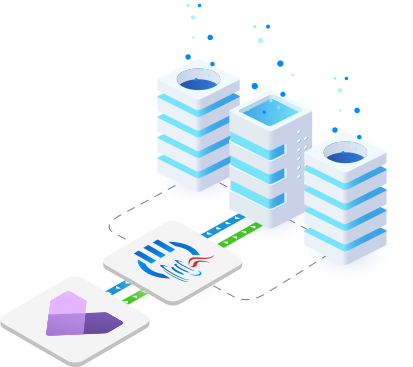
Reliable connectivity for accessing and managing
Dynamics 365 CE/CRM data.
JDBC Driver Pack
Advanced Capabilities

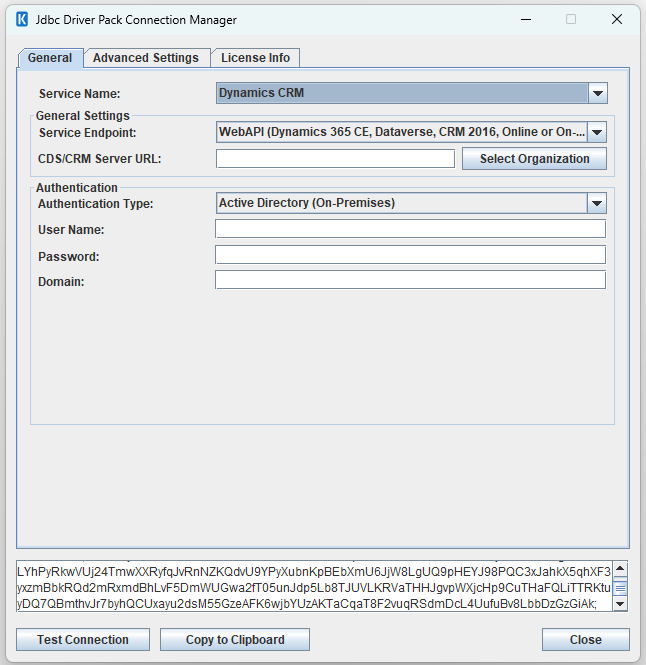
JDBC Connection Manager
The JDBC Connection Manager in the JDBC Driver Pack provides a user-friendly interface for configuring authentication, API behaviors that help work with various network and deployment settings in order to achieve optimal data access performance.
PurchaseStreamlined
Connectivity
Easy to configure and implement so your development can be completed in minutes and you can quickly leverage insights from your data.
Flexible and
Easy to Use
We make the most flexible integration solution on the market. Our software offers intuitive user interfaces that are flexible and easy to use.
Cost
Effective
With a simplified development experience, and an extremely simple licensing model, our solution offers the best value for your investment.
Unparalleled
Performance
Our software includes purpose-built features that help you achieve optimal performance while ensuring exceptional efficiency and reliability.
More Resources
Download our Data Sheet for
JDBC Driver Pack
CRM & ERP JDBC Drivers
Our JDBC Driver Pack includes a diverse selection of
drivers for seamless connectivity across business applications.

Acumatica

Blackbaud

Copper

Crelate

Dynamics 365 AX/FO

Dynamics 365 CE/CRM

Dynamics 365 Customer Insights

Dynamics 365 NAV/BC

Freshdesk

HubSpot

Insightly

Intercom

Keap

Outreach

Pipedrive

Salesforce

ServiceNow

Zendesk

Zoho Bigin

Zoho CRM
FAQ
The KingswaySoft JDBC Driver allows Java applications and JDBC-compatible software to connect to Dynamics 365 Customer Engagement, CRM, and Dataverse (CDS) using standard SQL statements. The driver translates these statements into calls against the WebAPI endpoint.
The driver supports two primary deployment types: Active Directory (On-Premises) and OAuth (for Online or On-Premises). OAuth options include Authorization Code, Client Credentials (Server-to-Server), Certificate, and Password (not recommended for security).
Yes. The driver exposes Dynamics 365 entities as relational tables, allowing you to execute SELECT, INSERT, UPDATE, DELETE, and UPSERT operations using standard Java Statement and PreparedStatement classes.
The UPSERT operation supports two matching methods: Alternate Key Method (using system-defined keys) and Manually Specified Key Method (defining custom fields for lookup). Both methods ensure records are either updated or inserted in a single call.
You can use the included connection management tool by executing the command java -jar kingswaysoft.jdbc.jar. The tool guides you through entering details and automatically generates a complete and ready-to-use JDBC connection URL.
Yes. The driver provides Query Options like BypassCustomSyncBusinessLogicExecution and BypassCustomAsyncBusinessLogicExecution which can be appended to your SQL statement to disable synchronous and asynchronous logic during write operations.
Get In Touch
If you would like to know more specific details about our solutions, or if you have any suggestions about our product offerings, we are always here to listen and help!
Contact Us