

Webex Data Integration
Powered by KingswaySoft Solutions
Connect Webex with enterprise applications, databases, and reporting platforms through SSIS-based integration, Java connectivity, webhook processing, and codeless data synchronization.

Explore Data Solutions for Webex

SQL Server-Based Integration

Java Connectivity

Data Synchronization

Real Time Integration
The Most Feature-Rich and Flexible Data Solutions
SSIS Connectors - ETL Components - JDBC Drivers - Productivity Tools

SQL Server Based Data Integration
Powerful Webex SSIS Integration

Integrate Webex with Any Source and Destination
Integrate supported Webex data with virtually any application or data source using SSIS. Build codeless data flows for meetings, messages, people, devices, reports, and related collaboration records while the components handle authentication, filtering, pagination, field mappings, supported write operations, and error handling.
Java Connectivity
Developer-Focused JDBC Access for Webex
Give Java applications structured, API-based access to supported Webex data through the KingswaySoft JDBC Driver. Work with meetings, participants, people, messages, recordings, and related collaboration information using familiar JDBC interfaces.

Webex with EasySync
Turnkey Data Synchronization Solution for Webex
Use a codeless experience to configure and manage repeatable data synchronizations from Webex into supported database destinations. Define connections, mappings, tasks, and schedules, and monitor execution results through a centralized web interface.
Connect & Configure
-
Connect Webex as a source and select a supported database destination.
-
Configure reusable connections, field mappings, tasks, and job settings.
Synchronize & Automate
-
Use full or supported incremental extraction modes to transfer Webex data.
-
Run jobs manually or on a defined schedule and monitor status, processed rows, and failures.
Real-Time Syncing
Receive Webex Webhook Events
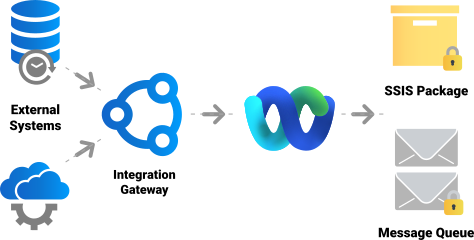
Configure supported Webex webhook subscriptions to send selected event notifications to an Integration Gateway Custom Webhook endpoint. Process incoming messages and initiate local integration workflows without recurring API polling.
More Collaboration Components
Our Collaboration components make it easy to connect and exchange data with a wide range of services. In addition to Webex, we support the following Collaboration services:
Browse Connectors

Asana

BaseCamp

Calendly

ClickUp

DocuSign

GitHub

Jira

Microsoft Planner

Microsoft Project Server
Microsoft SharePoint

Microsoft Teams

Microsoft To Do

Monday.com

OpenAI

Replicon

RingCentral

Slack

Smartsheet

Team Foundation Server

Teamwork

Trello

Wrike

Yammer

Zoho Sheet

Zoom
Download Solutions for Webex



FAQ
Webex is supported through KingswaySoft's SSIS Integration Toolkit, JDBC Driver Pack, EasySync, and Integration Gateway Custom Webhooks. These products support SSIS-based integration, Java connectivity, codeless database synchronization, and webhook-driven processing.
The Webex REST Connection Manager is an SSIS connection manager that enables secure connectivity to Cisco Webex REST APIs. It manages authentication, API throttling, proxy settings, and advanced connection options, and is required when using the Webex REST Source and Webex REST Destination components for Webex data integration.
To connect SSIS to Webex, add a REST (KingswaySoft) Connection Manager to your SSIS project in Visual Studio. From the General page, select the Webex service, configure your site and API throttling rate, and choose an authentication method such as Bot Token, Personal Access Token, or OAuth Authorization Code. Once configured, you can test the connection to ensure Webex is reachable.
The Webex REST Connection Manager supports three authentication methods: Bot Token, Personal Access Token, and OAuth 2.0 Authorization Code. OAuth is recommended for production deployments, providing secure token generation and refresh using either a KingswaySoft test app or your own registered Webex application.
The Webex REST Connection Manager supports multiple authentication methods to match different integration scenarios. These include Bot Token for bot-based access, Personal Access Token for user-level API access, and OAuth Authorization Code for secure, production-grade integrations using your own Webex application credentials.
You can retrieve data from Webex using the Webex REST Source Component. This component allows you to select Webex objects and endpoints, configure batch size, apply filter parameters, control output time zones, and dynamically refresh metadata. Only selected fields are returned, helping optimize performance and downstream processing.
Writing data to Webex is handled through the Webex REST Destination Component. You can choose the destination object, specify supported actions, map input columns to Webex fields, and configure batch size and time zones. Advanced features such as child object inputs and error handling outputs make it possible to manage complex data structures and capture detailed API response diagnostics.
The Integration Gateway utilizes its Custom Webhooks feature to listen for immediate data change messages from Webex, instantly processing the event to keep data up-to-date across your connected systems.
EasySync provides a codeless way to synchronize supported Webex data into supported database destinations. Configure connections, mappings, tasks, extraction settings, and schedules, then monitor execution status, processed rows, and failures through a centralized web interface.
Get In Touch
If you would like to know more specific details about our solutions, or if you have any suggestions about our product offerings, we are always here to listen and help!
Contact Us