

Using the Premium File Watcher Task
The Premium File Watcher Task is a control flow component that can be used to monitor a folder based on a condition if required, and based on a trigger, write to output if a change has occurred.
General Page
The General page includes the general properties for the component.
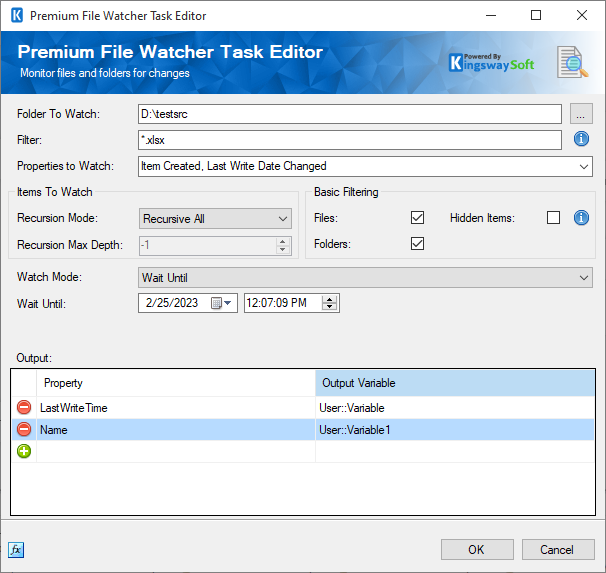
- Folder To Watch
-
Specify the folder location that needs to be watched.
- Filter
-
Specify a filter to only watch files and folders based on a condition. * and ? characters may be included in the filter to perform wildcard searches (example *.xlsx will check any number or characters followed by .xlsx). If the filter is left blank, all files and folders will be monitored.
- Recursion Mode
-
Choose one from the drop-down
- Recursive All
- Immediate Children Only
- Recursive With Max Depth
- Recursion Max Depth (Available when Recursive With Max Depth Recursion Mode is chosen)
-
Adjust the number to specify the recursion max depth.
- Files
-
Check the option to filter on files
- Directories
-
Check the option to filter on Directories.
- Hidden Items
-
Check the option to filter on hidden items.
This consists of two columns
- Property: Choose which property to read and map to the variable.
- Output Variable: Choose the variable that the property is to be mapped to.
Click the blue fx icon to launch SSIS Expression Editor to enable dynamic updates of the property at run time.