

Salesforce and Dataverse/CRM Integration
Moving your enterprise data between Salesforce and Dataverse/CRM platform is a high-stakes endeavor that poses architectural hurdles and risks of data loss at every stage of development. To streamline this process, we offer our Salesforce and Dataverse Integration/Migration Starter Pack, designed for two-way data movement. Built using KingswaySoft SSIS Integration Toolkit, this ready-to-use sample package provides a solid foundation that can be deployed immediately or customized to power your ongoing data synchronization pipeline.
KingswaySoft Integration/Migration Starter Pack
Moving your enterprise data between Salesforce and Dataverse/CRM platform is a high-stakes endeavor that poses architectural hurdles and risks of data loss at every stage of development. To streamline this process, we offer our Salesforce and Dataverse Integration/Migration Starter Pack, designed for two-way data movement. Built using KingswaySoft SSIS Integration Toolkit, this ready-to-use sample package provides a solid foundation that can be deployed immediately or customized to power your ongoing data synchronization pipeline.
The biggest hurdle in any project involving Salesforce to Dataverse/CRM or vice versa is untangling the complex entities and relational dependencies inherent in nearly all data flows. We have a solution that removes the guesswork and simplifies this process.
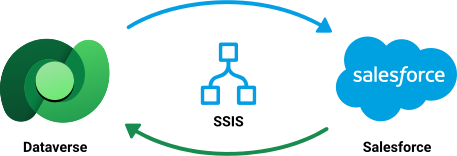
The Integration/Migration Starter Pack is available for download as an SSIS project using this link. Within the project folder, you will find the two pre-configured packages discussed in this post. These packages simplify the ETL process by handling complex tasks such as built-in lookups, optionset mapping, error handling, and record skipping for retries. By using these features, your development team can significantly reduce the effort required to create such ETL processes. Below are some important aspects of the provided packages and their design:
- The sample project we shared consists of two separate packages: one for migrating data from Salesforce to Dataverse and the other for moving data from Dataverse to Salesforce. This division aims to clarify the two directional flows while keeping them distinct. If needed, the packages can be combined into one using sequence containers or other controls available in the SSIS platform.
- The packages are currently designed for performing a full migration. This can be easily modified to enable incremental integration between the two systems by making some changes, such as using an SOQL query to read the last-modified records from Salesforce and implementing Change Tracking in Dataverse/CRM. We have several blog posts that can guide you in designing these solutions, which you can find in the links below:
- The package provides a sample migration between Salesforce and Dataverse CRM for key entities or objects, such as accounts, contacts, emails, tasks, email attachments, files, and note attachments.
- The packages are migration-ready and can be run by changing the connection credentials to your own, with minimal configuration adjustments as needed.
- The data flow logic can be adapted to other out-of-the-box or custom Dataverse and Salesforce objects as well.
- Please be aware that in the data flows, we have not showcased how to construct PartyList fields to keep the flow linear, and to focus on other major aspects of the integration/migration use cases. For those interested in a deeper exploration of PartyList manipulation and writing, we have additional blog posts available here that cover this topic in detail.
- We have grouped a few data flows that can run in parallel; however, you may choose to execute them in series to avoid throttling or other potential issues.
- Annotations are included in the package to explain necessary actions or completed tasks.
The Design and Data Flow: A Brief Summary
The first package, Salesforce to Dataverse/CRM, looks as shown below:
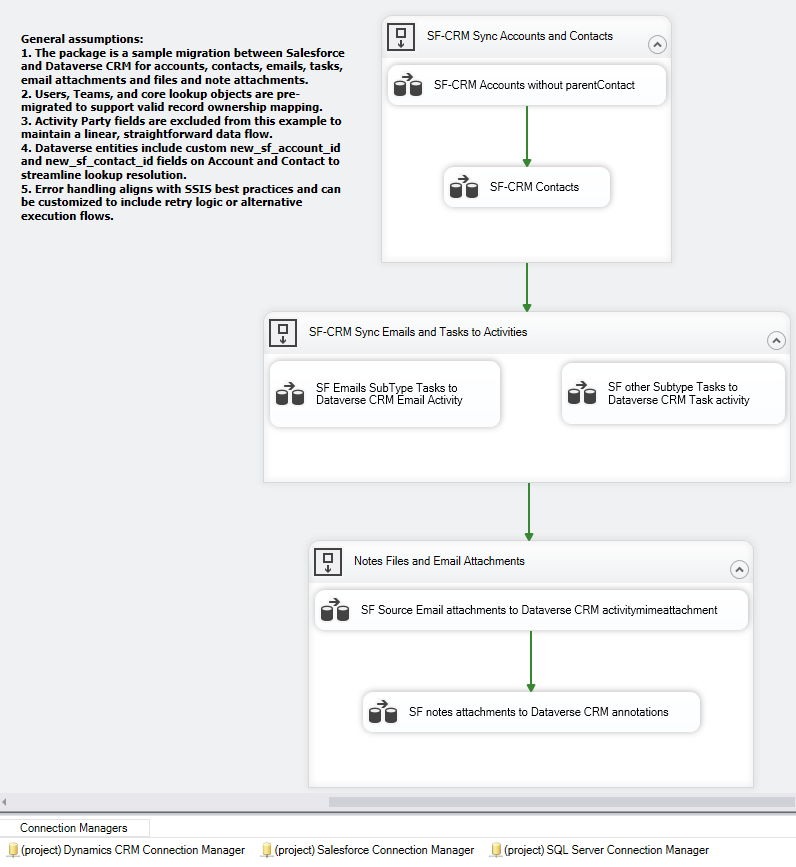
We start with:
- We will first move the Account records without including the parent or primary contact details (primarycontactid). In the subsequent data flow, we will transfer the Contacts and then update the Accounts with the parentcontactid. This process ensures that the mutual relationship between Contacts and Accounts is properly managed.
- In the next Sequence container, we have an Activity Migration where Emails and Task activities are divided into two data flows, which run in parallel. Initially, all records are written into the Activity entities with the regardingobjecttype set to "account." For records that do not get associated, we attempt to process them again in the second Dataverse/CRM Destination component, this time with the regardingobjecttype set to "contact."
- The final Sequence container includes both Notes and Attachments. This section is divided into two Data Flows: one for Email attachments and the other for Notes attachments. In the first Data Flow, we use several premium Service Lookup components to connect the Email with its corresponding account or contact (with the help of the Activity Pointer entity) and ensure that the attachments are handled appropriately. In the second data flow, we Upsert the Notes attachments to the Annotations entity for Account records. Any attachments that are skipped are then written for contact records.
The second package, Dataverse/CRM to Salesforce, looks as shown below:
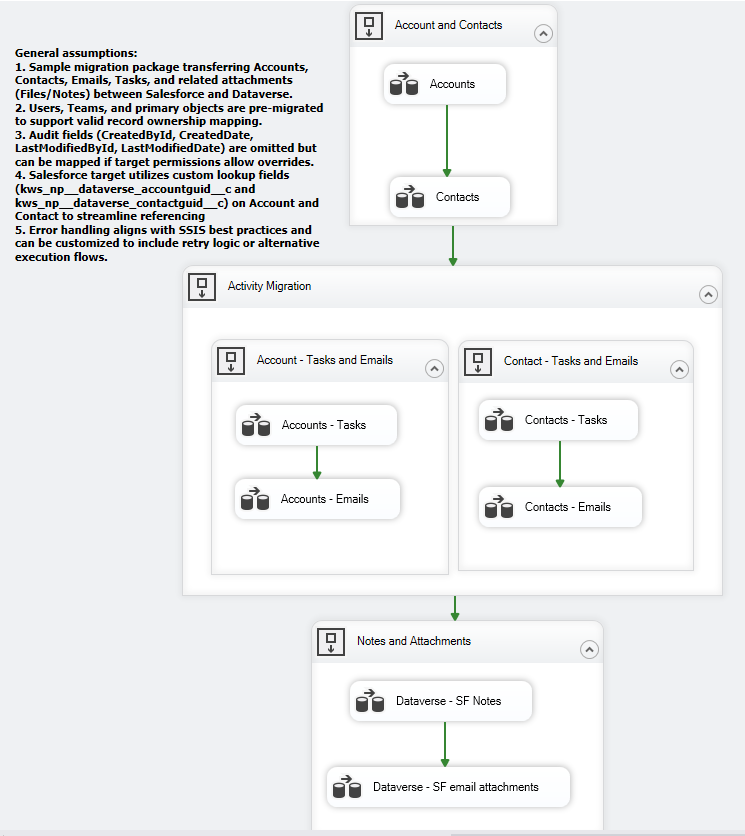
This is a more straightforward approach, given the object relationships in Salesforce.
- In the first Sequence container, we migrate Accounts first, followed by Contacts. You will notice that within the Data Flows, there is a one-to-one mapping. However, we have used a custom GUID-related field as the External ID for the Upsert operation in both objects on the Salesforce side.
- The second Sequence container contains two groups: one for Account-related tasks and emails, managed separately; and the other for Contact-related tasks and emails, also handled separately.
- The third Sequence Container includes Notes and Email Attachments. This is achieved by writing to the ContentVersion object to upload the binary content of the attachments into its VersionData field. This process is linked to create a ContentDocumentLink, which connects the attachments to specific Task or Email records.
Assumptions
General Assumptions and Design Decisions
- Sample migration package for transferring Accounts, Contacts, Emails, Tasks, and related attachments (Files/Notes) between Salesforce and Dataverse.
- Users, Teams, and primary objects are pre-migrated to support valid record ownership mapping.
- Error handling follows SSIS best practices and can be customized to include retry logic or alternative execution flows.
Assumptions for Dataverse-to-Salesforce Migration
- Salesforce target utilizes custom lookup fields (kws_np__dataverse_accountguid__c and kws_np__dataverse_contactguid__c) on Account and Contact to streamline referencing
- Audit fields (CreatedById, CreatedDate, LastModifiedById, LastModifiedDate) are omitted but can be mapped if target permissions allow overrides.
Assumptions for Salesforce-to-Dataverse Migration
- Activity Party fields are excluded from this example to maintain a linear, straightforward data flow.
- Dataverse entities include custom new_sf_account_id and new_sf_contact_id fields on Account and Contact to streamline lookup resolution.
Get Started
Please feel free to give the sample packages a try and let us know if you have any further comments.
Download Starter Pack Contact UsAbout KingswaySoft
KingswaySoft offers robust data enablement solutions that simplify complex integration scenarios and enhance data connectivity. These include our recently introduced JDBC Driver Pack, and over 300 SSIS components across diverse categories, such as data masking and anonymization, duplicate detection, data comparison, data profiling, advanced expression, encryption and compression, JSON & XML processing, SFTP/FTPS, and message queuing, to name a few. Many other premium components support in delivering a rapid ETL development experience using Microsoft Visual Studio and SQL Server Integration Services (SSIS) as the platform.
Our solution also includes support for connecting to NoSQL databases, cloud storage services, REST APIs, and virtually any other API or web service endpoint (SOAP or REST). Connectivity solutions are also available for facilitating data integration with enterprise applications such as Microsoft Dynamics 365, Active Directory, HubSpot, Microsoft SharePoint, Salesforce, SAP, and many more. Similarly, REST connections are available for numerous applications, including LinkedIn, Facebook Messenger, Acumatica, Zoom, Shopify, ServiceNow, and Zendesk, to name a few.
Get in touch with an expert to plan
your Dataverse and Salesforce migration.
Our expert team will be available to answer any questions.
FAQ
Salesforce and Microsoft Dataverse integration enables seamless two-way data synchronization between CRM systems, allowing organizations to maintain consistent customer, sales, and operational data across platforms.
Integrating Salesforce with Dataverse helps eliminate data silos, improves reporting accuracy, and enables seamless workflows across systems used by different departments within an organization.
KingswaySoft provides a Salesforce and Dataverse Integration/Migration Starter Pack built using its SSIS Integration Toolkit, which includes sample packages that simplify migration between the two systems. The packages use built-in lookups, option set mapping, error handling, and skipping records for retries, helping reduce the effort required to handle complex entity relationships and data movement between Salesforce and Dataverse.
Yes. The migration starter pack supports two-way data movement between Salesforce and Dataverse. It can also be adapted for ongoing integration by using SOQL queries to retrieve modified records from Salesforce and using Change Tracking in Dataverse/CRM to support incremental synchronization.
A full migration transfers all data at once, while an incremental sync only moves new or updated records. Incremental sync is typically used for ongoing integrations after an initial migration is complete.
Common objects include Accounts, Contacts, Emails, Tasks, Notes, and Attachments. The integration can also be extended to custom objects and fields in both Salesforce and Dataverse.