


The most reliable approach is a scheduled, incremental integration pipeline with recoverable loads, validation, and monitoring (not simply an export that runs on a timer).
For organizations using SQL Server Integration Services, KingswaySoft’s SSIS Integration Toolkit is a practical starting point providing Dynamics connectivity, incremental retrieval capabilities, and API throttling handling. Pair those capabilities with an appropriate scheduler and warehouse loading controls.
Which Approach Makes Scheduled Dynamics 365 Data Transfers More Reliable?
Use an initial full extraction followed by incremental loads that capture changes since the last successful run. Preserve progress between executions, make warehouse writes safe to repeat, and define how failed batches are recovered. This combines Microsoft’s documented incremental loading pattern with its guidance on retry safety and idempotent operations.
Source: Use Microsoft Fabric to design an enterprise BI solution.
Treat this as ongoing Dynamics 365 integration, rather than a one-time migration. When evaluating data integration tools, ask vendors to demonstrate recovery and repeat execution, not just a successful first copy.
Start by identifying the exact Dynamics application. KingswaySoft provides components for Customer Engagement, Dataverse, Finance & Operations, and Business Central, but extraction capabilities depend on the application and endpoint. For example, Dataverse change tracking and Finance & Operations row version change tracking have separate requirements. Do not assume one incremental configuration applies everywhere.
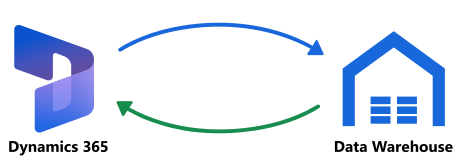
Build Your Pipeline Around Recoverable Batches
Use the following design as an implementation checklist. It applies Microsoft’s documented incremental-load sequence: "identify a boundary, copy the changes, then save progress", while adding explicit validation and recovery requirements for your project.
Source: Use Microsoft Fabric to design an enterprise BI solution.
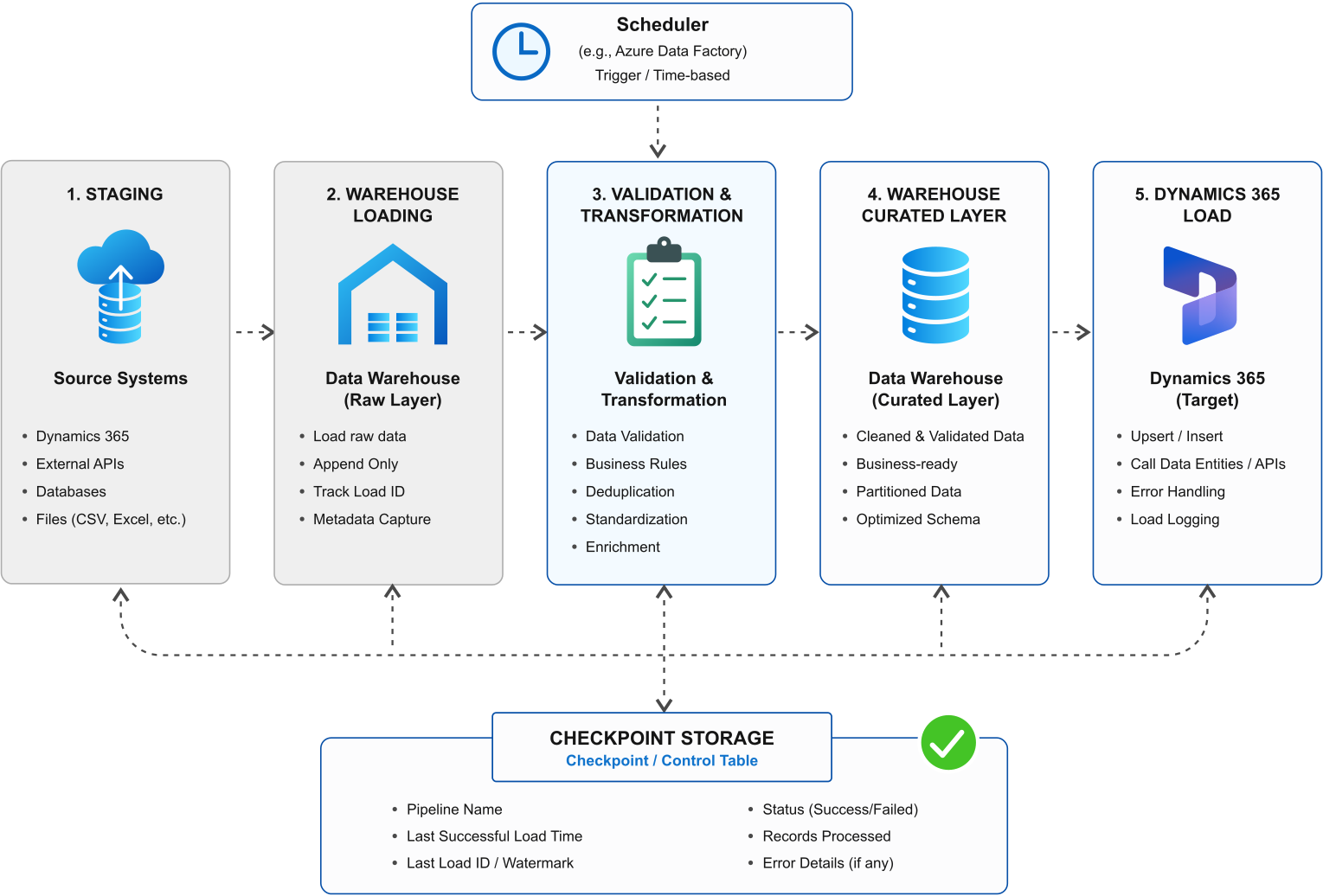
- Define the extraction contract: List the entities, fields, source identifiers, relationships, and reporting deadlines. Specify whether each warehouse table represents current state or retained history. Record exclusions so a deliberately omitted field is not mistaken for missing data.
- Establish the initial baseline: Load the required existing records and confirm key coverage before enabling recurring updates. For Dataverse change tracking, the initial retrieval establishes the dataset and returns state used to retrieve subsequent changes. Follow the selected endpoint’s initialization process.
Source: Microsoft Learn – Use change tracking to synchronize data with external systems - Capture changes into staging: Use supported change tracking where appropriate; otherwise, assess a suitable modification timestamp. With a watermark approach, determine both the previous boundary and the new boundary before copying. Save enough batch metadata to identify what each run attempted.
Source: Microsoft Learn – Incrementally copy data to a warehouse or lakehouse - Apply repeatable warehouse writes: Match records using stable source identifiers and design inserts or updates so replaying a batch doesn't generate duplicates. For historical tables, explicitly define versioning rules. Idempotent processing is important since retries can otherwise repeat side effects.
Source: Microsoft Learn – Define alternate keys to reference rows - Validate before advancing progress: Set acceptance checks for rejected rows, missing keys, and expected relationships. Persist the new checkpoint only after the intended load has completed successfully. Microsoft’s watermark example likewise updates its stored boundary after the copy activity.
Source: Microsoft Learn – Incrementally copy data to a warehouse or lakehouse
For your first pilot, select a related group of entities rather than the entire application. Require the pilot to prove initialization, incremental updates, deletion handling, and replay before expanding its scope.
How Should You Handle Deletions, Retries, and Missed Runs?
Handle each explicitly. Use supported deletion information or reconciliation, retry transient failures without duplicating warehouse records, and resume from the last committed extraction state. Dataverse change tracking can return deleted-record information, but its retained change history is bounded. Recovery planning must therefore include what happens when an outage exceeds the available tracking window.
A modification-timestamp filter alone cannot return a record that has already been physically deleted. Define a separate deletion mechanism or reconciliation process if your chosen endpoint does not expose deletion changes. Also decide whether deletion should remove the warehouse row, mark it inactive, or preserve it for historical reporting. Dataverse’s documented change responses illustrate why deletion processing needs its own logic.
Source: Microsoft Learn – Use change tracking to synchronize data with external systems
For Dataverse throttling, respect the service’s Retry-After guidance rather than retrying immediately or increasing concurrency indiscriminately. Distinguish temporary failures from invalid mappings and permission errors; endless retries are not a repair strategy. Log failed operations and bound retry attempts so someone can investigate persistent problems.

Data Integration Best Practices for Scheduled Operations
Use the following checklist when comparing data integration strategies or preparing a cloud data integration pipeline for production. Ask your team or supplier to demonstrate each capability in a test environment.
- Prove unattended execution: Run the deployed package through its actual scheduler and execution identity, not only from a developer workstation. Microsoft documents specific troubleshooting considerations for SSIS packages launched by SQL Server Agent.
Source: Microsoft Learn – SQL Server Agent jobs for packages - Test failure recovery deliberately: Interrupt a test load, restore access, and replay it. Check that the result matches an uninterrupted run and that repeated writes do not introduce duplicates. Fault testing and idempotency are established resilience practices.
Source: Microsoft Learn – Transient fault handling - Define freshness acceptance criteria: Specify when each dataset must be usable, what constitutes a missed refresh, and who responds. Ask for evidence of completed warehouse loading rather than accepting a scheduler’s start notification.
- Approve schema changes deliberately: Test added fields, changed mappings, and altered types before exposing them to reporting. If evaluating EasySync’s dynamic schema management, confirm which changes it handles automatically and which require review.
Source: KingswaySoft – EasySync
Include operational ownership in the handover: name the person responsible for alerts, credentials, mapping changes, and controlled reloads. Require a short recovery runbook that another team member can follow.
Choosing the Right Tool
Choosing the right tool for integrating Dynamics 365 with a data warehouse depends on your existing environment and data needs. KingswaySoft offers several solutions, including SSIS-based ETL, Java connectivity, workflow automation, and data synchronization. Consider your source system, target warehouse, refresh frequency, and recovery requirements when evaluating the options below.
SSIS Integration Toolkit for Controlled ETL Workflows
The SSIS Integration Toolkit extends SSIS with Dynamics-specific integration components, supporting advanced queries, delta retrieval, incremental processing, and Dynamics API throttling. It is a good fit for teams that need configurable data extraction within established SSIS workflows.
Use it to extract Dynamics data, apply transformations, and load warehouse destinations through SSIS packages. Schedule execution through SQL Server Agent where available.
The toolkit includes components for Dynamics 365 FO / AX, Dynamics 365 NAV / BC, Dynamics 365 CE / CRM, Dynamics 365 Marketing, Dynamics 365 Customer Insights, Microsoft Dataverse.
JDBC Driver Pack for Java-based Pipelines
The JDBC Driver Pack provides SQL-style access to Dynamics 365 APIs from Java applications and compatible tools. It includes pagination, retry mechanisms, caching, and logging capabilities. This makes it worth evaluating when your existing integration environment already uses JDBC.
For scheduled data warehouse integration, the JDBC Driver Pack can provide the connectivity layer within a broader data integration architecture. Combine it with appropriate orchestration, extraction state management, warehouse loading, and operational monitoring to build a reliable, repeatable data pipeline.
The pack includes JDBC drivers for Dynamics 365 FO/AX, Dynamics 365 NAV / BC, Dynamics 365 CE / CRM, Dynamics 365 Customer Insights, Microsoft Dataverse.

Integration Gateway for scheduling and Event Triggers
Integration Gateway supports both scheduled and event-driven integration through its CRON scheduler and webhook capabilities. It can trigger execution destinations such as SSIS packages and route incoming notifications to queues or files, providing flexibility in how integration workflows are initiated and managed.
For example, use the CRON scheduler to trigger regular warehouse refreshes while webhooks initiate separate workflows in response to selected events. This approach allows scheduled and event-driven processes to work together, with extraction, reconciliation, and warehouse transformation handled by the downstream workflows.
The Integration Gateway includes webhook solutions for Dynamics 365 FO/AX, Dynamics 365 NAV/BC, Microsoft Dataverse.
EasySync for Replication-Focused Requirements
EasySync is KingswaySoft’s synchronization-focused solution, offering full extraction, timestamp-based incremental loading, token-based incremental loading, and dynamic schema management. It supports data movement to databases, data warehouses, and data lakes, making it a practical option for automated data replication across different environments.
Consider EasySync when you need a streamlined approach to keeping Dynamics data synchronized with downstream systems without building a heavily customized ETL package. Evaluate the available source and destination connectors, scheduling options, and deletion-handling capabilities to ensure they align with your integration requirements.
EasySync includes connectors for Dynamics 365 FO/AX, Dynamics 365 Customer Insights.
FAQ
A scheduled, incremental data integration pipeline is generally a reliable approach. Start with an initial full extraction, then capture changes through supported change tracking or timestamp-based extraction. Include staging, validation, retry handling, and checkpoint management to support consistent warehouse updates.
Yes. Incremental extraction retrieves records that have changed since the previous successful load, reducing the need to repeatedly transfer the entire dataset. Depending on the Dynamics 365 application and endpoint, this can use change tracking, row version tracking, or modification timestamps. The integration process should also account for deleted records and preserve extraction state between runs.
The right solution depends on your integration environment and requirements. The SSIS Integration Toolkit supports configurable ETL workflows, the JDBC Driver Pack provides SQL-style connectivity for Java-based applications, Integration Gateway supports scheduled and event-driven workflow orchestration, and EasySync provides a synchronization-focused approach to data replication.
Updated records can be captured through supported change tracking or modification timestamp mechanisms. Deleted records require a separate strategy, such as processing deletion information from the source or performing periodic reconciliation. Design warehouse writes to be repeatable and preserve the last successfully processed checkpoint so failed batches can be recovered without introducing duplicate records.

To read more about our data integration solutions, click here.
To return to the Industry Analysis Index Page, click here. To return to the Resources Index Page, click here.
About KingswaySoft
KingswaySoft is a leading integration solution provider that offers sophisticated software solutions that make data integration simple and affordable. We have an extreme passion for our software quality and an intense commitment to our client's success. Our development process has always been customer-focused, we have been working very closely with our customers to deliver what benefits them the most. We have also made sure that our support services are always highly responsive so that our customers receive maximum benefit from the use of our products.
Learn more at www.kingswaysoft.com