


Salesforce and QuickBooks Online Integration
For businesses using Salesforce to manage customers and sales orders, and QuickBooks Online to manage accounting and invoicing, the transfer of information between the two systems is an important part of the sales-to-billing process. Customer details recorded in Salesforce may need to be reflected in QuickBooks Online, while confirmed sales orders need to be converted into invoices with the appropriate customer, product, quantity, and pricing information. Managing these activities manually can lead to duplicate records, inconsistent information, and additional work for sales and accounting teams.
An integration between Salesforce and QuickBooks Online can help automate this process, but several considerations need to be addressed. Existing customers must be identified correctly, related records must be processed in the appropriate order, and changes to previously synchronized records must be handled without creating duplicates. These requirements become particularly important when the integration is expected to run on an ongoing basis rather than as a one-time data transfer.
KingswaySoft Integration Starter Pack
Using the KingswaySoft SSIS Integration Toolkit, we have developed a Salesforce and QuickBooks Online Integration Starter Pack that demonstrates how to synchronize Salesforce Accounts with QuickBooks Online Customers and Salesforce Orders with QuickBooks Online Invoices. The sample provides a practical implementation of the extraction, staging, matching, and synchronization logic required to move customer and sales information from Salesforce into QuickBooks Online.
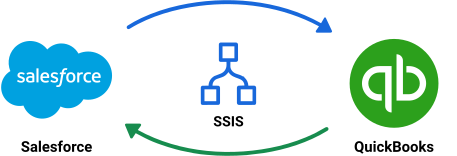
The starter pack is provided as an SSIS project containing a single synchronization package. The package uses SQL Server staging tables to maintain relationships between Salesforce and QuickBooks Online records, reconcile existing customers, and track changes across executions. It is designed for incremental synchronization and includes separate processing steps for Customer and Invoice creation and updates.
The implementation uses a selected set of standard Salesforce and QuickBooks Online fields and includes sample matching and transformation logic. These configurations can be modified to accommodate different data models, customer matching conditions, field mappings, and business rules. You can download the sample project using this link.
Some of the key aspects of the design
The Design and Data Flow: A Brief Summary
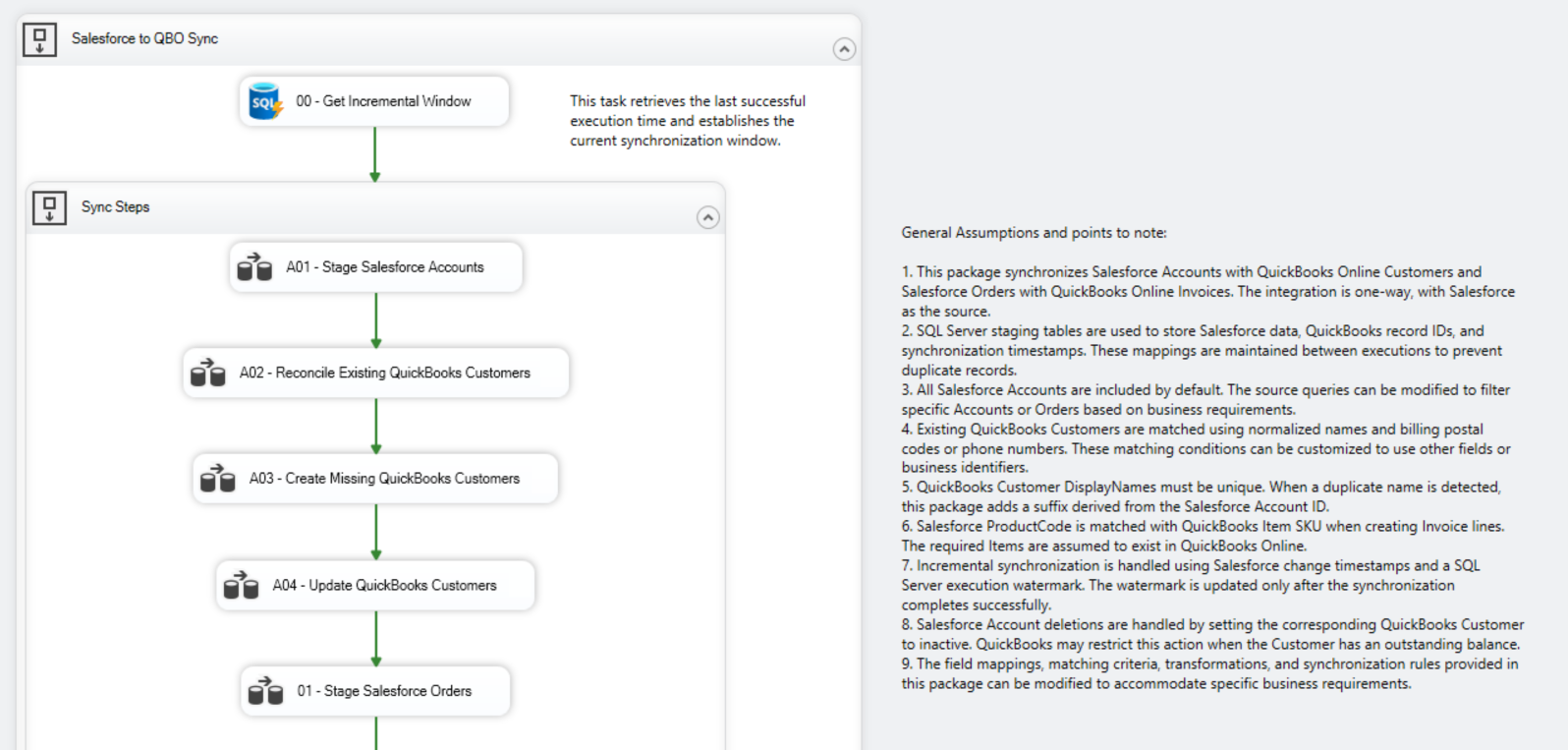
The package is organized into a sequence of Data Flow Tasks that first synchronize Salesforce Accounts with QuickBooks Online Customers, then process Salesforce Orders and their related Order Items to create or update QuickBooks Online Invoices. Execution begins by establishing an incremental synchronization window and ends by saving the new watermark after all synchronization steps complete successfully.
Salesforce Accounts to QuickBooks Online Customers
The first part of the package establishes and maintains the relationship between Salesforce Accounts and QuickBooks Customers. This is particularly important in environments where customer records may already exist in QuickBooks Online before the integration is introduced. The package separates the reconciliation, creation, and update operations so that existing Customers can be reused where an appropriate match is found.
- The Stage Salesforce Accounts flow retrieves Account information, including deleted records, and writes it to SQL Server staging. Existing QuickBooks Customer IDs are preserved to maintain previously established mappings.
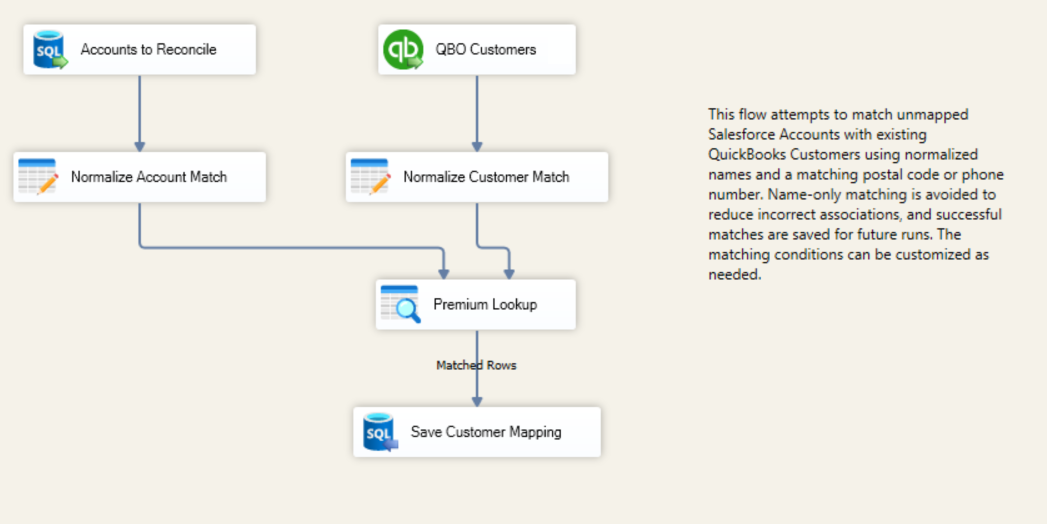
- The Reconcile Existing QuickBooks Customers flow attempts to match unmapped Salesforce Accounts with existing Customers. The sample combines normalized names with postal codes or phone numbers rather than relying on names alone. Successful matches are saved for subsequent executions.
- The Create Missing QuickBooks Customers flow processes active Accounts without an existing Customer mapping. It handles QuickBooks DisplayName uniqueness requirements by adding a Salesforce ID-based suffix when necessary, and then stores the newly created Customer ID.
- The Update QuickBooks Customers flow uses the stored Customer ID and current SyncToken to apply changes from Salesforce. It also handles Customer inactivation and reactivation when the corresponding Salesforce Account is deleted or restored.
Salesforce Orders to QuickBooks Online Invoices
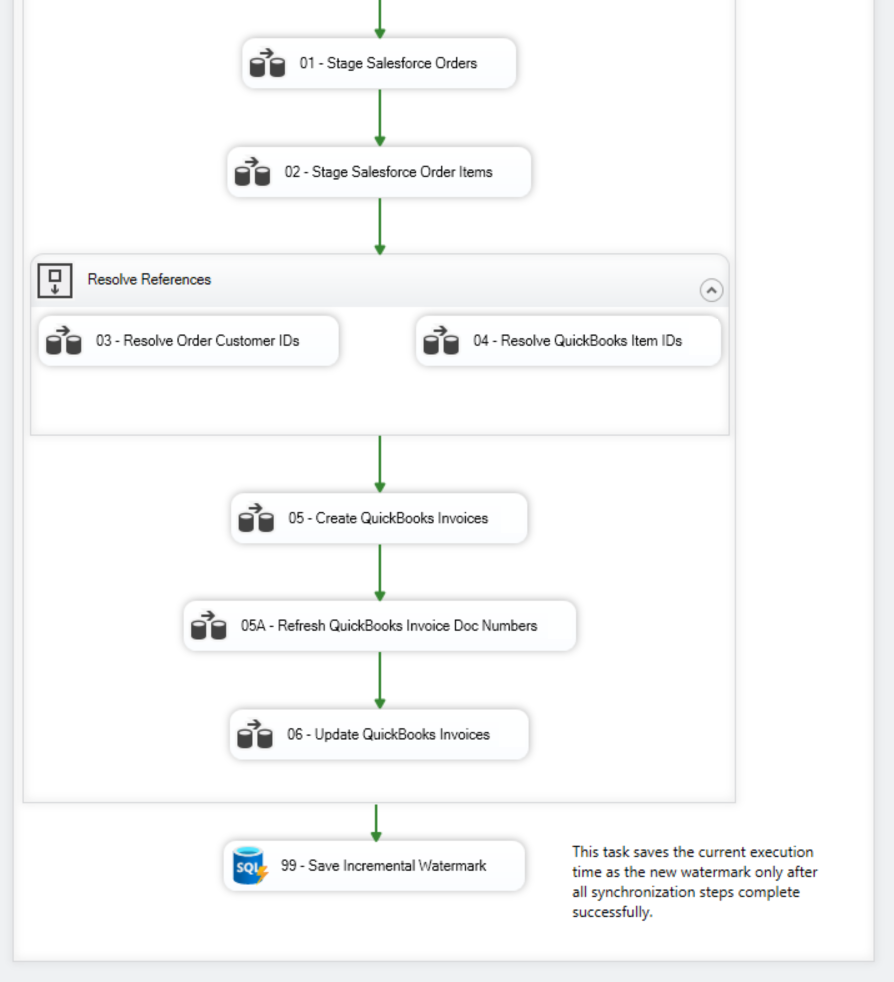
Once Customer processing is complete, the package moves on to Salesforce Orders and Order Items. Before an Invoice can be created, the package must identify both the QuickBooks Customer associated with the Order and the QuickBooks Items corresponding to its products. These references are resolved separately and saved in staging, allowing the Invoice creation and update flows to use the correct destination identifiers.
- The Stage Salesforce Orders and Stage Salesforce Order Items flows retrieve the relevant source records and write their header, product, quantity, and pricing information to SQL Server. Deleted Order Items are also retained so that removed lines can be reflected in subsequent Invoice updates.
- The Resolve Order Customer IDs flow uses the Account-to-Customer mappings established earlier in the package. The Resolve QuickBooks Item IDs flow then matches Salesforce ProductCodes to existing QuickBooks Item SKUs.
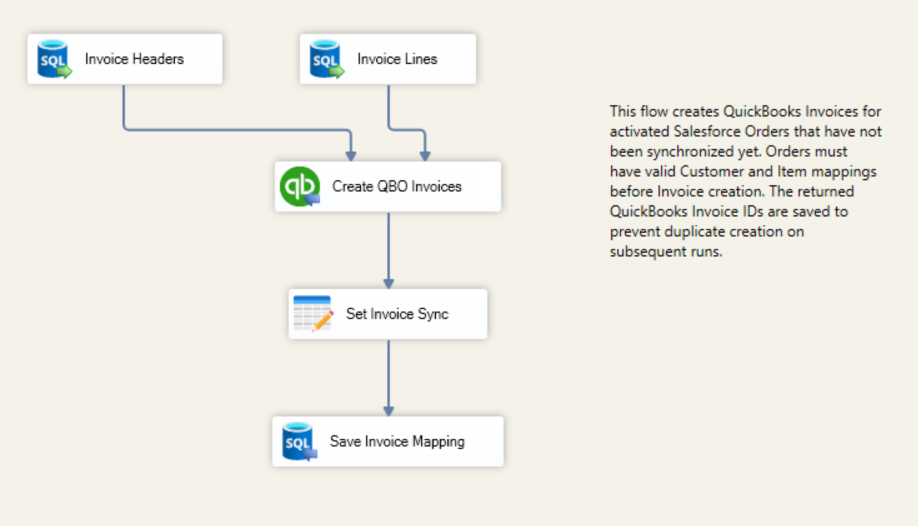
- The Create QuickBooks Invoices flow creates Invoices for activated Salesforce Orders that have not been synchronized previously, provided the required Customer and Item references have been resolved. The returned Invoice IDs are saved to staging for future updates.
- The Refresh QuickBooks Invoice Doc Numbers flow retrieves the DocNumbers assigned by QuickBooks Online after Invoice creation. This additional step is needed because the Invoice creation component does not return the generated DocNumber directly.
- The Update QuickBooks Invoices flow applies changes to previously synchronized Invoices using their stored IDs and current SyncTokens. Invoice lines are rebuilt from active Salesforce Order Items to account for changes to quantities and removed lines. An update is skipped when no active Order Items remain.
Incremental Synchronization
The package uses a SQL Server control table to maintain the timestamp of the last successful synchronization. At the beginning of each execution, this value is used to establish the incremental processing window for Salesforce changes. The retrieved records are staged and processed using the stored QuickBooks mappings to determine whether they need to be created or updated.
After the Customer and Invoice synchronization steps have completed successfully, the package saves the new watermark. If a synchronization step fails, the watermark is not advanced, allowing the same processing window to be considered during the next execution. The persistent staging tables also retain the relationships needed to work with records that have already been created in QuickBooks Online.
Assumptions
While developing the sample package, we made the following assumptions:
- The required KingswaySoft SSIS Integration Toolkit components are installed in a compatible SSIS development and execution environment.
- The Salesforce, QuickBooks Online, and SQL Server connection managers will be configured with the appropriate connection information and credentials before executing the package.
- The required SQL Server staging tables and integration control table have been created. These tables must be retained between executions to preserve existing record mappings and synchronization information.
- The integration is configured for one-way synchronization from Salesforce to QuickBooks Online. Changes made directly in QuickBooks Online are not synchronized back to Salesforce.
- All Salesforce Accounts are in scope by default, while activated Salesforce Orders are used for Invoice creation. The source filters and Order eligibility conditions can be adjusted based on business requirements.
- The sample Customer reconciliation logic uses normalized Account names and matching postal codes or phone numbers. Different matching conditions, including Account Numbers or custom identifiers, can be implemented as required.
- QuickBooks Customer DisplayNames must be unique. The package adds a suffix derived from the Salesforce Account ID only when a duplicate DisplayName needs to be avoided.
- The required QuickBooks Items already exist and can be matched using SKUs corresponding to Salesforce ProductCodes. Automatic creation of QuickBooks Items is not included in the sample.
- Customer inactivation is used to reflect deleted Salesforce Accounts. QuickBooks Online may restrict inactivation when a Customer has an outstanding balance, so the handling of these exceptions should be considered for each implementation.
- The package does not automatically void or delete existing QuickBooks Invoices when Salesforce Orders are cancelled. It also skips updates when an Invoice has no active Order Items. These behaviors can be modified according to the required accounting process.
- The initial synchronization watermark should be configured according to the desired starting point for the integration. The sample field mappings, transformation logic, and synchronization conditions can be extended to support additional standard or custom fields.
Get Started
The Salesforce and QuickBooks Online Integration Starter Pack provides the core processing logic needed to synchronize Salesforce Accounts and Orders with QuickBooks Online Customers and Invoices. To use the package, prepare the SQL Server staging tables, configure the connection managers for your environments, and review the source filters, matching conditions, and field mappings before execution.
The sample is intended to serve as a starting point and can be customized to accommodate the data structures and business requirements of your Salesforce and QuickBooks Online environments. Please feel free to give the starter pack a try and let us know if you have any questions or comments.
Download Starter Pack Contact UsAbout KingswaySoft
KingswaySoft provides robust data integration solutions that simplify connectivity and data movement across business applications, databases, and services. Our solutions support rapid integration development using Microsoft Visual Studio and SQL Server Integration Services (SSIS), with a wide range of components for data extraction, transformation, mapping, and loading.
With connectivity for hundreds of applications and services, organizations can build integrations involving CRM, ERP, accounting, marketing, and other business systems. KingswaySoft solutions support platforms such as Salesforce, Microsoft Dynamics 365, HubSpot, and many others, along with databases, REST APIs, and other services.
Get in touch with an expert to plan your Salesforce and QuickBooks Online integration.
Our expert team will be available to answer any questions.
FAQ
Salesforce and QuickBooks Online integration enables organizations to connect sales and accounting processes by transferring customer and transaction information between the two systems. It can help reduce manual entry and improve consistency between CRM and accounting records.
The sample package synchronizes Salesforce Accounts to QuickBooks Online Customers and Salesforce Orders, including their related Order Items, to QuickBooks Online Invoices. It supports the creation and updating of these destination records.
The package attempts to match Salesforce Accounts with existing QuickBooks Customers before creating new records. The sample matching logic uses normalized names and postal codes or phone numbers. Once matched, the QuickBooks Customer ID is stored for future synchronization.
The package uses Salesforce ProductCode and QuickBooks Item SKU to identify the Item records required for Invoice lines. The sample assumes these Items are already available in QuickBooks Online. Additional Item creation or alternative matching logic can be implemented if required.
Yes. The package uses Salesforce change timestamps and a watermark stored in SQL Server to establish an incremental processing window. The watermark is saved after a successful execution, while stored QuickBooks record IDs allow existing Customers and Invoices to be updated.
Yes. The starter pack provides a sample implementation that can be modified to use different Customer matching conditions, field mappings, source filters, transformations, and synchronization rules. Additional standard or custom fields can also be included.
Download the SSIS project, prepare the required SQL Server tables, and configure the Salesforce, QuickBooks Online, and SQL Server connections. Before execution, review the initial synchronization window and adjust the mappings and assumptions to suit your environment.