

Jira and Zendesk Integration
Jira and Zendesk are widely used to manage work across development, service, and support teams. While Jira provides teams with a structured environment for tracking issues and project work, Zendesk helps organizations manage customer requests and support conversations. When both platforms are used within the same organization, keeping tickets, issues, comments, attachments, and statuses aligned can provide teams with better visibility and reduce the need to manually reproduce information across systems.
KingswaySoft Integration/Migration Starter Pack
Building an integration between Jira and Zendesk involves more than mapping a few standard fields. Each platform handles descriptions, comments, attachments, identifiers, and status changes differently, and related records must be processed in the correct order. To simplify these challenges, we have created a Jira and Zendesk Integration/Migration Starter Pack using the KingswaySoft SSIS Integration Toolkit. The starter pack provides a robust and extensible foundation for implementing ongoing incremental data movement between the two applications.
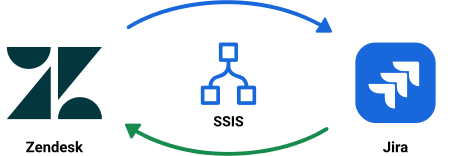
The starter pack is available as a single download and includes two separate sample packages: one for moving Jira data to Zendesk and another for moving Zendesk data to Jira. Each package can be reviewed, configured, and used independently based on the direction required for your integration. The packages implement the core extraction, staging, transformation, dependency handling, and destination-writing logic needed to provide a strong starting point for your own environment.
You can download the sample project using this link. The sample packages require KingswaySoft SSIS Integration Toolkit v26.2 or newer.
Some of the key aspects of the design
The Design and Data Flow: A Brief Summary
Jira to Zendesk
The Jira to Zendesk package retrieves new and updated Jira issues, comments, and attachments within the current incremental window and writes the extracted data to SQL Server staging tables. Once the source data has been staged, the package processes the records in the sequence required by the Zendesk API.
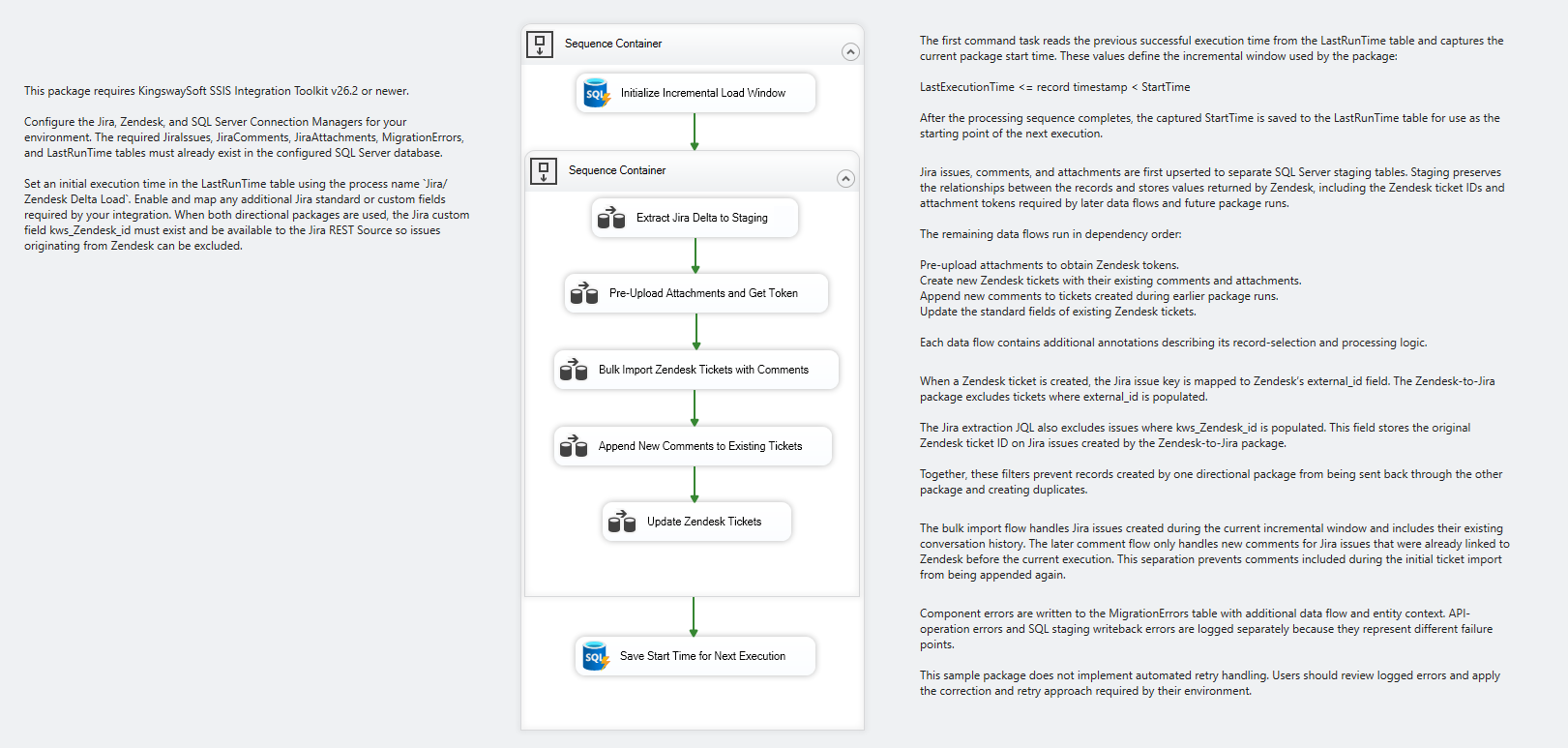
- Jira issues, comments, and attachment information are extracted and written to separate staging tables. Value mappings prepare Jira values such as issue type, priority, and status for the corresponding Zendesk fields.
- Jira attachments are uploaded to Zendesk before tickets and comments are written. Zendesk returns a temporary upload token for each attachment, which is saved to staging and associated with the appropriate ticket description or comment.
- New Jira issues are created as Zendesk tickets using the Ticket Bulk Import endpoint. The Jira description is included as the ticket’s first comment, followed by the existing Jira comments in chronological order. The returned Zendesk ticket ID is saved to staging for future processing.
- On subsequent executions, new Jira comments are appended to the corresponding Zendesk tickets, along with their related attachments. Existing Zendesk ticket fields are also updated when the associated Jira issue changes during the incremental window.
Zendesk to Jira
The Zendesk to Jira package follows the same incremental and staging-table-first design in the opposite direction. Zendesk tickets, comments, and comment attachments are extracted to SQL Server staging tables before the package creates or updates Jira issues and processes their dependent records.
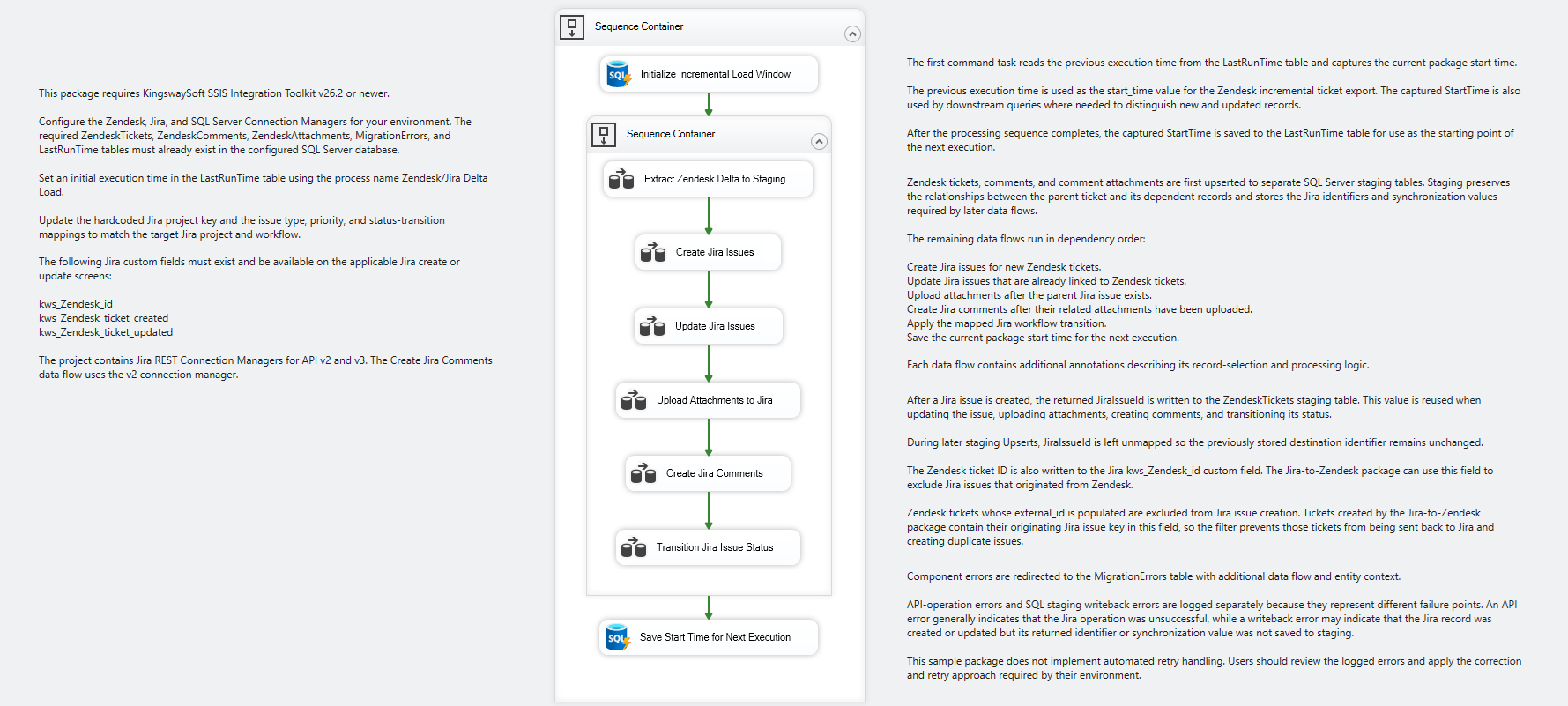
- The package uses Zendesk’s incremental ticket export functionality to retrieve tickets that have changed since the previous successful execution. Ticket, comment, and attachment outputs are processed separately and upserted into their corresponding staging tables.
- New Zendesk tickets are created as Jira issues, while tickets that already have a stored Jira issue ID are used to update the corresponding Jira records. The returned Jira issue ID is written back to staging and reused by the later attachment, comment, and status-processing steps.
- Zendesk comment attachments are uploaded after the parent Jira issue exists. The attachment identifiers and standardized filenames are saved so that the files can be referenced from their corresponding Jira comments.
- New Zendesk comments are appended to the related Jira issues after their attachments have been uploaded. The first Zendesk comment is treated as the Jira issue description and is not added a second time as a separate comment.
- Zendesk status values are mapped to Jira workflow transition IDs. When the current Zendesk status differs from the last successfully synchronized status, the package applies the configured Jira transition and updates the staging record.
Assumptions
While developing the packages, we made the following assumptions
- KingswaySoft SSIS Integration Toolkit v26.2 or newer is installed in the environment where the sample packages will be opened and executed.
- The required SQL Server staging tables, centralized error table, and LastRunTime control table are already available in the target environment.
- The Jira, Zendesk, and SQL Server connection managers will be updated with the appropriate connection information and credentials before the packages are executed.
- An initial execution time has been added to the LastRunTime table for each package process. This value determines the starting point for the first incremental execution.
- Users and accounts required by the integration have already been migrated, mapped, or otherwise handled between Jira and Zendesk.
- The Jira project key, issue types, priorities, statuses, workflow transition IDs, and related value mappings will be updated to match the target Jira project and workflow.
- The Jira custom fields used by the sample package (kws_Zendesk_id, kws_Zendesk_ticket_created, and kws_Zendesk_ticket_updated) already exist and are available in the Jira instance.
- Any additional Jira standard or custom fields required by the integration will be enabled in the Jira REST Source component and mapped as needed.
- Any required Zendesk fields or business rules that apply when tickets are created, updated, solved, or closed will be accounted for in the destination mappings.
- The Media GUID extraction logic in the Jira to Zendesk package is configured to support up to five attachments for a single Jira description or comment. The expression can be expanded where a higher number is required.
- The packages include mappings for a selected set of commonly used fields. Additional mappings can be added based on the requirements and configuration of each Jira and Zendesk environment.
Get Started
The Jira and Zendesk Integration/Migration Starter Pack provides the core architecture and processing logic required to manage incremental ticket, issue, comment, and attachment integration between the two platforms. The packages can be configured and extended to support the fields, mappings, workflows, and business requirements of your environment.
Please feel free to give the sample packages a try and let us know if you have any questions or comments.
Download Starter Pack Contact UsAbout KingswaySoft
KingswaySoft offers robust data enablement solutions that simplify complex integration scenarios and enhance data connectivity. These include our recently introduced JDBC Driver Pack, and over 300 SSIS components across diverse categories, such as data masking and anonymization, duplicate detection, data comparison, data profiling, advanced expression, encryption and compression, JSON & XML processing, SFTP/FTPS, and message queuing, to name a few. Many other premium components support in delivering a rapid ETL development experience using Microsoft Visual Studio and SQL Server Integration Services (SSIS) as the platform.
Our solution also includes support for connecting to NoSQL databases, cloud storage services, REST APIs, and virtually any other API or web service endpoint (SOAP or REST). Connectivity solutions are also available for facilitating data integration with enterprise applications such as Microsoft Dynamics 365, Active Directory, HubSpot, Microsoft SharePoint, Salesforce, SAP, and many more. Similarly, REST connections are available for numerous applications, including LinkedIn, Facebook Messenger, Acumatica, Zoom, Shopify, ServiceNow, and Zendesk, to name a few.
Get in touch with an expert to plan
your Jira and Zendesk integration.
Our expert team will be available to answer any questions.
FAQ
Jira and Zendesk integration enables data to move between the two platforms so development, project, service, and support teams can access consistent ticket and issue information. An integration can help keep record details, comments, attachments, and status-related information aligned across both systems.
Integrating Jira with Zendesk can improve collaboration between teams that work in different systems, reduce duplicate data entry, and provide better visibility into the progress of customer requests, support tickets, and related development work.
KingswaySoft provides a Jira and Zendesk Integration/Migration Starter Pack built using the SSIS Integration Toolkit. The sample packages include incremental extraction, SQL Server staging, value mapping, dependency handling, error logging, and destination identifier tracking to simplify the movement of tickets, issues, comments, and attachments between the two platforms.
Yes. The starter pack contains two independent directional packages: one for moving Jira data to Zendesk and another for moving Zendesk data to Jira. Each package can be configured and used independently based on the direction required for the integration.
The packages use a LastRunTime control table to identify records that are new or have changed since the previous successful execution. The retrieved data is first written to SQL Server staging tables before new destination records are created, existing record fields are updated, and new comments and related attachments are processed.
The sample packages require KingswaySoft SSIS Integration Toolkit v26.2 or newer.
The sample packages handle Jira issues, Zendesk tickets, comments, attachments, and selected standard fields such as priority, type, and status-related values. The mappings and package logic can also be extended to support additional standard or custom fields required by each environment.