


KingswaySoft Integration/Migration Starter Pack
Organizations often move between email marketing platforms to accommodate changing business needs, improve flexibility, or adopt tools that better align with their marketing workflows. Mailchimp and EmailOctopus are both established players in the email marketing space, offering powerful tools for managing contacts, audiences, and email campaigns. When building an integration or transitioning between Mailchimp and EmailOctopus in either direction, a key challenge is ensuring existing contacts, members, and their associated information are transferred accurately and efficiently. Manually exporting, transforming, and importing large contact lists can be time-consuming, error-prone, and difficult to maintain, particularly when dealing with custom fields, subscription statuses, tags, and audience segmentation.
Using the KingswaySoft SSIS Integration Toolkit, organizations can build automated, scalable integration workflows between Mailchimp and EmailOctopus, leveraging SSIS to extract, transform, validate, and load contact data between the platforms. This approach provides greater control over data mapping and transformation while reducing manual effort and supporting repeatable migration and synchronization processes.
The Integration/Migration Starter Pack is available for download as an SSIS project. Within the folder, you will find the two pre-configured packages discussed in this post. These packages simplify the ETL process by handling complex tasks, such as looping through Audience and List IDs, lookups, joins, handling Merge Fields, Tags, Error Handling, etc. By using these features, your development team can significantly reduce the effort required to create such ETL processes. Some key aspects with respect to the design:
- The sample project includes two separate SSIS packages: one for migrating data from Mailchimp to EmailOctopus and another for migrating data from EmailOctopus to Mailchimp. This separation clearly illustrates each directional migration flow while keeping the implementations independent.
- If required, both migration flows can be consolidated into a single SSIS package using Sequence Containers or other SSIS control-flow components.
- The packages are configured for a full data migration by default. They can be adapted for incremental/Delta integration with minor modifications, such as leveraging available parameters to identify or filter records based on their last modified date. For general guidance on implementing incremental data loads, refer to the Achieve Incremental/Delta Data Load Logic in Any Data Flow with KingswaySoft blog post.
- The sample packages demonstrate the migration of Contacts and/or List Members between the two services.
- The packages are migration-ready and can be executed by updating the connection credentials to the target environments, with only minimal configuration changes required.
- Certain demonstration-specific assumptions have been incorporated, such as the approach used for handling Tags, looping through Lists, etc. These can be easily adjusted to accommodate how Tags are created, managed, and stored within either API, and how your List structure is, and so on.
- Annotations have been included throughout the packages to document required actions, configuration considerations, and completed implementation steps.
The Design and Data Flow: A Brief Summary
The first package, Mailchimp to EmailOctopus, would look as shown below:
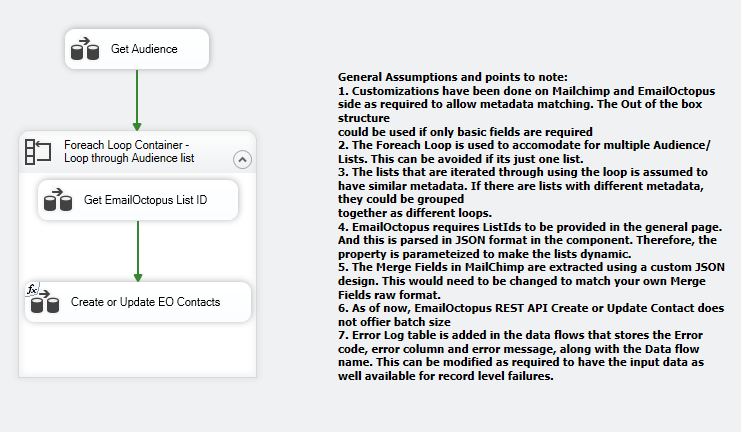
Let's see how the design functions:
- The Get Audience Data flow retrieves the list of Audiences (ID and Name) from Mailchimp and assigns the results to an object variable using a recordSet Destination for use in downstream flows.
- The Foreach Loop container iterates through the object variable mentioned above and assigns each List and Name to their respective string variables.
- During each iteration, the Get EmailOctopus List ID Data Flow Task retrieves the corresponding Lists from EmailOctopus based on a filter and generates a JSON format containing its ID and Name.
- This JSON format is required by the EmailOctopus REST Destination component for parameterization and to identify the target List.
- Finally, in the Create or Update EO Contacts step, the Members and Member Tags - which are transformed to match the Destination requirements - are joined and sent to the corresponding List for writing.
- In addition, the Merge Fields from Mailchimp, which are returned as a raw JSON structure, are extracted and written along with the Member records.
Let's take a look at the second package, EmailOctopus to Mailchimp, and its design shown below:
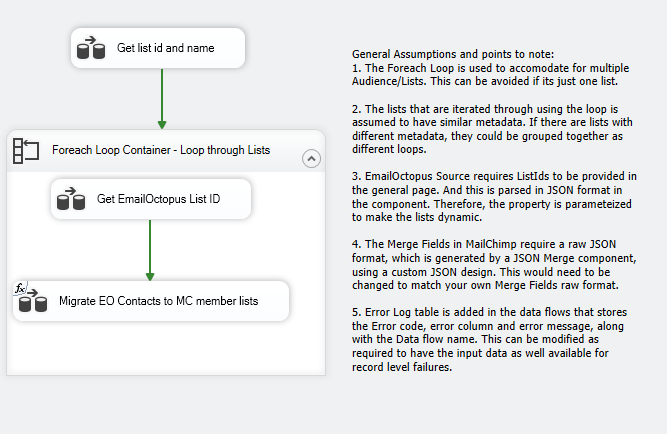
- This works similarly to its counterpart, where the first Data Flow Task retrieves the List IDs and Names from EmailOctopus and assigns the results to an object variable.
- The Foreach Loop container iterates through the recordSet and assigns the ID and Name to their respective string variables.
- The Get EmailOctopus List ID step creates the JSON format required to target the List, this time for parameterization of the EmailOctopus REST Source component.
- Within the Migrate EO Contacts to MC member lists Data Flow Task, for each List iteration, the EmailOctopus Contacts are retrieved, Tags are split and processed, the Merge Fields JSON is created, and the resulting data is written to Mailchimp.
Assumptions
- The Foreach Loop is used to accommodate multiple Audiences/Lists. If the integration involves only a single List, the loop can be omitted.
- The Lists being processed through the loop are assumed to have a similar metadata structure. If Lists with different metadata structures need to be processed, they can be grouped and handled using separate loops.
- The EmailOctopus Source and Destination both require ListIds to be specified on the General page, with the value being parsed in JSON format within the component. The corresponding property is therefore parameterized to allow the Lists to be processed dynamically.
- Merge Fields in Mailchimp require a raw JSON format, which is generated using a JSON Merge component based on a custom JSON design, and extracted using a JSON Extract component in respective packages. This design should be modified as needed to match the Merge Fields raw format used in your environment. Mailchimp requires a raw JSON format, which is generated using a JSON Merge component based on a custom JSON design and extracted using a JSON Extract component in respective packages. This design should be modified as needed to match the Merge Fields raw format used in your environment.
- An Error Log table has been added to the Data Flows to capture the Error Code, Error Column, Error Message, and Data Flow Name. This can be further customized to also capture the input data associated with record-level failures, if required.
Get Started
Please feel free to give the sample Starter Packages a try and let us know if you have any feedback.
Download Pack Contact UsAbout KingswaySoft
KingswaySoft provides robust data integration solutions that simplify complex integration scenarios and enhance connectivity across business applications, databases, and services. Our solutions support rapid, codeless integration development using Microsoft Visual Studio and SQL Server Integration Services (SSIS), with capabilities for REST and SOAP APIs, JSON & XML processing, cloud services, databases, and more.
With connectivity for hundreds of business applications and services, organizations can integrate leading CRM, marketing, ERP, e-commerce, and collaboration platforms. Flexible integration capabilities and a wide range of prebuilt connectors support applications such as Mailchimp, EmailOctopus, Salesforce, Microsoft Dynamics 365, HubSpot, Shopify, and many others.
Get in touch with an expert to plan
your Dataverse and Salesforce migration.
Our expert team will be available to answer any questions.
FAQ
Mailchimp and EmailOctopus integration enables organizations to transfer and synchronize contact and member data between the two email marketing platforms, helping maintain consistent information across systems.
Yes. The Mailchimp to EmailOctopus package demonstrates how to retrieve Audience and Member data from Mailchimp, transform it as needed, and load it into the corresponding EmailOctopus Lists.
Yes. The starter pack includes a separate EmailOctopus to Mailchimp package that retrieves List and Contact data from EmailOctopus, processes Tags and other fields, and writes the resulting data to Mailchimp.
The migration of Contacts and/or List Members, including associated Tags and Merge Fields. The packages can be customized to accommodate additional fields and data requirements.
The sample packages are configured for full data migration by default. They can be adapted for incremental or delta-based integration with minor modifications, such as using available parameters to identify or filter records based on their last modified date.
Yes. The two directional migration flows are provided as separate SSIS packages for clarity, but they can be consolidated into a single package using Sequence Containers or other SSIS control-flow components.
The packages use Foreach Loop containers to iterate through multiple Mailchimp Audiences or EmailOctopus Lists. The List IDs and names are assigned to variables and used to dynamically process the corresponding Lists during each iteration.
The Integration/Migration Starter Pack is available as a downloadable SSIS project containing the pre-configured packages described in this article. After downloading the project, update the connection credentials for your environments and make any necessary adjustments to the mappings or implementation-specific assumptions.