


KingswaySoft Integration/Migration Starter Pack
Integration and migration between customer relationship management (CRM) platforms are common practices to streamline business processes, improve data accessibility, and better align with changing operational needs. HubSpot and Microsoft Dynamics 365 (Dataverse/Dynamics CRM) are both widely used CRM platforms, offering powerful capabilities for managing customer relationships and business data. When building an integration or transitioning between HubSpot and Dataverse/Dynamics CRM in either direction, a key challenge is ensuring that existing accounts, contacts, opportunities, and their associated information are transferred accurately and efficiently. Manually exporting, transforming, and importing large volumes of CRM data can be time-consuming, error-prone, and difficult to maintain, particularly when dealing with custom fields, data relationships, record ownership, and differences in data structures across the two platforms.
Using the KingswaySoft SSIS Integration Toolkit, organizations can build automated, scalable integration workflows between HubSpot and Microsoft Dynamics 365 (Dataverse/Dynamics CRM), leveraging SSIS to extract, transform, and load CRM Object data between the platforms. This approach provides greater control over data mapping and relationship management while reducing manual effort and supporting ongoing synchronization or a migration project.
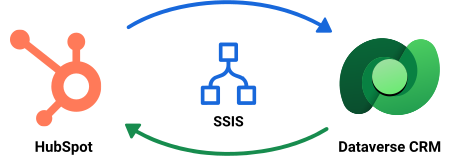
The project contains two pre-configured SSIS packages that demonstrate how to migrate data between HubSpot and Microsoft Dataverse/Dynamics CRM in either direction. The packages provide practical examples of a common migration scenario, including data mapping, transformations, lookups, relationship handling, and error management. These pre-built workflows serve as a foundation for developing integration solutions, helping reduce the time and effort involved in building similar ETL processes from scratch.
Some key design considerations and features of the sample project include:
- The sample project includes two separate SSIS packages: one for migrating data from HubSpot to Dataverse/Dynamics CRM and another for migrating data from Dataverse/Dynamics CRM to HubSpot.
- The packages are configured for a full data migration, but they can be adapted for incremental/Delta integration with a few modifications, such as filtering records based on their last modified date , which is a standard approach. For general guidance on implementing incremental data loads, refer to the Achieve Incremental/Delta Data Load Logic in Any Data Flow with KingswaySoft blog post.
- The sample packages cover the migration of key CRM entities, including Owners/Users, Companies/Accounts, Contacts, Deals/Opportunities, and Notes. These examples demonstrate how corresponding records can be transferred between the two systems while accounting for differences in their data structures.
- The packages would first require you to populate the existing Source and Target Connection Managers; this way, the mapping already created would persist.
- Annotations are provided throughout the SSIS packages to explain key implementation details, identify configuration requirements, and highlight areas that may require further customization.
The Design and Data Flow
The first package, HubSpot to Dataverse/Dynamics CRM, is shown below:
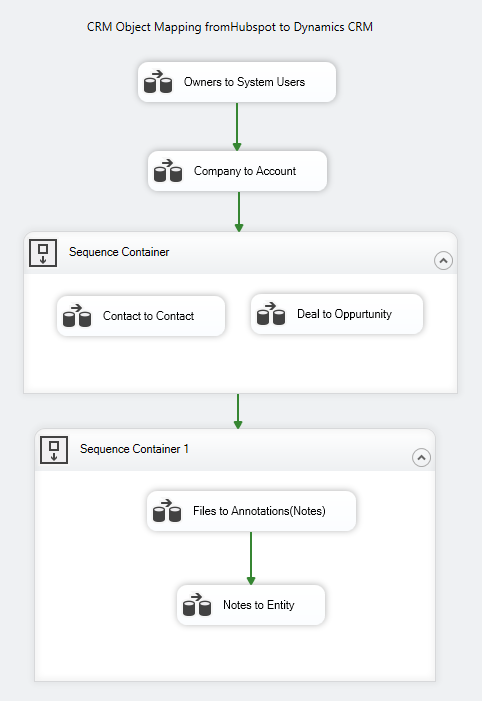
Let's see how the design functions:
- The Owners/Users Data Flow retrieves owner information from the source system and matches it with the corresponding user records in the destination using lookup operations. This helps ensure that migrated records are assigned to the appropriate users.
- The Companies/Accounts Data Flow migrates company and account information between the two systems. Field mappings and transformations are applied to accommodate differences in data structures, including custom fields and choice values.
- The Contacts Data Flow retrieves contact records and uses lookup operations to identify their associated companies or accounts. These relationships are then mapped to the corresponding destination records to preserve the existing associations.
- The Deals/Opportunities Data Flow handles the migration of sales opportunities, including deal details, ownership information, associated accounts, and sales stages. Where necessary, transformations are applied to map source statuses and pipeline values to their destination equivalents.
- The Notes Data Flow migrates note content and associates each note with its corresponding CRM record. Additional processing may be required to retrieve and migrate file attachments, as HubSpot stores attachment references separately from the note content.
Let's take a look at the second package, Dataverse/Dynamics CRM to HubSpot, and its design shown below:
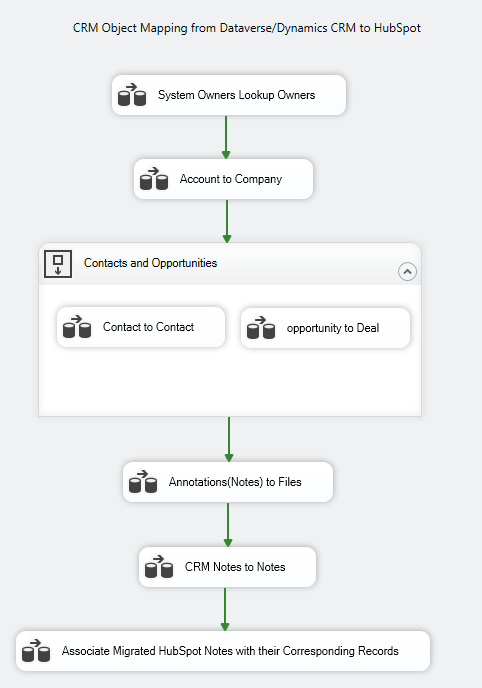
- The Users/Owners Data Flow retrieves user information from Dataverse/Dynamics CRM and matches it with the corresponding HubSpot owners using lookup operations to identify the appropriate owner IDs.
- The Accounts/Companies Data Flow migrates account records from Dataverse/Dynamics CRM to HubSpot Companies, applying field mappings and transformations to accommodate differences in field structures, data types, and property values.
- The Contacts Data Flow migrates contact information and uses lookup operations to resolve associated company records and establish the corresponding relationships in HubSpot.
- The Opportunities/Deals Data Flow migrates opportunity records to HubSpot Deals, mapping sales stages, deal statuses, ownership information, and associated companies or contacts.
- The CRM Notes Data Flow migrates notes and their associated CRM records. Where applicable, attachments are processed separately to accommodate differences in how the two systems manage files.
- The Associate Migrated HubSpot Notes with Their Corresponding Records flow links previously migrated notes to their associated HubSpot Companies, Contacts, or Deals.
Assumptions
The sample packages have been developed with certain assumptions that may need to be reviewed or adjusted based on your HubSpot and Dataverse/Dynamics CRM environments.
- Dataverse/Dynamics CRM System Users are assumed to have been created and configured beforehand, as they cannot be created directly through the migration process. Existing users are matched with their corresponding HubSpot Owners using email addresses to maintain record ownership.
- Field Mappings and Custom Properties: The packages use both standard and custom fields. Any custom fields referenced must exist in the destination environment, or the mappings should be adjusted accordingly.
- Record Matching: Predefined matching criteria, such as source record IDs or email addresses, are used to identify existing records and determine whether to create or update them.
- Fields such as industry, deal stages, and opportunity statuses may require additional mapping to accommodate differences in the values configured in each system.
- An Error Table has been added to the Data Flows to capture the Error Code, Error Column, Error Message, and Data Flow Name. This can be further customized to also capture the input data associated with record-level failures, as required.
Starter Package
Please feel free to give the sample Starter Package a try and let us know if you have any feedback.
Download Pack Book a DemoGet in touch with an expert to plan
your HubSpot and Dataverse migration.
Our expert team will be available to answer any questions.
FAQ
Yes. The starter package includes a pre-configured SSIS package demonstrating how to migrate data from HubSpot to Dataverse/Dynamics CRM. It covers Owners, Companies/Accounts, Contacts, Deals/Opportunities, and Notes, including field mappings and relationship handling.
Yes. A second SSIS package demonstrates the reverse migration, transferring data from Dataverse/Dynamics CRM to HubSpot. It includes examples of mapping CRM entities, resolving related records, and associating migrated notes with their corresponding HubSpot records.
The sample packages demonstrate migration of the following CRM entities:
- Owners/Users
- Companies/Accounts
- Contacts
- Deals/Opportunities
- Notes
They also demonstrate how to preserve relationships between records, including associating contacts with companies and notes with their corresponding CRM records.
Yes. Although the sample packages are configured for full data migration, they can be adapted for incremental or delta synchronization with modifications. For example, you can filter source records based on their last modified dates to retrieve only records that have changed since the previous execution. For additional guidance, see our Achieve Incremental/Delta Data Load Logic in Any Data Flow with KingswaySoft blog post.
You must populate the existing Source and Target Connection Managers with the appropriate connection details for your HubSpot and Dataverse/Dynamics CRM environments. The sample packages include pre-configured data mappings that can be retained when the existing Connection Managers are populated. The destination environments must also have the required entities, fields, and custom properties configured. Dataverse/Dynamics CRM users must already exist because they cannot be created directly through the sample migration process. Existing users are matched with their corresponding HubSpot owners using email addresses.
The sample packages use lookup operations and predefined matching criteria, such as source record IDs or email addresses, to identify corresponding records in the destination system. Field mappings and transformations accommodate differences in data structures, data types, and property values. Fields such as industry, deal stages, and opportunity statuses may require additional value mapping to align with the configurations in each environment. These matching criteria and mappings can be customized to suit your migration requirements.
The sample data flows include error handling that captures details such as the Error Code, Error Column, Error Message, and Data Flow Name in an error table. This provides a starting point for identifying and troubleshooting record-level failures. The error-handling logic can also be extended to capture additional input data when needed.
Note content and its associated CRM records are covered by the sample packages. However, HubSpot stores attachment references separately from note content, so additional processing may be required to retrieve and migrate file attachments. The implementation may need to be customized based on your attachment migration requirements.
About KingswaySoft
KingswaySoft provides robust data integration solutions that simplify complex integration scenarios and enhance connectivity across business applications, databases, and services. Our solutions support rapid, codeless integration development using Microsoft Visual Studio and SQL Server Integration Services (SSIS), with capabilities for REST and SOAP APIs, JSON & XML processing, cloud services, databases, and more.
With connectivity for hundreds of business applications and services, organizations can integrate leading CRM, marketing, ERP, e-commerce, and collaboration platforms. Flexible integration capabilities and a wide range of prebuilt connectors support applications such as MailChimp, EmailOctopus, Salesforce, Microsoft Dynamics 365, Shopify, and many others.